- Stand-alone programs that run without the aid of a web browser.
- Relaxed security model since the user runs the program locally.
Applets :
- Small applications that require the use of a Java enabled web browser to run.
- Enhanced security model since the user merely goes to a web page and the applet runs itself.
Computer Systems: Hardware
Computer Systems: Software
Programming Languages
A program is a set of instructions a computer follows in order to perform a task.
A programming language is a special language used to write computer programs.
Program is a set of instructions that enable the computer to solve a problem or perform a task.
Collectively, these instructions form an algorithm,
an algorithm is a set of well defined steps to completing a task.
The steps in an algorithm are performed sequentially.
A computer needs the algorithm to be written in machine language.
Machine language is written using binary numbers.
The binary numbering system (base 2) only has two digits (0 and 1).
The binary numbers are encoded as a machine language.
Each CPU has its own machine language (Motorola 68000 series processors,
Intel x86 series processors, ARM processors, etc.).
Example of a machine language instruction: 1011010000000101.
In the distant past, programmers wrote programs in machine language.
Programmers developed higher level programming languages to make things easier.
The first of these was assembler.
Assembler made things easier but was also processor dependent.
High level programming languages followed that were not processor dependent, but many have to be compiled for each processor.
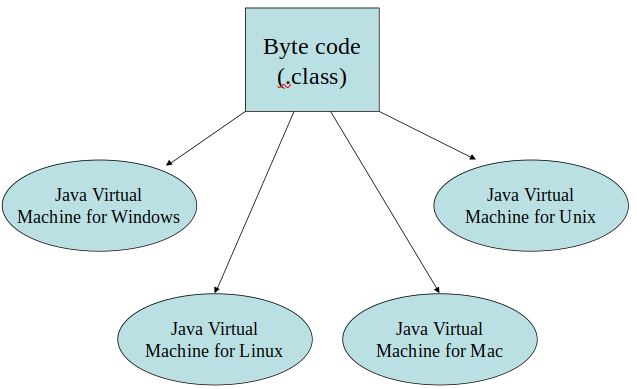
However, java is compiled once for all procs, but interpreted via java virtual machine (JVM).
There are some concepts that are common to virtually all programming languages :
- Key words
- Operators
- Punctuation
- Programmer-defined identifiers
- Strict syntactic rules
There are differences between lines and statements when discussing source code.
A statement is a complete Java instruction that causes the computer to perform an action.
Variables
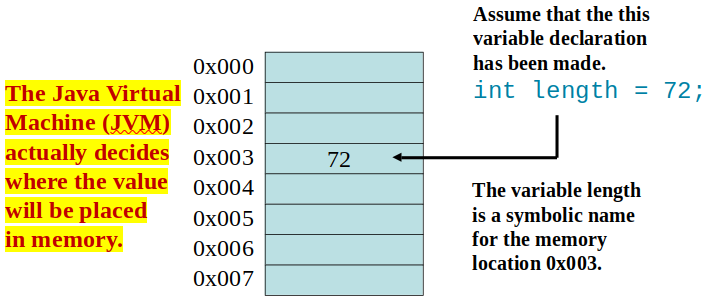
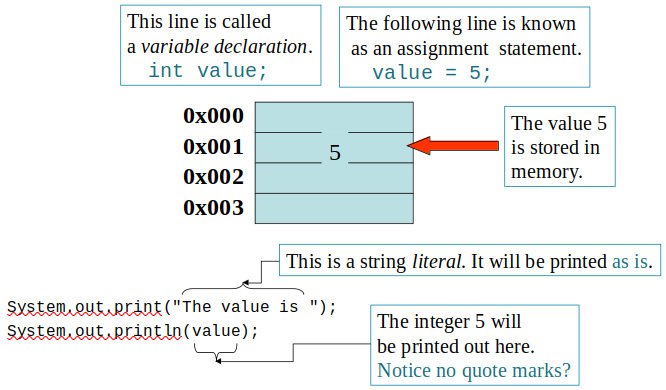
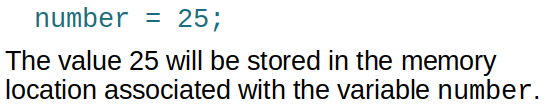
Data in a Java program is stored in memory.
Variablenames represent a location in memory.
Variables in Java are sometimes called fields.
Variables are created by the programmer who assigns it a programmer-defined identifier.
Variables are simply a name given to represent a place in memory.
The Compiler and the Java Virtual Machine
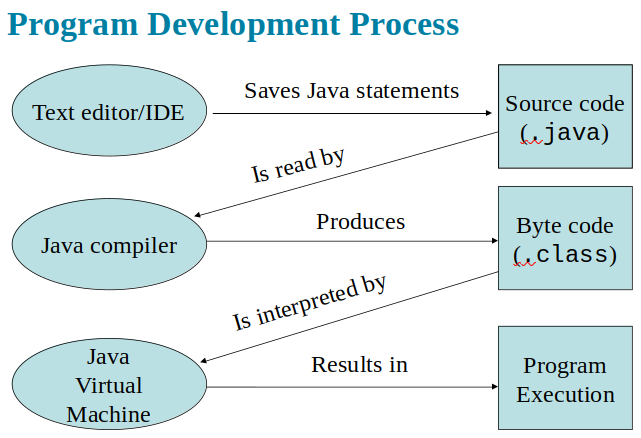
A programmer writes Java programming statements for a program.
These statements are known as source code.
Source code files have a .javafile extension.
A compiler is a program that translates source code into an executable form.
A compiler uses a source code file as input.
Syntax errors that may be in the program will be discovered during compilation.
Syntax errors are mistakes programmers make that violate programming language rules.
The compiler creates another file that holds the translated instructions.
Most compilers translate source code into executable files containing machine code.
The Java compiler translates a Java source file into a file that contains byte code instructions.
Byte code instructions are the machine language of the Java Virtual Machine (JVM) and cannot be directly executed directly by the CPU.
Byte code files end with the .classfile extension.
The JVM (Java Virtual Machine) is a program that emulates a micro-processor.
The JVM executes instructions as they are read.
JVM is often called an interpreter.
Java is often referred to as an interpreted language.
Portability
Portable means that a program may be written on one type of computer and then run on a wide variety of computers, with little or no modification.
Java byte code runs on the JVM and not on any particular CPU; therefore, compiled Java programs are highly portable.
With most programming languages, portability is achieved by compiling a program for each CPU it will run on.
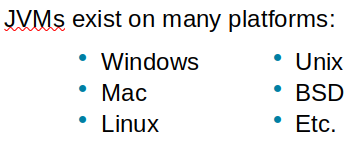
Java provides a JVM for each platform so that programmers do not have to recompile for different platforms.
Java Versions
Compiling a Java Program
The Java compiler is a command line utility.
The command to compile a program is: java filename.java, javac??(java) is the Java compiler.
The .java file extension must be used.
Example: To compile a java source code file named Payroll.java you would use the command:
javac Payroll.java.
The Programming Process
Software Engineering
Procedural Programming
Older programming languages were procedural.
A procedure is a set of programming language statements that, together, perform a specific task.
....
Object-Oriented Programming
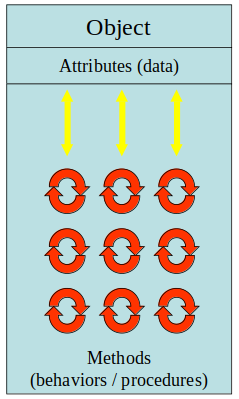
Object-oriented programming is centered on creating objects rather than procedures.
Objects are a melding of data and procedures that manipulate that data.
Data in an object are known as attributes.
Procedures in an object are known as methods.
Object-oriented programming combines data and behavior via encapsulation.
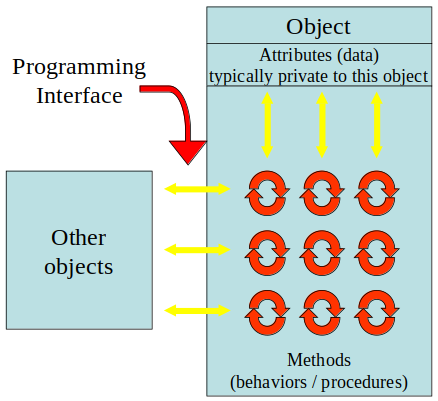
Data hiding is the ability of an object to hide data from other objects in the program.
Only an objects methods should be able to directly manipulate its attributes.
Other objects are allowed manipulate an object’s attributes via the object’s methods.
This indirect access is known as a programming interface.
Chapter 2
Parts of a Java Program
A Java source code file contains one or more Java classes.
If more than one class is in a source code file, only one of them may be public
.
The public class and the filename of the source code file must match.
Each Java class can be separated into parts.
Example (Simple.java):
javac Simple.java
//This compiles the file, resulting in "Simple" class being created
java Simple
//This runs the file, the java command assumes the extension is .class.
Analyzing The Example (Simple.java)
Parts of a Java Program
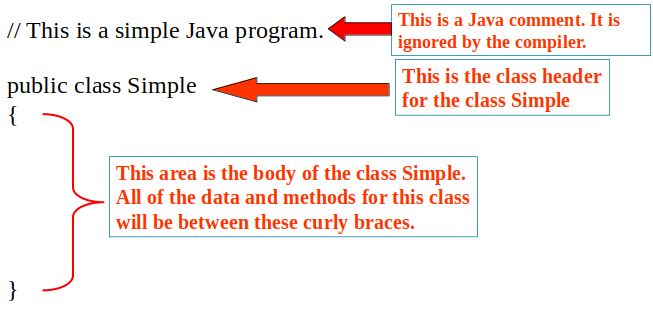
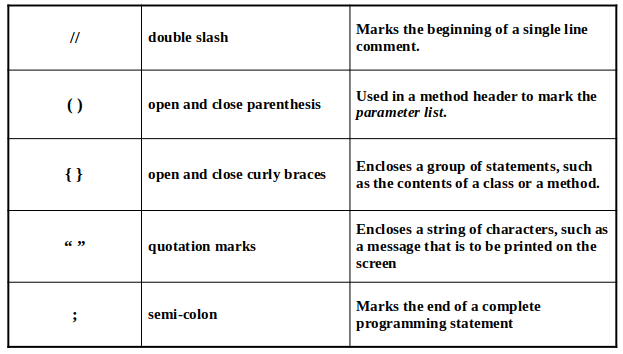
Comment lines are ignored by the compiler.
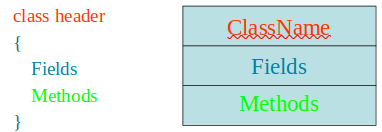
The class header tells the compiler things about
the class such as what other classes can use it
(public) and that it is a Java class (class), and
the name of that class (Simple).
Curly braceswith the class header, define the scope of the class.
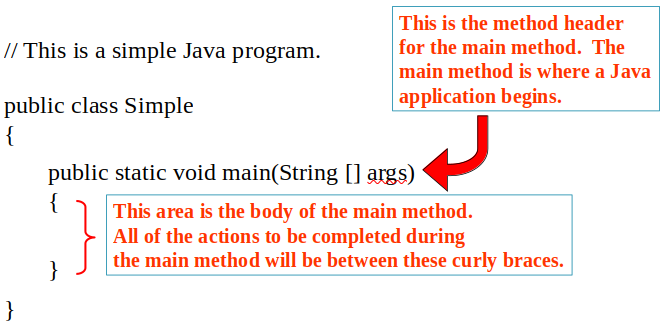
The main method line must be exactly as shown in the example
(except the args variable name can be programmer defined).
This is the line of code that the java command will run first.
Main method starts the Java program.
Every Java application must have a main method.
Curly braceswith a method, define the scope of the method.
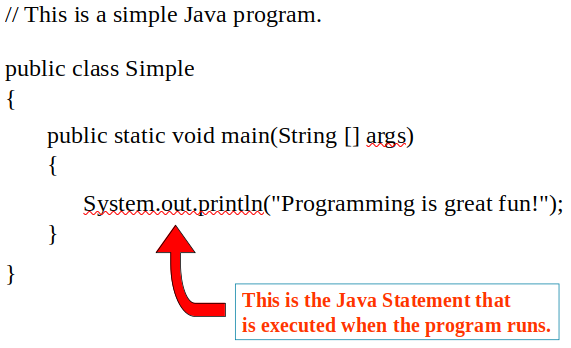
When the program runs, the Java statements within the main method will be executed.
Java Statements
Short Review
Java is a case-sensitive language.
All Java programs must be stored in a file with a .java file extension.
Comments are ignored by the compiler.
A .java file may contain many classes but may only have one public class.
If a .java file has a public class, the class must have the same name as the file.
Java applications must have a main method.
For every left brace, or opening brace, there must be a corresponding right brace, or closing brace.
Statements are terminated with semicolons.
(Comments, class headers, method headers, and braces are not considered Java statements)
Special Charcaters
Console Output
Many of the programs that you will write will run in a console window.
The console window that starts a Java application is typically known as the standard output device.
The standard input device is typically the keyboard.
Java sends information to the standard output device by using a Java class stored in the standard Java library.
Java classes in the standard Java library are accessed using the Java Applications Programming Interface (API).
The standard Java library is commonly referred to as the Java API.
....
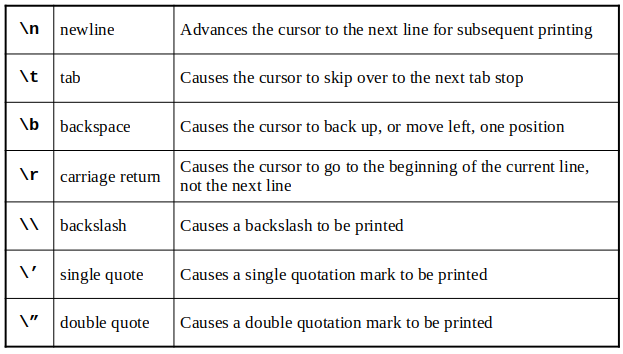
Java Escape Sequences
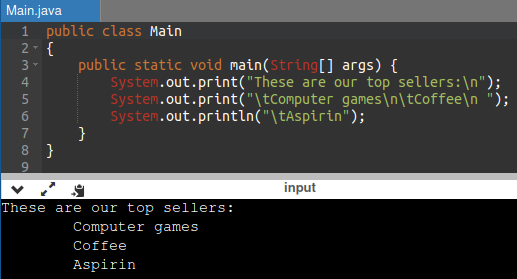
Escape sequences allow the programmer to print characters that otherwise would be unprintable.
Even though the escape sequences are comprised of two characters, they are treated by the compiler as a single character.
Table :
Example :
Variables and Literals
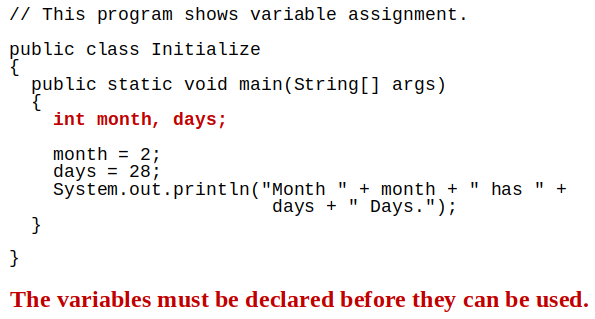
A variable is a named storage location in the computer’s memory.
A literal is a value that is written into the code of a program.
Programmers determine the number and type of variables a program will need.
Example :
The + Operator
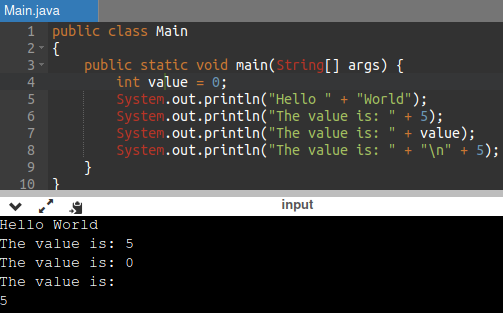
The +operator can be used in two ways.
As a concatenation operator
or as an addition operator
If either side of the + operator is a string, the
result will be a string.
Example:
String Concatenation
Java commands that have string literals must be treated with care.
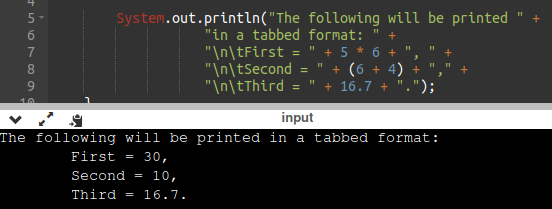
String concatenation can join various data types.
Example :
The Concatenation operator can be used to format complex String objects.
Notice that if an addition operation is also needed, it must be put in parenthesis.
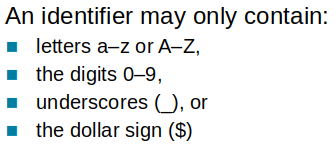
Identifiers
Identifiers are programmer-defined names for:
classes, variables, & methods.
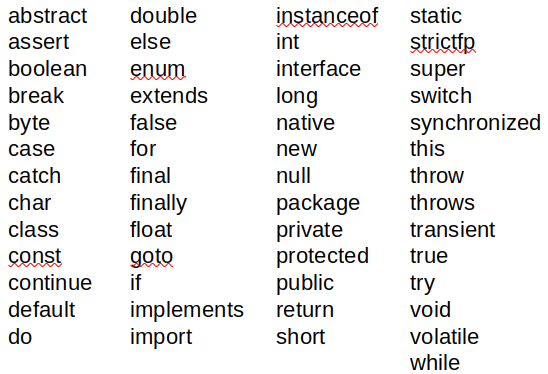
Identifiers may not be any of the Java reserved keywords.
Format :
The first character may not be a digit.
Identifiers are case sensitive.
Identifiers cannot include spaces.
Java Reserved Keywords
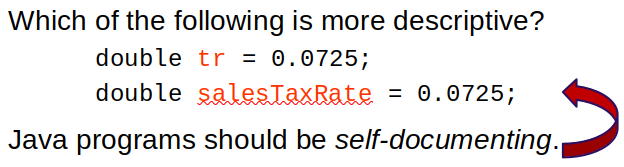
Variable Names
Variable names should be descriptive.
Descriptive names allow the code to be more readable; therefore, the code is more maintainable
Java Naming Conventions
Variable names should begin with a lower case letter
and then switch to title case thereafter (Ex : int caTaxRate).
Class names should be all title case (Ex : public class BigLittle).
A general rule of thumb about naming variables and
classes are that, with some exceptions, their names
tend to be nouns or noun phrases.
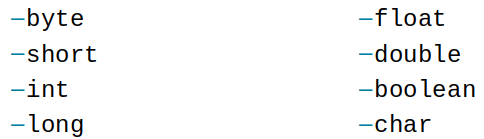
Primitive Data Types
Primitive data types are built into the Java language and are not derived from classes.
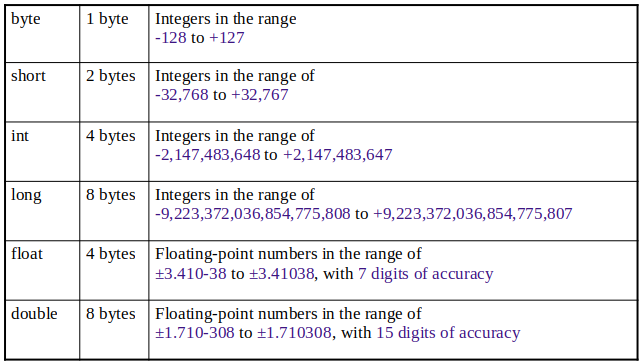
There are 8 Java primitive data types.
Numeric Data Types
Variable Declarations
Integer Data Types
byte, short, int, and long are all integer data types.
They can hold whole numbers such as 5, 10, 23, 89, etc.
Integer data types cannot hold numbers that have a decimal point in them.
Integers embedded into Java source code are called integer literals.
Floating Point Data Types
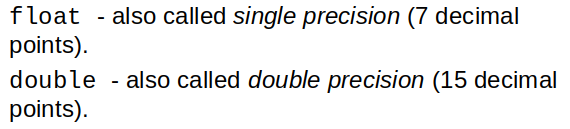
Data types that allow fractional values are called floating-point numbers.
In Java there are two data types that can represent floating-point numbers.
Floating Point Literals
When floating point numbers are embedded into Java source code they are called floating point literals.
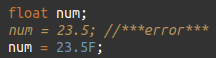
The default type for floating point literals is double.
Java is a strongly-typed language.
A double value is not compatible with a float variable because of its size and precision.
A double can be forced into a float by appending the letter F or f to the literal.
Example 1 :
Literals cannot contain embedded currency symbols or commas.
Example :
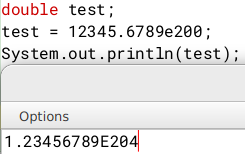
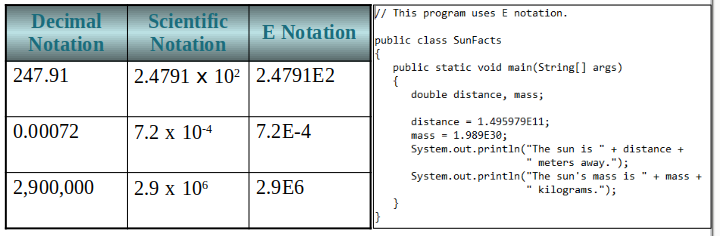
Floating-point literals can be represented in scientific notation.
Java uses E notation to represent values in scientific notation.
Example 1 :
Example 2 :
Scientific and E Notation
The boolean Data Type
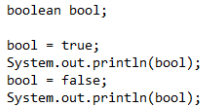
The Java boolean data type can have two possible values : true or false.
The value of a boolean variable may only be copied into a boolean variable.
The char Data Type
The Java char data type provides access to single characters.
Char literals are enclosed in single quote marks.
Don’t confuse char literals with string literals.
(char literals are enclosed in single quotes,
String literals are enclosed in double quotes).
Unicode
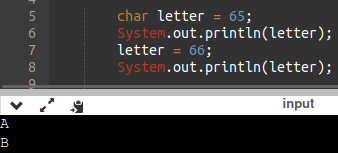
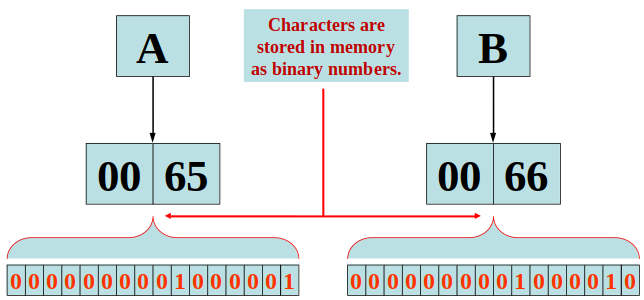
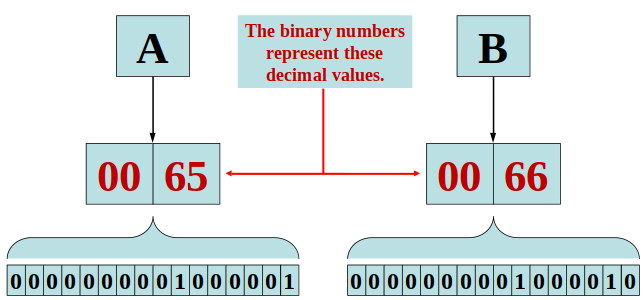
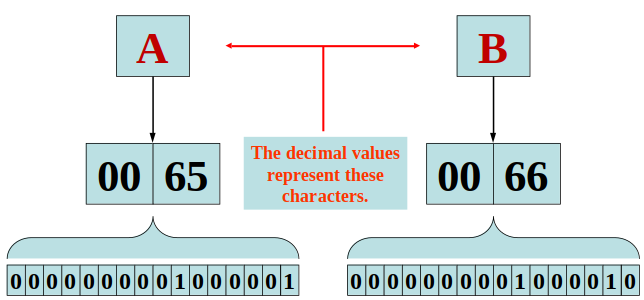
Internally, characters are stored as numbers.
Character data in Java is stored as Unicode characters.
The Unicode character set can consist of 65536 (216) individual characters.
This means that each character takes up 2 bytes in memory.
The first 256 characters in the Unicode character set are compatible with the ASCII* character set.
Example :
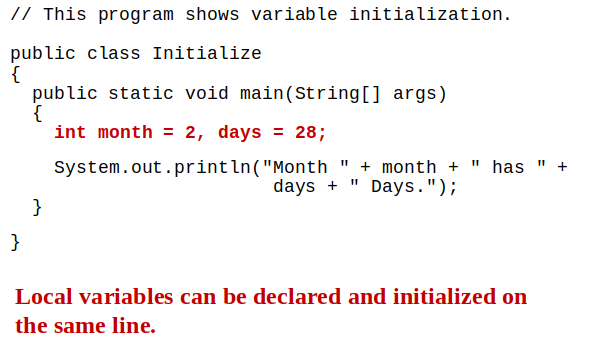
Variable and Initialization
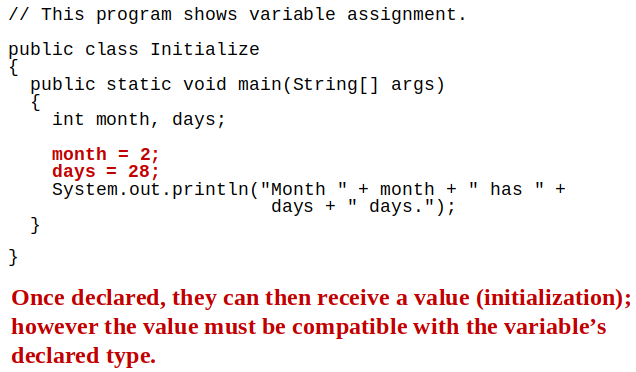
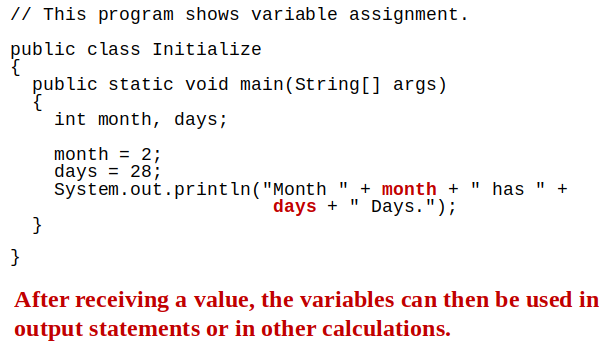
In order to store a value in a variable, an assignment statement must be used.
The assignment operator is the equal (=) sign.
The operand on the left side of the assignment operator must be a variable name.
The operand on the right side must be either a literal or expression that evaluates to a type that is compatible with the type of the variable.
Example 1 :
Example 2 :
Variables can only hold one value at a time.
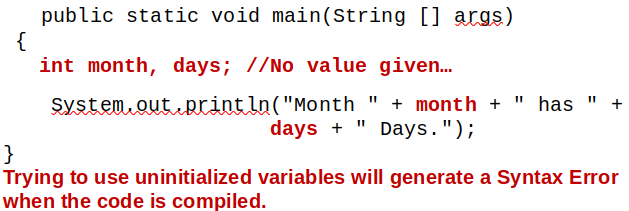
Local variables do not receive a default value.
Local variables must have a valid type in order to be used.
Example :
Arithmetic Operators
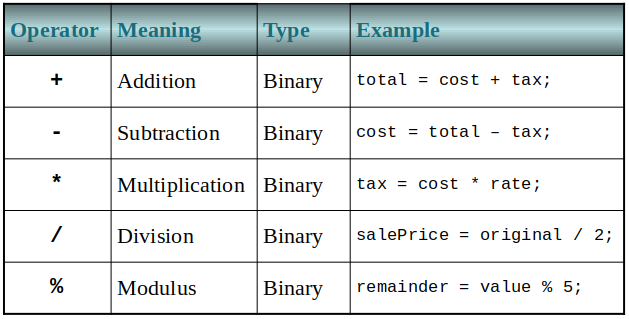
Java has five (5) arithmetic operators.
The operators are called binary operators because they must have two operands.
Each operator must have a left and right operator.
The arithmetic operators work as one would expect.
It is an error to try to divide any number by zero.
When working with two integer operands, the division operator requires special attention.
Integer Division
Division can be tricky.
In a Java program, what is the value of 1/2?
You might think the answer is 0.5…
But, that’s wrong.
The answer is simply 0.
Integer division will truncate any decimal remainder.
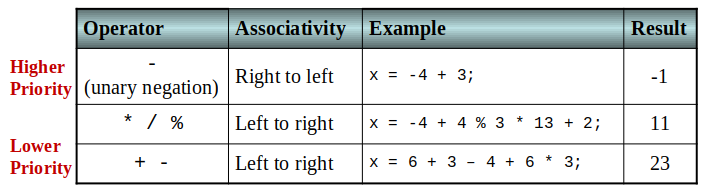
Operator Precedence
Mathematical expressions can be very complex.
There is a set order in which arithmetic operations will be carried out.
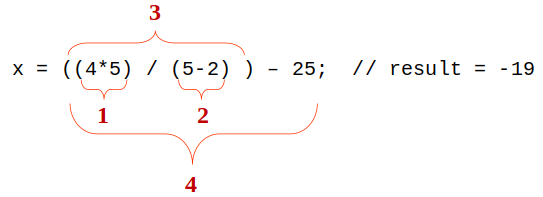
Grouping with Parenthesis
When parenthesis are used in an expression, the inner most parenthesis are processed first.
If two sets of parenthesis are at the same level, they are processed left to right.
Example :
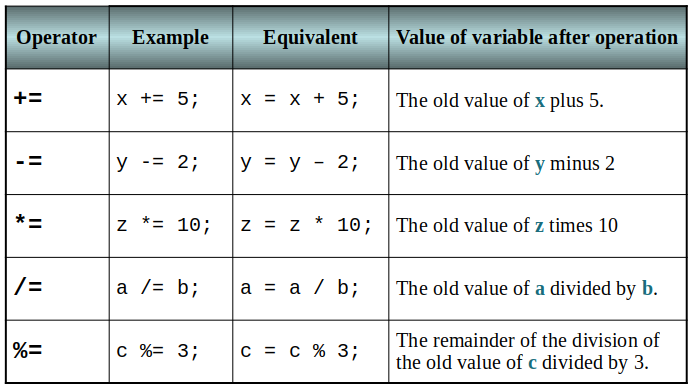
Combined Assignment Operators
Java has some combined assignment operators.
These operators allow the programmer to perform an arithmetic operation and assignment with a single operator.
Although not required, these operators are popular since they shorten simple equations.
Creating Constants with final
Many programs have data that does not need to be changed.
Littering programs with literal values can make the program hard do read and maintain.
Replacing literal values with constants remedies this problem.
Constants allow the programmer to use a name rather than a value throughout the program.
Constants also give a singular point for changing those values when needed.
Constants keep the program organized and easier to maintain.
Constants are identifiers that can hold only a single value.
Constants are declared using the keyword final.
Constants need not be initialized when declared; however, they must be initialized before they are used or a compiler error will be generated.
Once initialized with a value, constants cannot be changed programmatically.
By convention, constants are all upper case and words are separated by the underscore character.
Example :
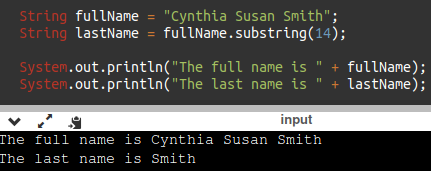
The String Class
Java has no primitive data type that holds a series of characters.
The String class from the Java standard library is used for this purpose.
In order to be useful, the variable must be created to reference a String object.
Example :
Notice the S in String is upper case.
By convention, class names should always begin with an upper case character.
Primitive vs. Reference Variables
Primitive variables actually contain the value that they have been assigned.
Example :
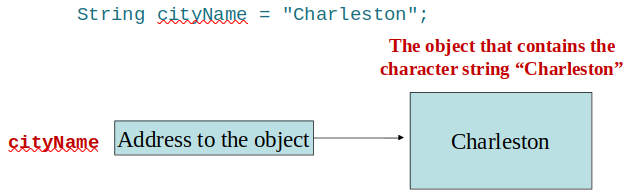
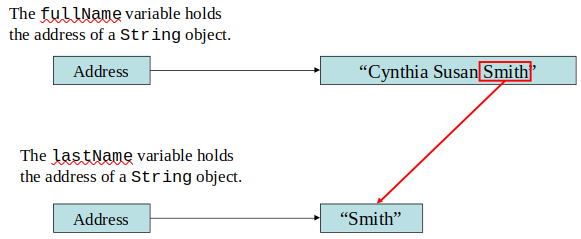
Objects are not stored in variables, however.
Objects are referenced by variables.
When a variable references an object, it contains the memory address of the object’s location.
Then it is said that the variable references the object.
Example :
String Objects
A variable can be assigned a String literal.
Example :
Strings are the only objects that can be created in this way.
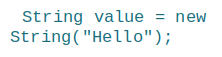
A String variable can be created using the new keyword.
Example :
This is the method that all other objects must use when they are created.
Example :
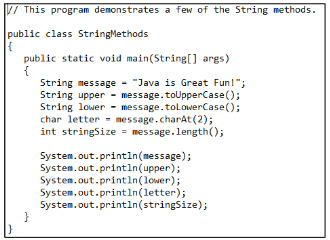
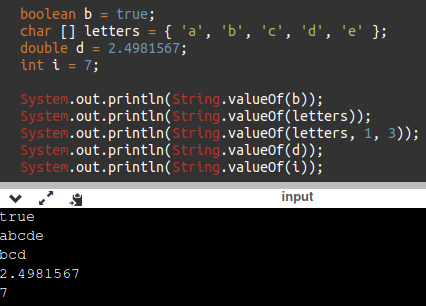
The String Methods
Since String is a class, objects that are instances of it have methods.
One of those methods is the length method.
Example :
The String class contains many methods that help with the manipulation of String objects.
String objects are immutable, meaning that they cannot be changed.
Many of the methods of a String object can create new versions of the object.
Example :
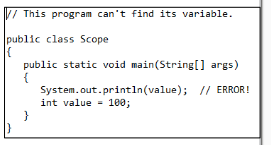
Scope
Scope refers to the part of a program that has access to a variable’s contents.
Variables declared inside a method (like the main method) are called local variables.
Local variables’ scope begins at the declaration of the variable and ends at the end of the method in which it was declared.
Example :
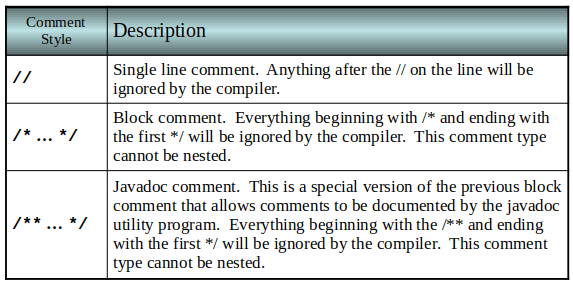
Commenting Code
Java provides three methods for commenting code.
Table :
Javadoc comments can be built into HTML documentation.
To create console documentation : run the javadoc program
with the source file as an argument (Ex: javadoc Comment3.java)
The javadoc program will create index.html and several other documentation files in the same directory as the input file.
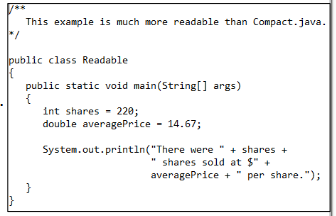
Programming Style
Although Java has a strict syntax, whitespace characters are ignored by the compiler.
The Java whitespace characters are : space, tab, newline, carriage return, form feed.
Indentation
Programs should use proper indentation.
Each block of code should be indented a few spaces from its surrounding block.
Two to four spaces are sufficient.
Tab characters should be avoided.
Tabs can vary in size between applications and devices.
Most programming text editors allow the user to replace the tab with spaces.
The Scanner Class
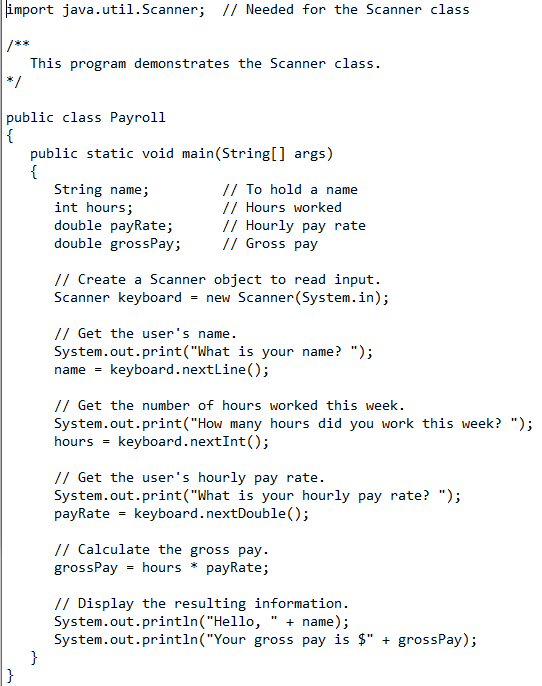
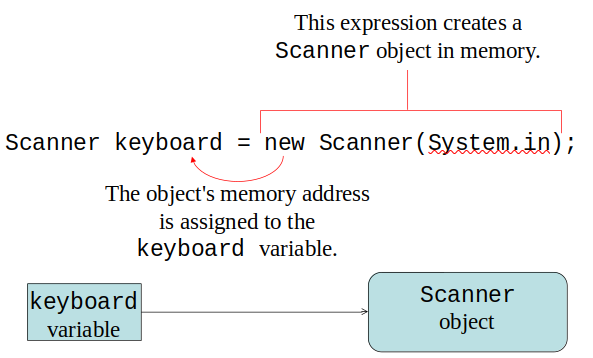
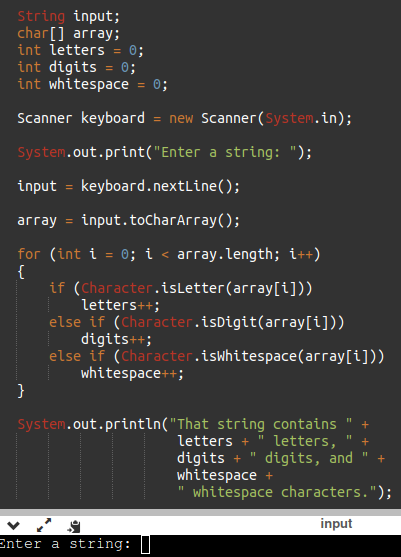
To read input from the keyboard we can use the Scanner class.
The Scanner class is defined in java.util, so we will use the following statement at the top of our programs:
Format :
Scanner objects work with System.in
to create a Scanner object:
Format :
The most common methods are nextLine(), nextInt(), & nextDouble().
The nextLine() is for string input, it advances the scanner past the current line and returns the input that was skipped.
The nextInt() scans the next token of the input as an int.
The nextDouble() scans the next token of the input as a double.
Example :
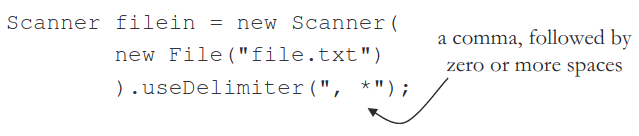
Scanner's useDelimiter() Method
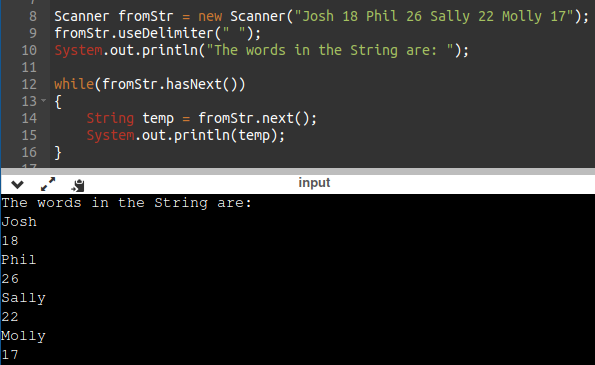
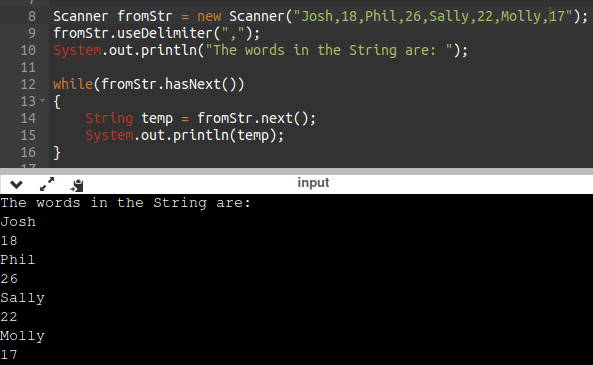
Another Scanner Method is the useDelimiter().
A delimiter is something such as a mark or symbol used to show the beginning or end of separate elements in a text, computer program, etc.
A useDelimiter() splits a string by the delimiter argument called a regular expression (or regex).
Format :
Example 1 :
Example 2 :
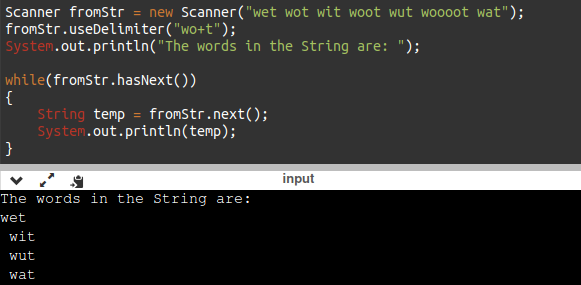
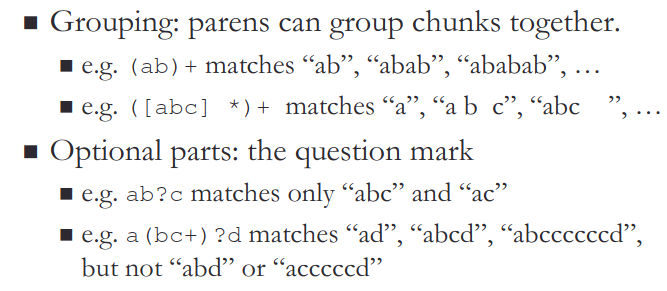
You can specify repetition in a regular expression.
A * matches zero or more of those.
A + matches one or more of those.
e.g. the regex wo+t will match : wot, woot, wooot
(literal translation: "a 'w', followed by one or more 'o', followed by a 't'.").
Example 1 :
Example 2 :
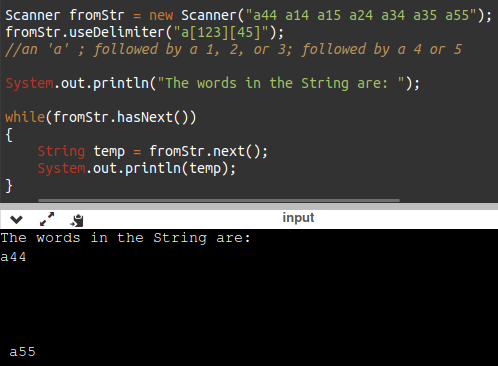
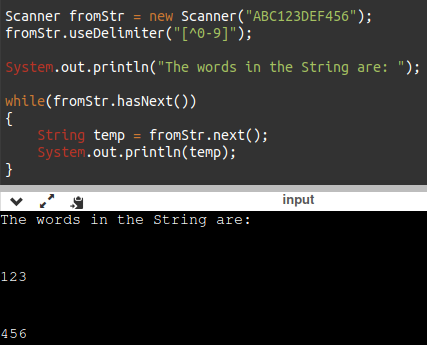
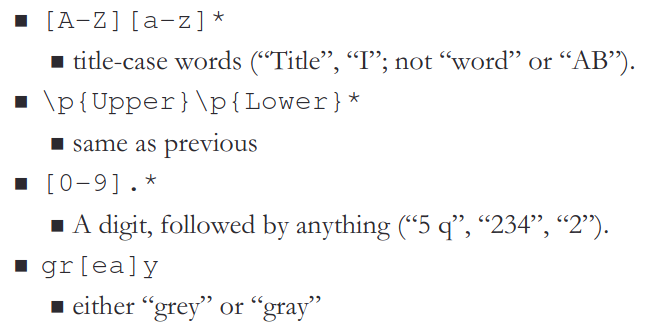
In a regular expression, several characters can be enclosed in brackets ([...]),
that will match any one of the characters.
A character range can be specified with -.
A character class can also be negated with ^ to indicate "any character except".
Example 1 :
Example 2 :
Example 3 :
Example 4 :
Other examples :
Examples :
Dialog Boxes
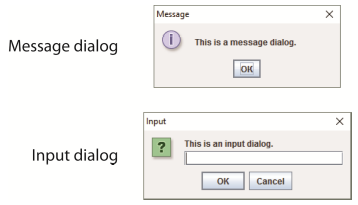
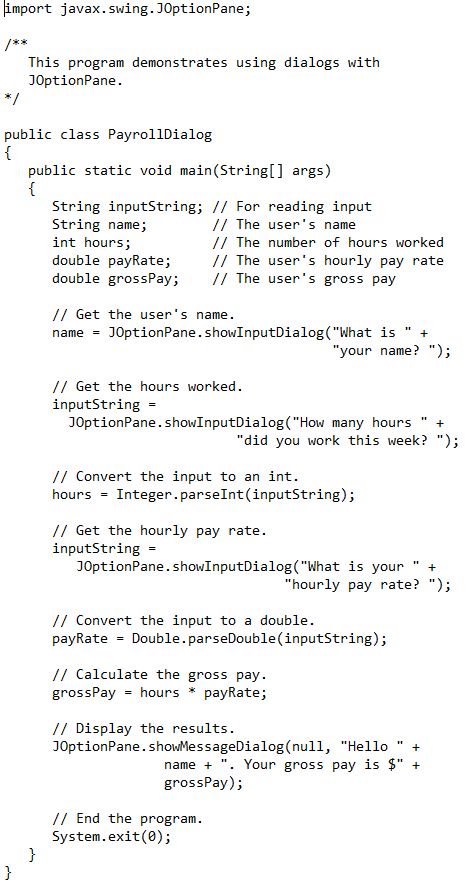
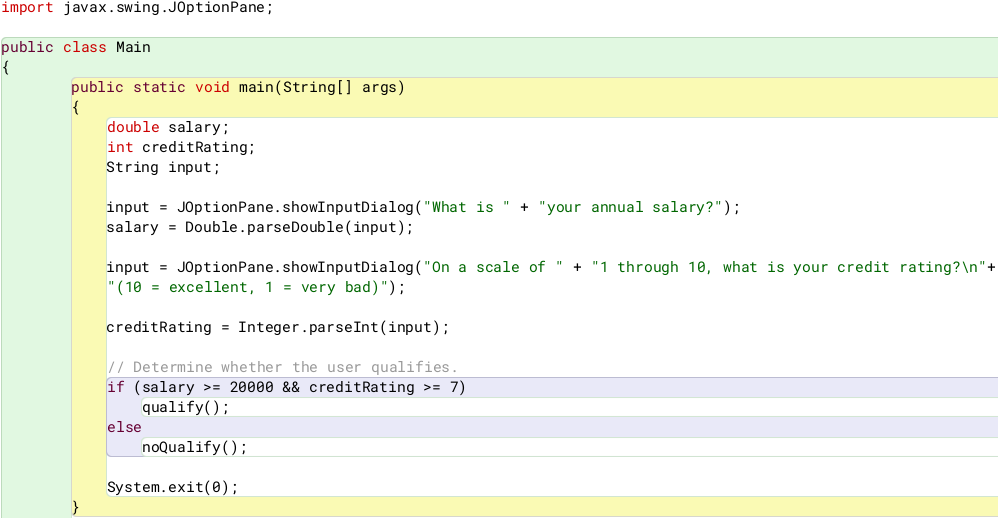
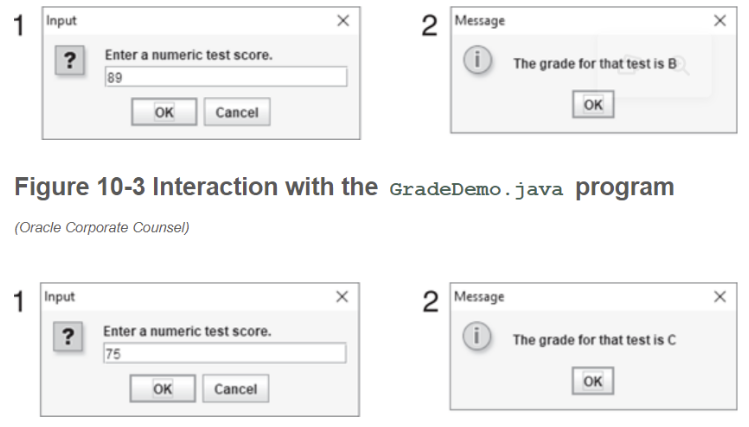
A dialog box is a small graphical window that displays a message to the user or requests input.
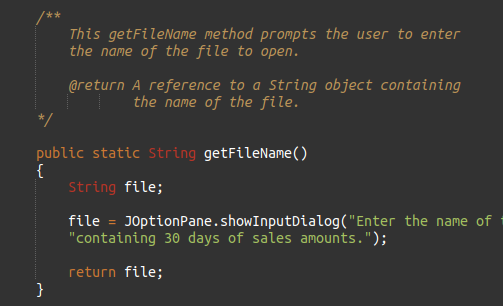
A variety of dialog boxes can be displayed using the JOptionPane class.
Two of the dialog boxes are :
Message Dialog - a dialog box that displays a message.
Input Dialog - a dialog box that prompts the user for input.
The JOptionPane Class
The JOptionPane class is not automatically available to your Java programs.
The following statement must be before the program’s class header:
import javax.swing.JOptionPane;
This statement tells the compiler where to find the JOptionPane class.
The JOptionPane class provides methods to display each type of dialog box.
Format :
Example :
Message Dialogs
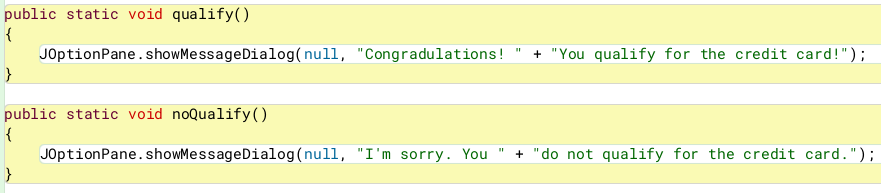
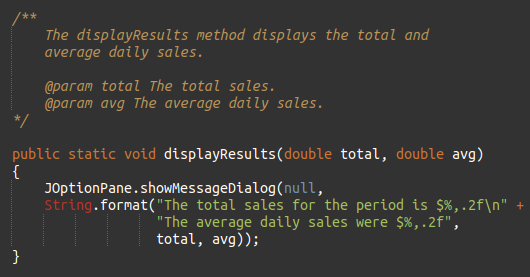
JOptionPane.showMessageDialog method is used to display a message dialog.
The first argument will be discussed in Chapter 7.
The second argument is the message that is to be displayed.
Input Dialogs
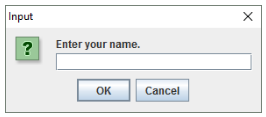
An input dialog is a quick and simple way to ask the user to enter data.
The dialog displays a text field, an Ok button and a Cancel button.
If Ok is pressed, the dialog returns the user’s input.
If Cancel is pressed, the dialog returns null.
The argument passed to the method is the message to display.
If the user clicks on the OK button, name references the string entered by the user.
If the user clicks on the Cancel button, name references null.
The System.exit Method
A program that uses JOptionPane does not automatically stop executing when the end of the main method is reached.
Java generates a thread, which is a process running in the computer, when a JOptionPane is created.
If the System.exit method is not called, this thread continues to execute.
The System.exit method requires an integer argument.
Example :
System.exit(0);
The argument is an exit code that is passed back to the operating system.
This code is usually ignored, however, it can be used outside the program:
to indicate whether the program ended successfully or as the result of a failure.
The value 0 traditionally indicates that the program ended successfully.
Converting a String to a Number
The JOptionPane’s showInputDialog method always returns the user's input as a String
A String containing a number, such as “127.89, can be converted to a numeric data type.
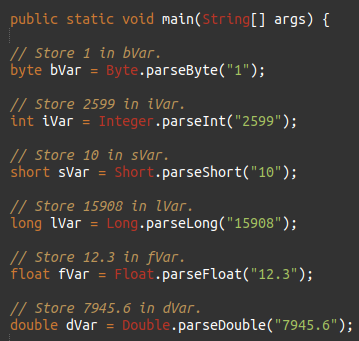
Each of the numeric wrapper classes, (covered in Chapter 10) has a method that converts a string to a number.
The Integer class has a method that converts a string to an int,
the Double class has a method that converts a string to a double, and etc.
These methods are known as parse methods because their names begin with the word “parse.”
Example :
Reading an Integer with an Input Dialogs
Example :
Reading a double with an Input Dialog
Example 1 :
Example 2 :
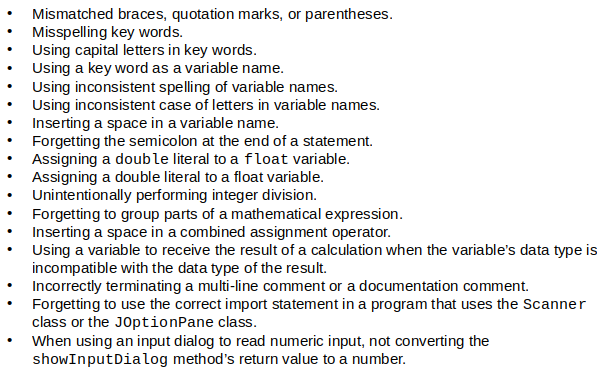
Common Erros to Avoid
Chapter 3
The if statement
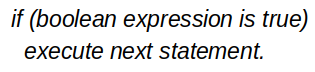
The if statement decides whether a section of code executes or not.
The if statement uses a boolean to decide whether the next statement or block of statements executes.
Format :
Flowcharts
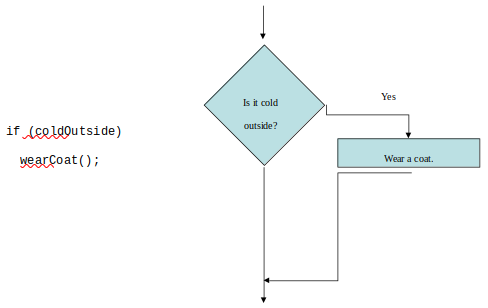
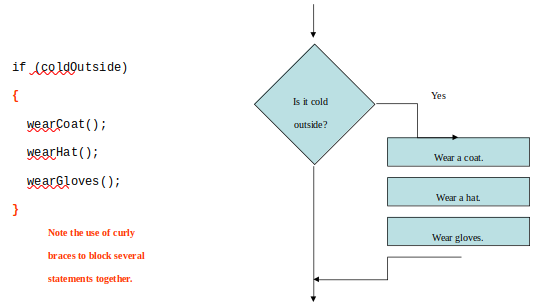
If statements can be modeled as a flow chart.
Example/Format :
A block if statement may be modeled as:
Example/Format :
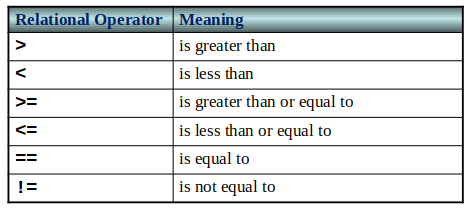
Relational Operators
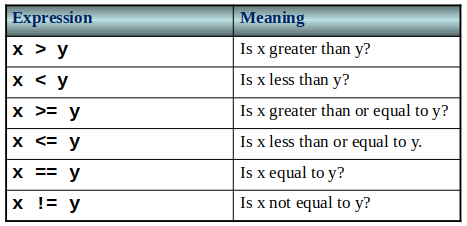
In most cases, the boolean expression, used by the if statement, uses relational operators.
Boolean Expressions
A boolean expression is any variable or calculation that results in a true or false condition.
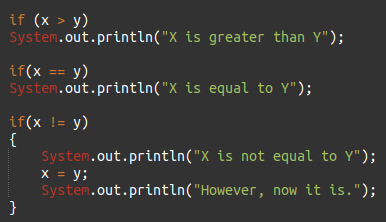
if Statements and Boolean Expressions
Programming Style and if Statements
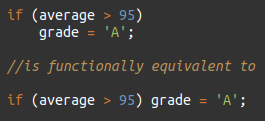
An if statement can span more than one line; however, it is still one statement.
Example :
Rules of thumb :
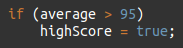
The conditionally executed statement should be on the line after the if condition.
The conditionally executed statement should be indented one level from the if condition.
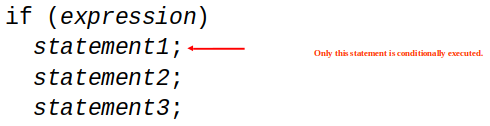
If an if statement does not have the block curly braces, it is ended by the first semicolon encountered after the if condition.
Example :
Block if statements
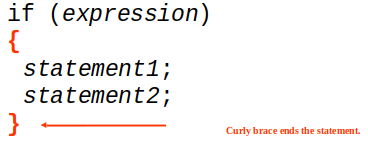
Conditionally executed statements can be grouped into a block. by using curly braces {} to enclose them.
If curly braces are used to group conditionally executed statements, the if statement is ended by the closing curly brace.
Example :
Remember that when the curly braces are not used, then only the next statement after the if condition will be executed conditionally.
Flags
A flag is a boolean variable that monitors some condition in a program.
When a condition is true, the flag is set to true.
The flag can be tested to see if the condition has changed.
Later, this condition can be tested:
Comparing Characters
Characters can be tested with relational operators.
Characters are stored in memory using the Unicode character format.
Unicode is stored as a sixteen (16) bit number.
Characters are ordinal, meaning they have an order in the Unicode character set.
Since characters are ordinal, they can be compared to each other.
if-else Statements
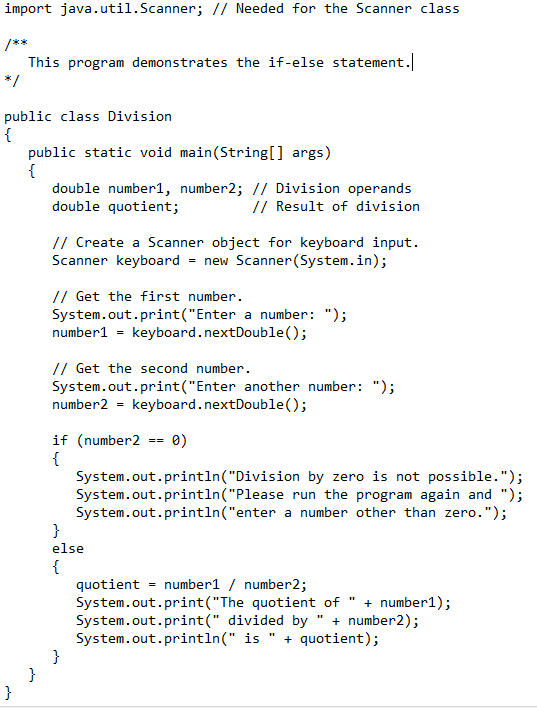
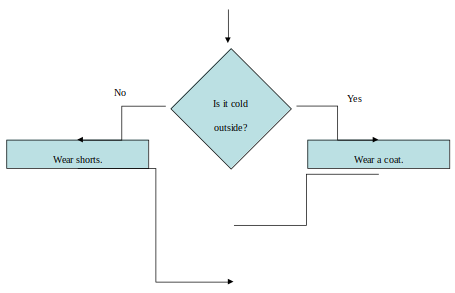
The if-else statement adds the ability to conditionally execute code when the if condition is false.
if-else Statement Flowcharts
Nested if Statements
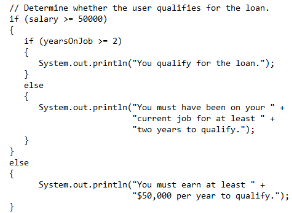
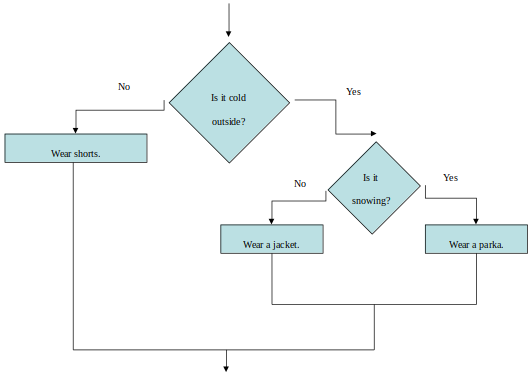
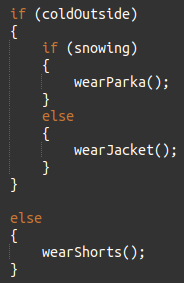
If an if statement appears inside another if statement (single or block) it is called a nested if statement.
The nested if is executed only if the outer if statement results in a true condition.
Example :
Flowchart :
Example 2 :
if-else Matching
Curly brace use is not required if there is only one statement to be conditionally executed.
However, sometimes curly braces can help make the program more readable.
Additionally, proper indentation makes it much easier to match up else statements with their corresponding if statement.
if-else-if Statements
Nested if statements can become very complex.
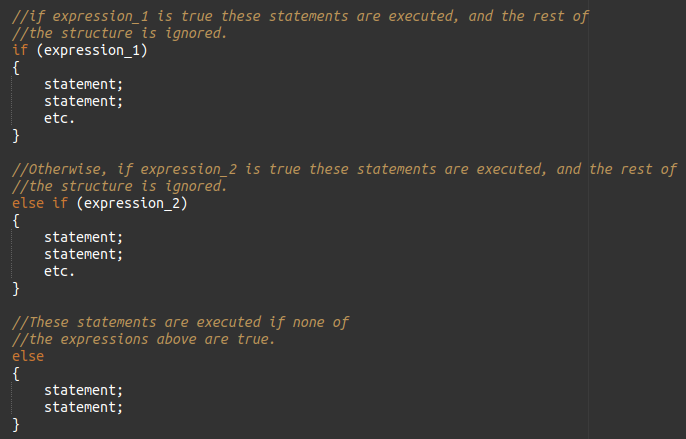
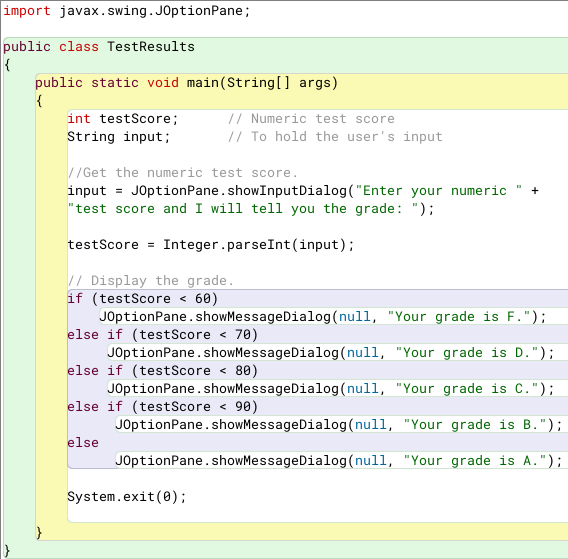
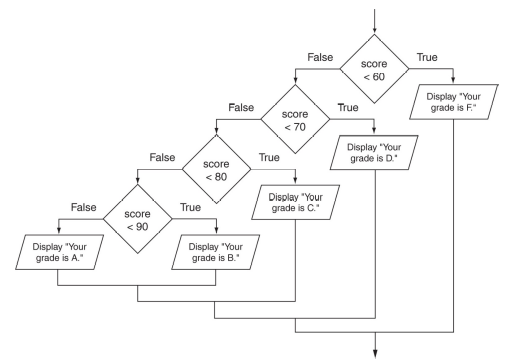
The if-else-if statement makes certain types of nested decision logic simpler to write.
Care must be used since else statements match up with the immediately preceding unmatched if statement.
Example :
Flowchart :
Logical Operators
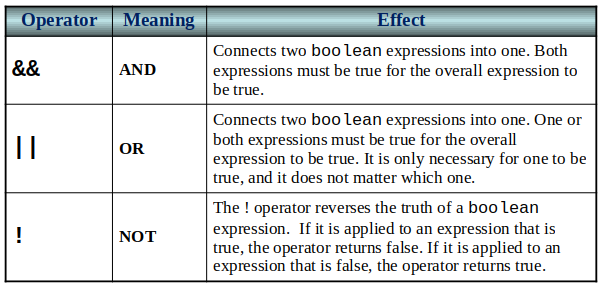
Java provides two binary logical operators (&& and ||) that are used to combine boolean expressions.
Java also provides one unary (!) logical operator to reverse the truth of a boolean expression.
The && Operator
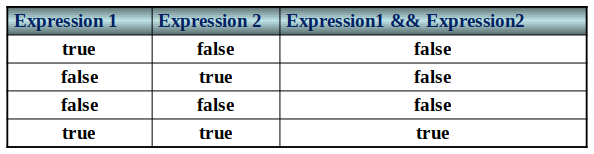
The logical AND operator (&&) takes two operands that must both be boolean expressions.
The resulting combined expression is true if (and only if) both operands are true.
The || Operator
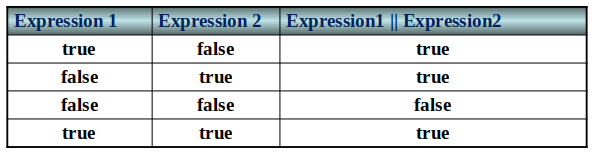
The logical OR operator (||) takes two operands that must both be boolean expressions.
The resulting combined expression is false if (and only if) both operands are false.
The ! Operator
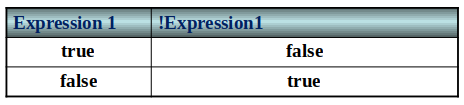
The ! operator performs a logical NOT operation.
If an expression is true, !expression will be false.
Example :
Format :
Short Circuiting
Logical AND and logical OR operations perform short-circuit evaluation of expressions.
Logical AND will evaluate to false as soon as it sees that one of its operands is a false expression.
Logical OR will evaluate to true as soon as it sees that one of its operands is a true expression.
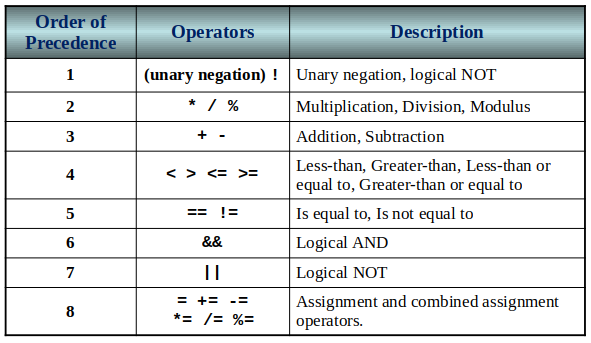
Order of Precedence
The ! operator has a higher order of precedence than the && and || operators.
The && and || operators have a lower precedence than relational operators like < and >.
Parenthesis can be used to force the precedence to be changed.
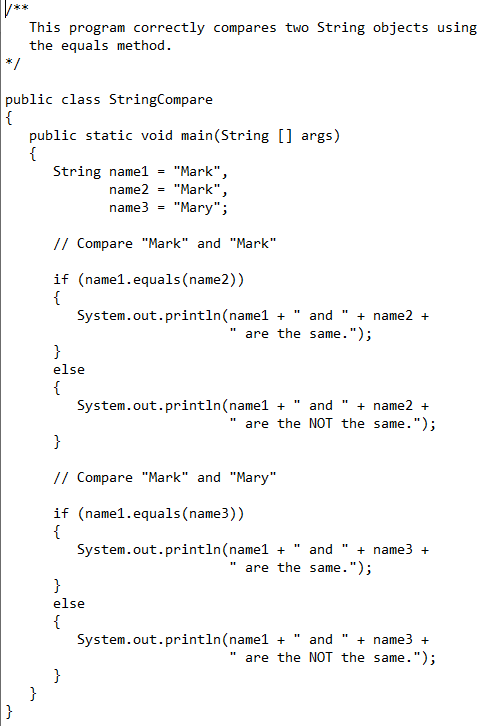
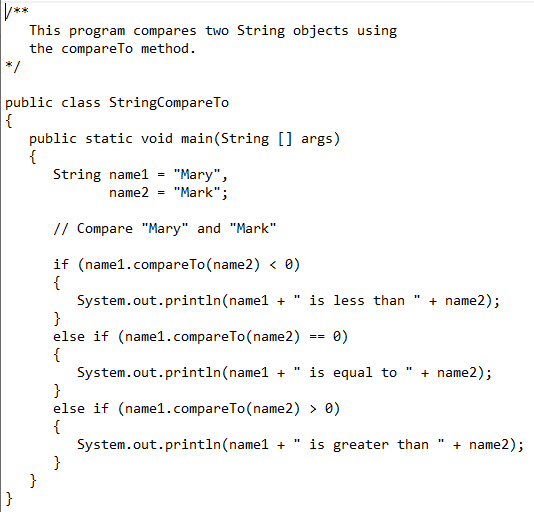
Comparing String Objects
In most cases, you cannot use the relational operators to compare two String objects.
Reference variables contain the address of the object they represent.
Unless the references point to the same object, the relational operators will not return true.
Example 1 (with equals method) :
Example 2 (with compareTo method) :
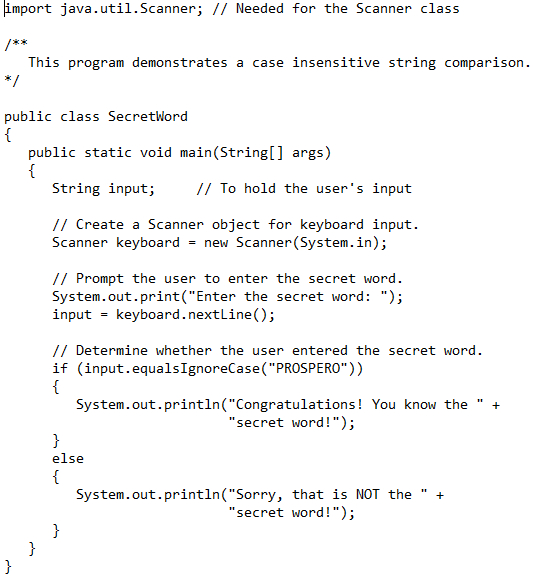
Ignoring Case in String Comparisons
In the String class the equals and compareTo methods are case sensitive.
In order to compare two String objects that might have different case, use:
equalsIgnoreCase, or compareToIgnoreCase
Example :
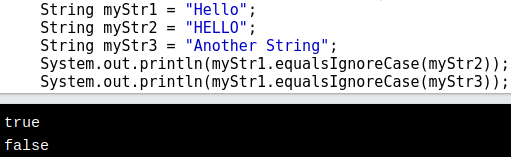
The equalsIgnoreCase() method compares two strings(variables), ignoring lower case and upper case differences.
This method returns true if the strings are equal, and false if not.
Example 1 :
Example 2 :
Variable Scope
In Java, a local variable does not have to be declared at the beginning of the method.
The scope of a local variable begins at the point it is declared and terminates at the end of the method.
When a program enters a section of code where a variable has scope, that variable has come into scope, which means the variable is visible to the program.
The Conditional Operator
The conditional operator is a ternary (three operand) operator.
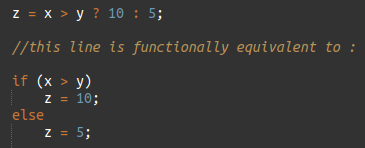
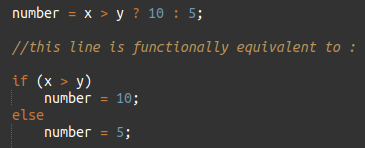
You can use the conditional operator to write a simple statement that works like an if-else statement.
Format :
BooleanExpression ? Value1 : Value2
This forms a conditional expression.
If BooleanExpression is true, the value of the conditional expression is Value1.
If BooleanExpression is false, the value of the conditional expression is Value2.
Example :
Many times the conditional operator is used to supply a value.
Example 2 :
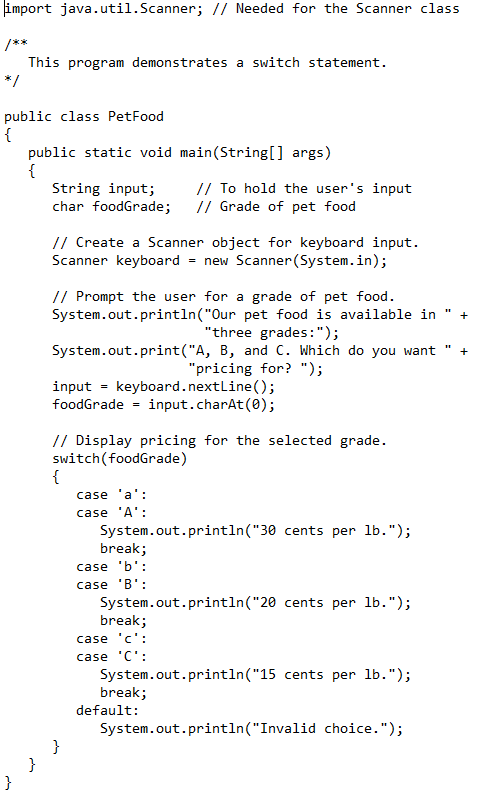
The switch Statement
The if-else statement allows you to make true / false branches.
The switch statement allows you to use an ordinal value to determine how a program will branch.
The switch statement can evaluate an integer type or character type variable and make decisions based on the value.
Format :
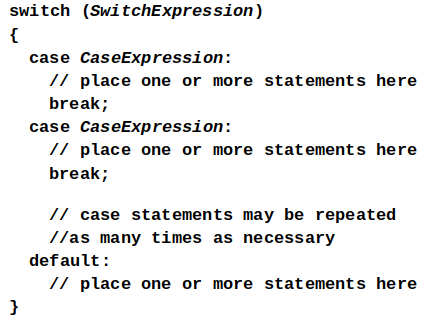
The switch statement will evaluate the SwitchExpression, which can be a byte, short, int, long, or char.
If you are using Java 7+, the SwitchExpression can also be a String.
If there is an associated case statement that matches that value, program execution will be transferred to that case statement.
Each case statement will have a corresponding CaseExpression that must be unique.
If the SwitchExpression matches the CaseExpression, the Java statements between the colon and the break statement will be executed.
The case Statement
The break statement ends the case statement.
The break statement is optional.
If a case does not contain a break, then program execution continues into the next case.
The default section is optional and will be executed if no CaseExpression matches the SwitchExpression.
Example :
The System.out.printf Method
You can use the System.out.printf method to perform formatted console output.
Format :
System.out.printf(FormatString, ArgList);
FormatString is a string that contains text and/or special formatting specifiers.
ArgList is optional. It is a list of additional arguments that will be formatted according to the format specifiers listed in the format string.
Example :
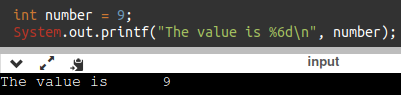
%d
The %d format specifier indicates that a decimal integer will be printed.
Example 1 :
Example 2 :
The %6d format specifier indicates the integer will appear in a field that is 6 spaces wide.
Example 1 :
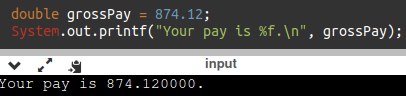
%f
The %f format specifier indicates that a floating-point value will be printed.
Example 1 :
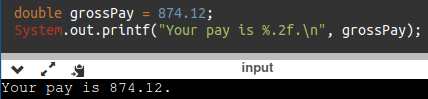
The %.2f format specifier indicates that a floating-point value will be printed, rounded to two decimal places.
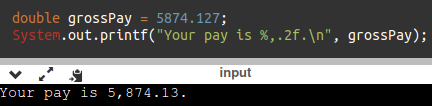
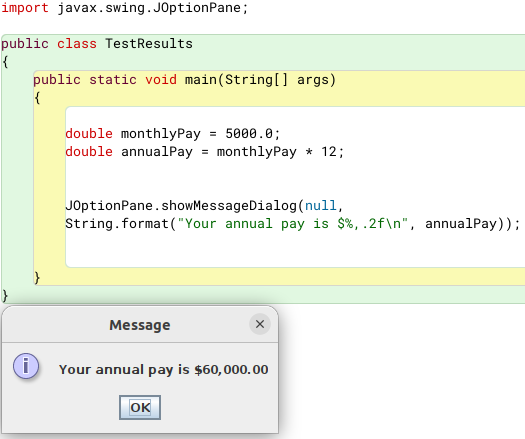
%,.2f format specifier indicates that a floating-point value will be printed with comma separators, rounded to two decimal places.
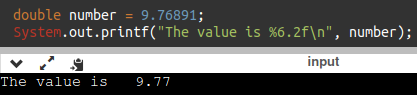
The%6.2f format specifier indicates the number will appear in a field that is 6 spaces wide, and be rounded to 2 decimal places.
Example 1 :
Example 2 :
Example 3 :
%s
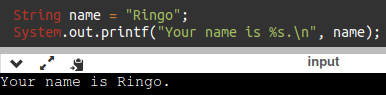
The %s format specifier indicates that a string will be printed.
Example 1 :
Example 1 :
The String.format Method
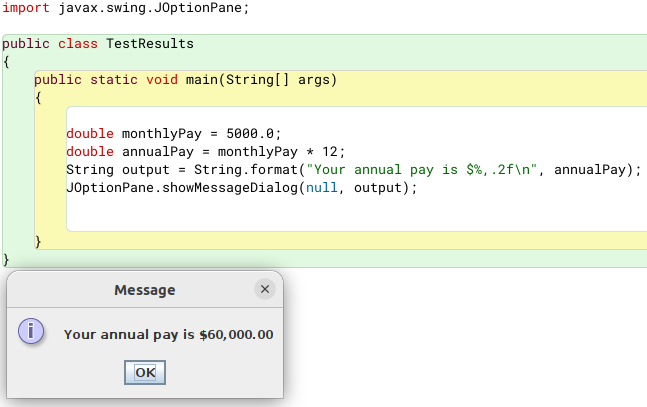
The String.format method works exactly like the System.out.printf method, except that it does not display the formatted string on the screen.
Instead, it returns a reference to the formatted string.
You can assign the reference to a variable, and then use it later.
Format :
FormatString is a string that contains text and/or special formatting specifiers.
ArgumentList is optional. It is a list of additional arguments that will be formatted according to the format specifiers listed in the format string.
Example 1:
Example 2:
Chapter 4
The Increment and Decrement Operators
There are numerous times where a variable must simply be incremented or decremented.
Java provide shortened ways to increment and decrement a variable’s value.
Using the ++ or -- unary operators, this task can be completed quickly.
Format:
When an increment or decrement are the only operations in a statement, there is no difference between prefix and postfix notation.
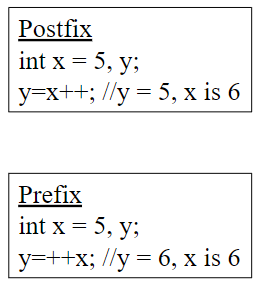
When used in an expression:
Prefix notation indicates that the variable will be incremented or decremented prior to the rest of the equation being evaluated.
Postfix notation indicates that the variable will be incremented or decremented after the rest of the equation has been evaluated.
Examples:
The while Loop
Java provides three different looping structures.
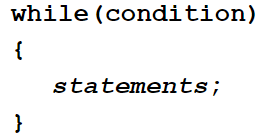
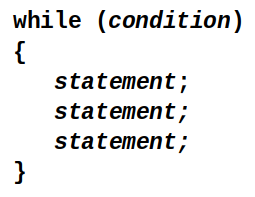
The while loop has the form:
Format:
While the condition is true, the statements will execute repeatedly.
The while loop is a pretest loop, which means that it will test the value of the condition prior to executing the loop.
Care must be taken to set the condition to false somewhere in the loop so the loop will end.
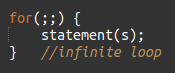
Loops that do not end are called infinite loops.
A while loop executes 0 or more times.
If the condition is false, the loop will not execute.
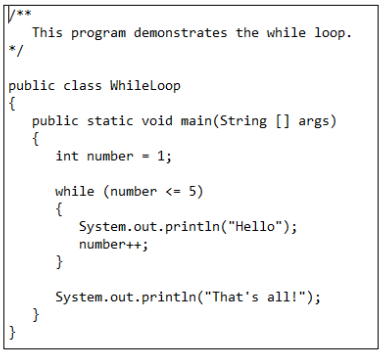
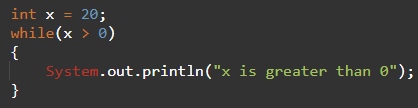
Example:
Infinite Loops
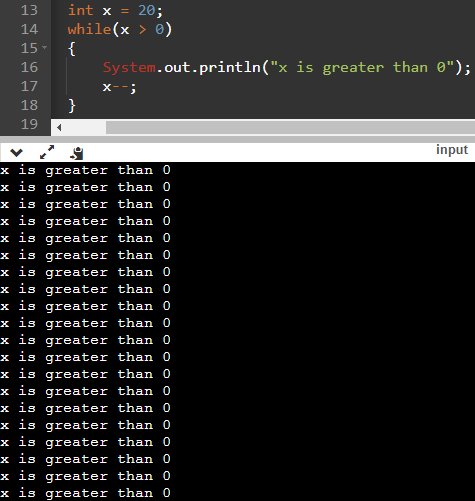
In order for a while loop to end, the condition must become false. The following loop will not end:
This version of the loop decrements x during each iteration:
Block Statement in Loops
Curly braces are required to enclose block statement while loops. (like block if statements)
Format:
The while Loop for Input Validation
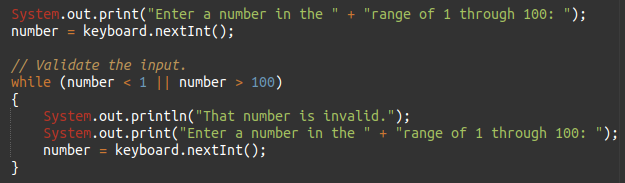
Input validation is the process of ensuring that user input is valid.
Example :
The do while Loop
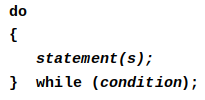
The do while loop is a post-test loop, which means it will execute the loop prior to testing the condition.
Guaranteed to run at least one time.
The do while loop (sometimes called called a do loop) takes the form:
Format :
Example :
The for loop
The for loop is a pre-test loop.
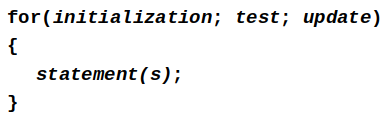
The for loop allows the programmer to initialize a control variable, test a condition, and modify the control variable all in one line of code.
Format :
Example :
The Sections of The for Loop
The initialization section of the for loop allows the loop to initialize its own control variable.
The test section of the for statement acts in the same manner as the condition section of a while loop.
The update section of the for loop is the last thing to execute at the end of each loop.
The for Loop Initialization
The initialization section of a for loop is optional; however, it is usually provided.
Typically, for loops initialize a counter variable that will be tested by the test section of the loop and updated by the update section.
The initialization section can initialize multiple variables.
Variables declared in this section have scope only for the for loop.
The Update Expression
The update expression is usually used to increment or decrement the counter variable(s) declared in the initialization section of the for loop.
The update section of the loop executes last in the loop.
The update section may update multiple variables.
Each variable updated is executed as if it were on a line by itself.
For loops and objects (objects in for loops)
Modifying The Control Variable
You should avoid updating the control variable of a for loop within the body of the loop.
The update section should be used to update the control variable.
Updating the control variable in the for loop body leads to hard to maintain code and difficult debugging.
Multiple Initializations and Updates
The for loop may initialize and update multiple variables.
Note that the only parts of a for loop that are mandatory are the semicolons.
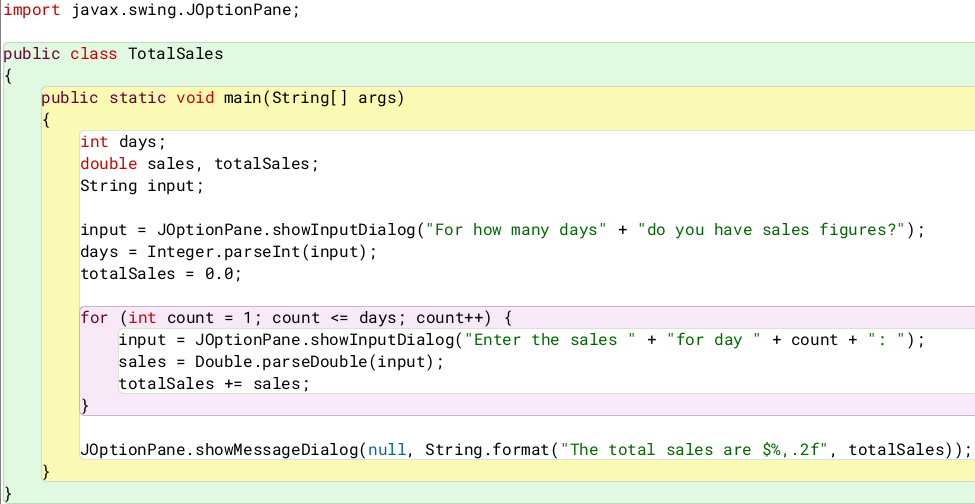
Running Totals
Loops allow the program to keep running totals while evaluating data.
Imagine needing to keep a running total of user input.
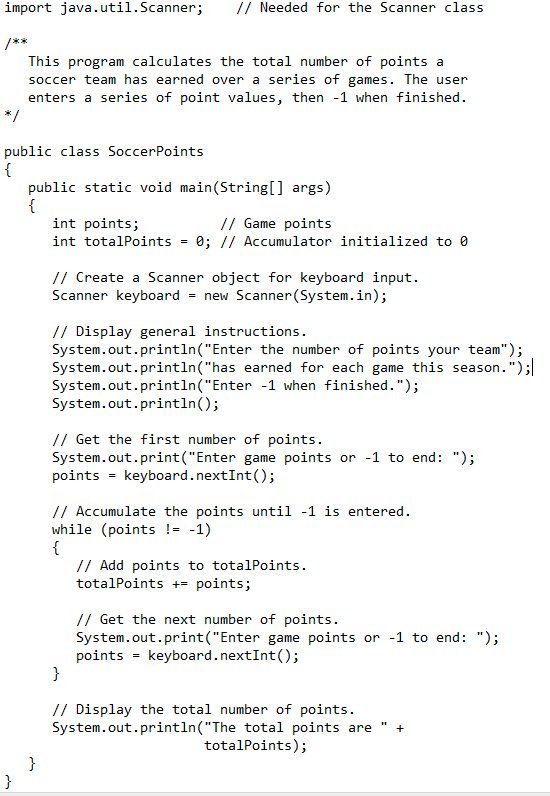
Sentinel Values
Sometimes the end point of input data is not known.
A sentinel value can be used to notify the program to stop acquiring input.
If it is a user input, the user could be prompted to input data that is not normally in the input data range (i.e. –1 where normal input would be positive.)
Programs that get file input typically use the end-of-file marker to stop acquiring input data.
Nested Loops
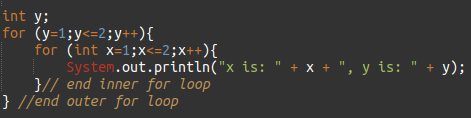
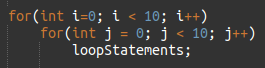
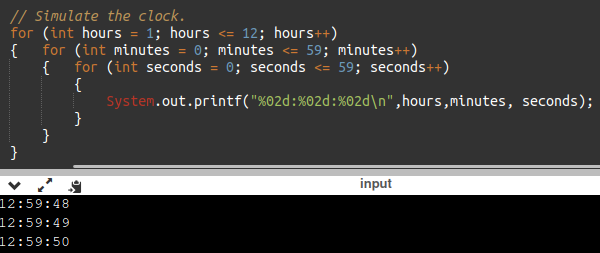
Like if statements, loops can be nested.
If a loop is nested, the inner loop will execute all of its iterations for each time the outer loop executes once.
Format :
Example :
The break Statement
The break statement can be used to abnormally terminate a loop.
break is good for switch, but frowned upon in other uses.
The use of the break statement in loops bypasses the normal mechanisms and makes the code hard to read and maintain
, it is considered bad form to use the break statement in this manner.
the continue statement should be avoided because it makes the code hard to read and debug
.
Deciding Which Loops to Use
The while loop:
- Pretest loop
- Use it where you do not want the statements to execute if the condition is false in the beginning & unknown number of times.
The do-while loop:
- Post-test loop
- Use it where you want the statements to execute at least one time.
The for loop:
- Pretest loop
- Use it where there is some type of counting variable that can be evaluated. Where number of times is know.
File Input & Output
Reentering data all the time could get tedious for the user.
The data can be saved to a file (Files can be input files or output files).
Files:
- Files have to be opened.
- Data is then written to the file.
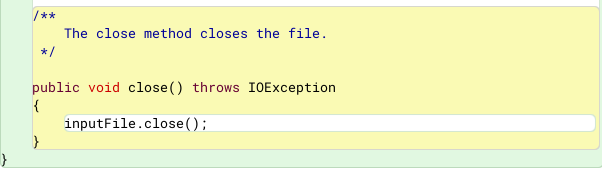
- The file must be closed prior to program termination.
In general, there are two types of files:
- binary
- text
Writing Text to a File
To use the PrintWriter class, put the following import statement at the top of the source file:
Format :
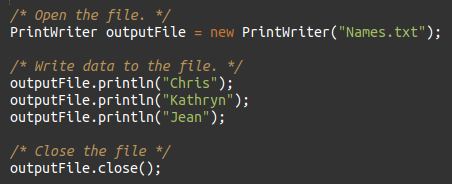
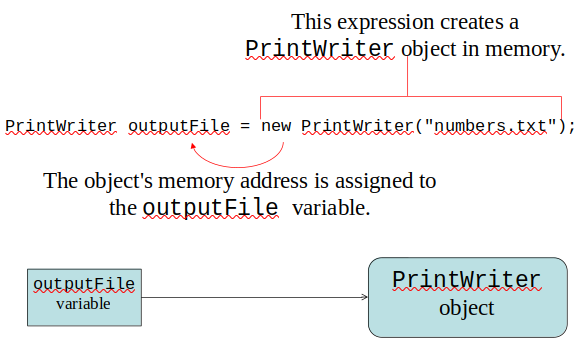
To open a file for text output you create an instance of the PrintWriter class.
Pass the name of the file that you wish to open as an argument to the PrintWriter constructor.
Warning: if the file already exists, it will be erased and replaced with a new file.
The PrintWriter Class
The PrintWriter class allows you to write data to a file using the print and println methods, as you have been using to display data on the screen.
Just as with the System.out object, the println method of the PrintWriter class will place a newline character after the written data.
The print method writes data without writing the newline character.
Example :
Exceptions
When something unexpected happens in a Java program, an exception is thrown.
The method that is executing when the exception is thrown must either handle the exception or pass it up the line.
Handling the exception will be discussed later.
To pass it up the line, the method needs a throws clause in the method header.
To insert a throws clause in a method header, simply add the word throws and the name of the expected exception.
PrintWriter objects can throw an IOException, so we write the throws clause like this:
Appending Text to a File
To avoid erasing a file that already exists, create a FileWriter object in this manner:
Then, create a PrintWriter object in this manner:
Specifying a File Location
On a Windows computer, paths contain backslash (\) characters.
Remember, if the backslash is used in a string literal, it is the escape character so you must use two of them:
This is only necessary if the backslash is in a string literal.
If the backslash is in a String object then it will be handled properly.
Fortunately, Java allows Unix style filenames using the forward slash (/) to separate directories:
Reading Data From a File
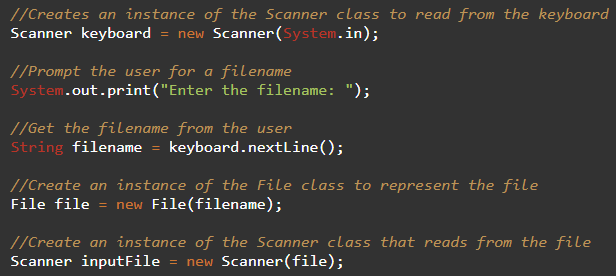
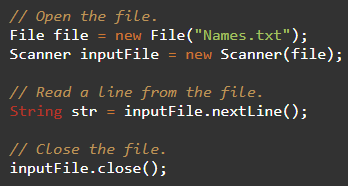
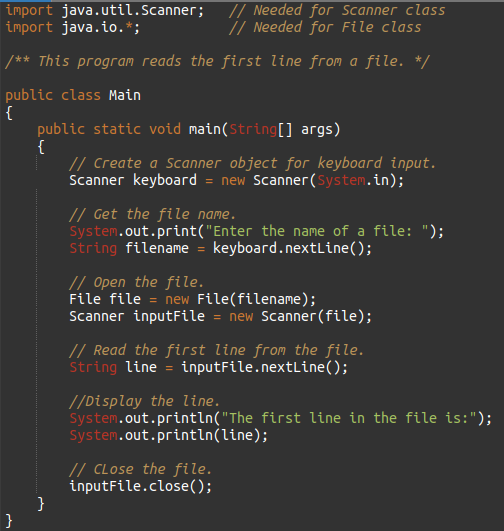
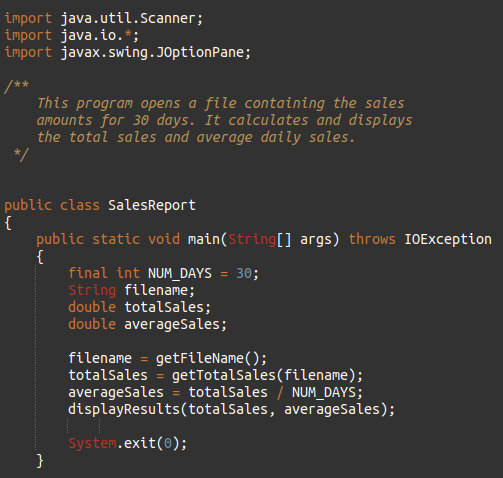
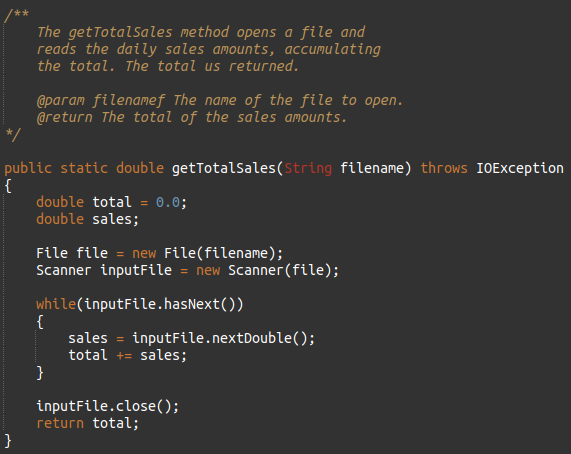
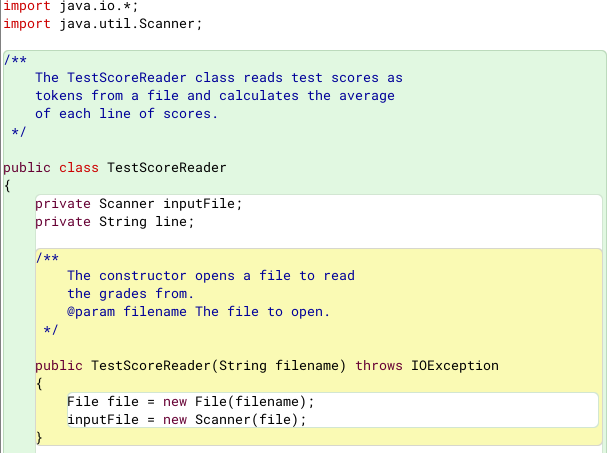
You use the File class and the Scanner class to read data from a file.
Pass the name of the file as an argument to the File class constructor.
Pass the File object as an argument to the Scanner class constructor.
Example 1 :
Example 2 :
Once an instance of Scanner is created, data can be read using the same methods that you have used to read keyboard input (nextLine, nextInt, nextDouble, etc).
Example 3 :
Exceptions
The Scanner class can throw an IOException when a File object is passed to its constructor.
So, we put a throws IOException clause in the header of the method that instantiates the Scanner class.
Example 1 :
Detecting The End of a File
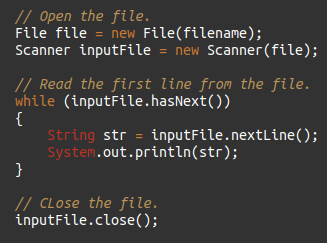
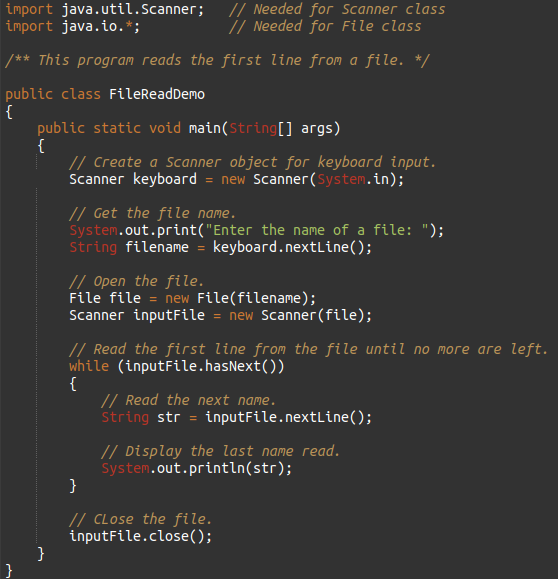
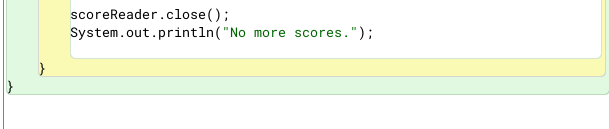
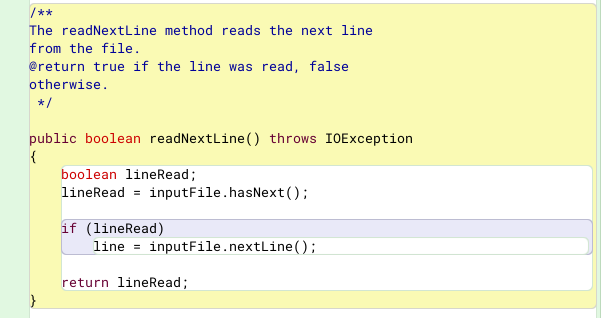
The Scanner class’s hasNext() method will return true if another item can be read from the file.
Example 1 :
Example 2 :
Working with Files Recap
Must import java.io.*, use .close() for PrintWriter and Scanner,and throws IOException on any methods that use these including main()
Writing to a file with text vs binary, you can use PrintWriter object.
NOTE-This creates a new file or erases existing file.
To append, you can use FileWriter with 2 arguments, path/name to file and true, and then pass into PrintWriter
to read files, create File object and pass into Scanner.
Scanner can use .hasNext() or hasNextLine() on Scanner object to see if more data to read based on delimiter (space by default) or (invisible) end of line marker
Generating Random Numbers with the Random Class
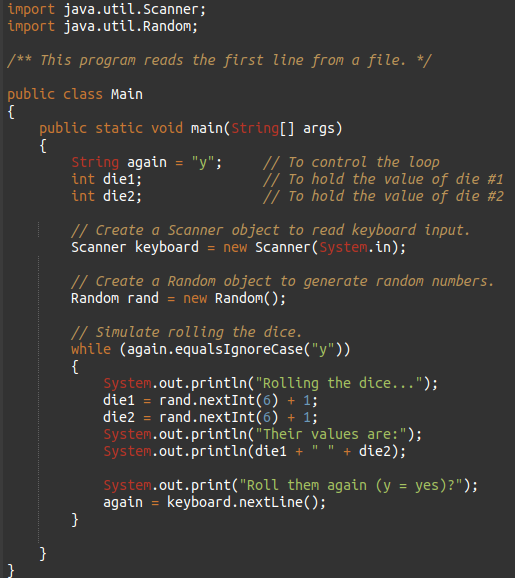
Some applications, such as games and simulations, require the use of randomly generated numbers.
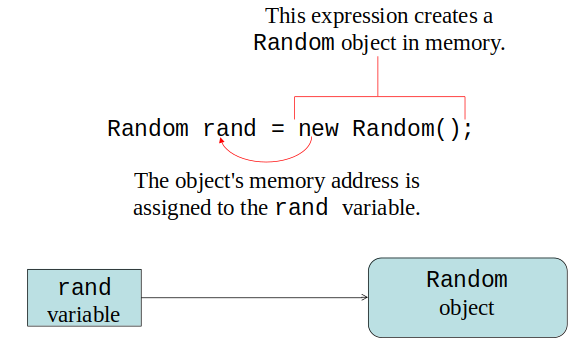
The Java API has a class, Random, for this purpose. To use the Random class, use the following import statement and create an instance of the class.
Format/Example :
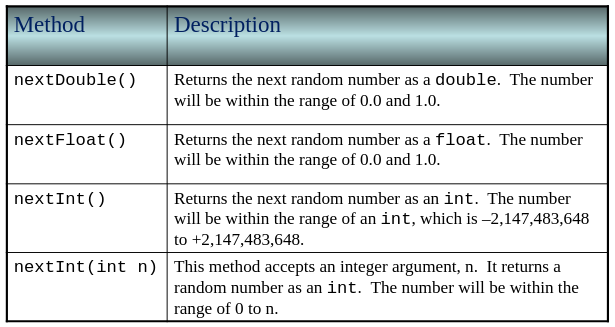
Some Methods of the Random Class
Table :
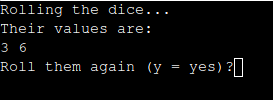
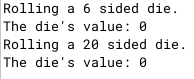
RollDice Psuedo? Class
Chapter 5
Why Write Methods?
Methods are commonly used to break a problem down into small manageable pieces.
This is called divide and conquer.
Methods simplify programs.
If a specific task is performed in several places in the program, a method can be written once to perform that task, and then be executed anytime it is needed.
This is known as code reuse.
void Methods and Value-Returning Methods
A void method is one that simply performs a task and then terminates.
A value-returning method not only performs a task, but also sends a value back to the code that called it.
Defining a void?? Method
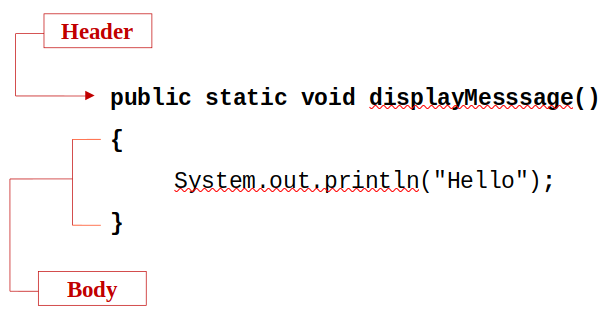
To create a method, you must write a definition, which consists of a header and a body.
The method header, which appears at the beginning of a method definition, lists several important things about the method, including the method’s name and any parameters.
The method body is a collection of statements that are performed when the method is executed.
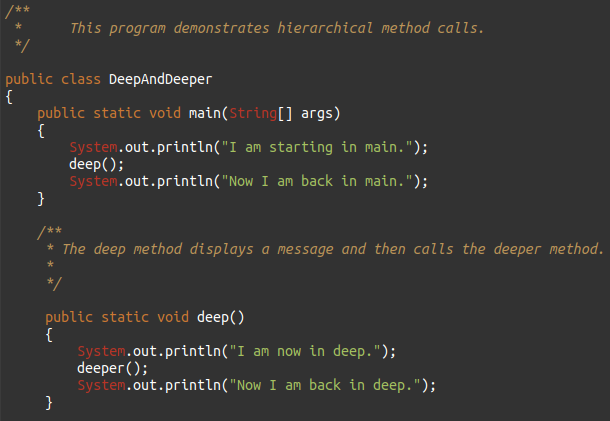
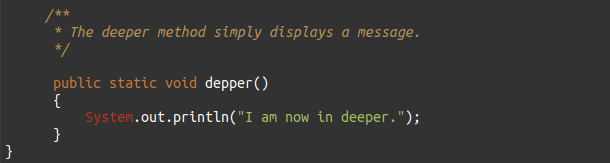
Example(void Method) :
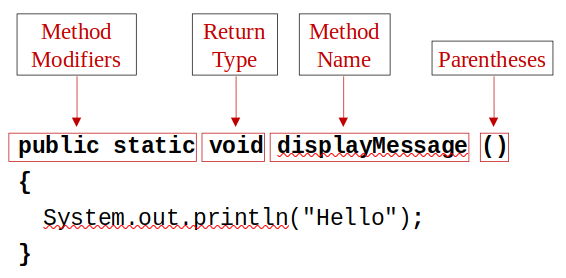
Parts of a Method Header
Example :
Method modifiers :
public—method is publicly available to code outside the class
static—method belongs to a class, not a specific object.
Return types :
void
The data type from a value-returning method
Method name — name that is descriptive of what the method does
Parentheses — contain nothing or a list of one or more variable declarations if the method is capable of receiving arguments.
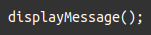
Calling a Method
A method executes when it is called.
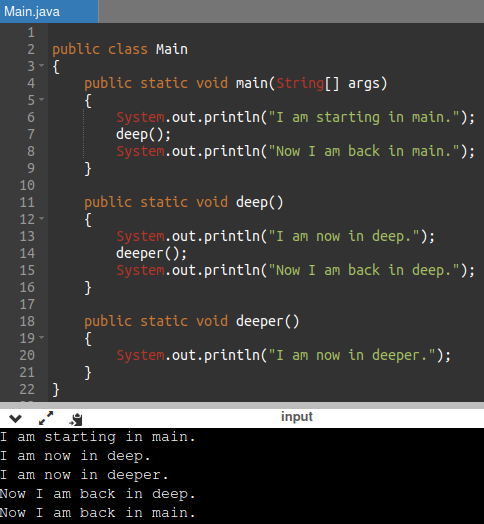
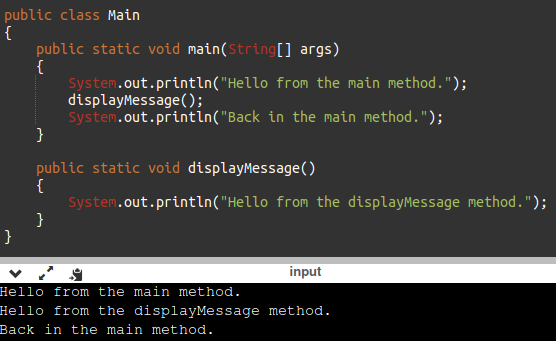
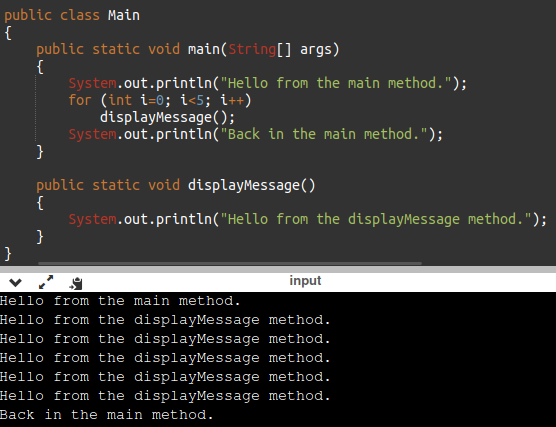
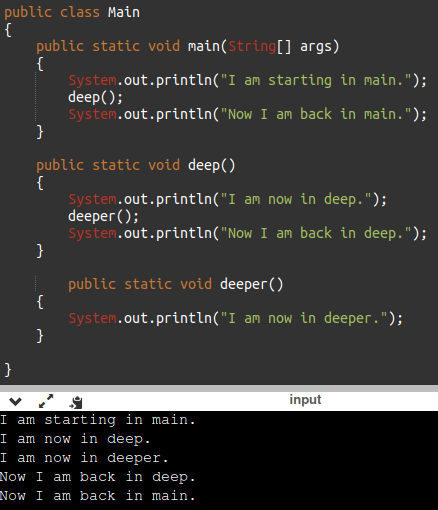
The main method is automatically called when a program starts, but other methods are executed by method call statements.
Notice that the method modifiers and the void return type are not written in the method call statement.
Those are only written in the method header.
Example 1 :
Method Examples
Example 1 :
Example 2 :
Example 3 :
Example 4 :
Documenting Methods
A method should always be documented by writing comments that appear just before the method’s definition.
The comments should provide a brief explanation of the method’s purpose.
The documentation comments begin with /** and end with */.
Example 1 :
Passing Arguments to a Method
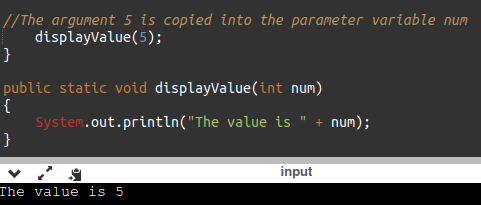
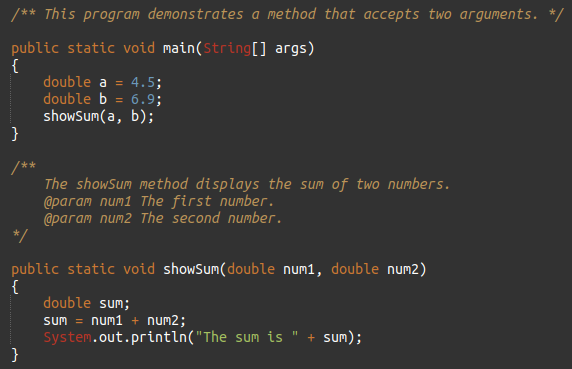
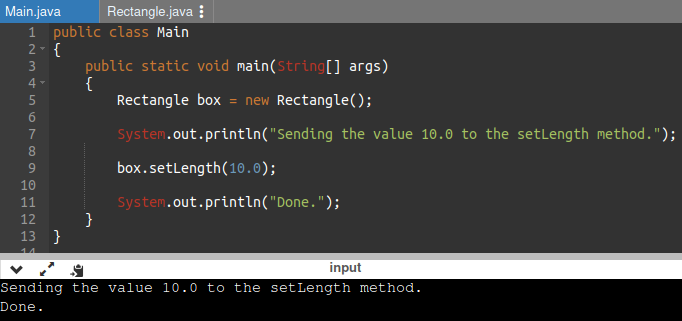
Values that are sent into a method are called arguments.
Examples :
The data type of an argument in a method call must correspond to the variable declaration in the parentheses of the method declaration
.
The parameter is the variable that holds the value being passed into a method.
By using parameter variables in your method declarations, you can design your own methods that accept data this way.
Example :
Argument and Parameter Data Type Compatibility
When you pass an argument to a method, be sure the argument’s data type is compatible with the parameter variable’s data type.
Java will automatically perform widening conversions, but narrowing conversions will cause a compiler error.
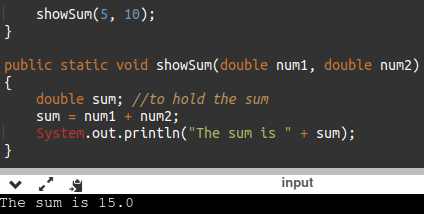
Passing Multiple Arguments
Arguments are passed in order.
Example :
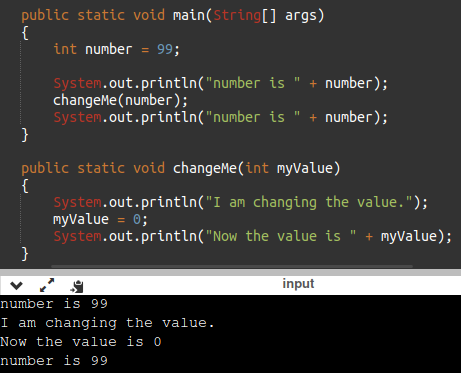
Arguments are Passed by Value
In Java, all arguments of the primitive data types are passed by value, which means that only a copy of an argument’s value is passed into a parameter variable.
A method’s parameter variables are separate and distinct from the arguments that are listed inside the parentheses of a method call.
If a parameter variable is changed inside a method, it has no affect on the original argument.
Example :
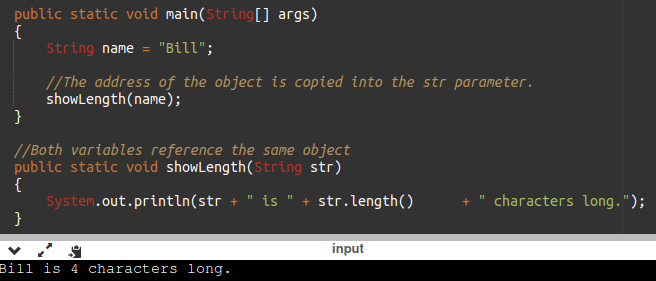
Passing Object References to a Method
Recall that a class type variable does not hold the actual data item that is associated with it, but holds the memory address of the object.
A variable associated with an object is called a reference variable.
When an object such as a String is passed as an argument, it is actually a reference to the object that is passed.
Example :
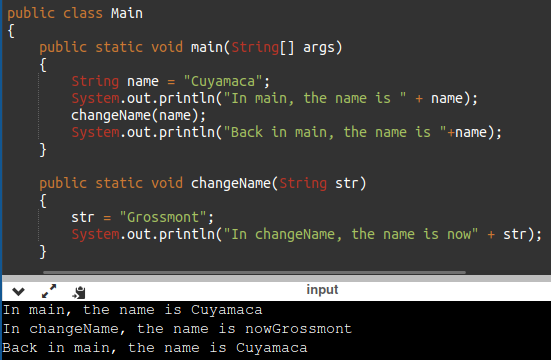
Strings are Immutable (non-changeable) Objects
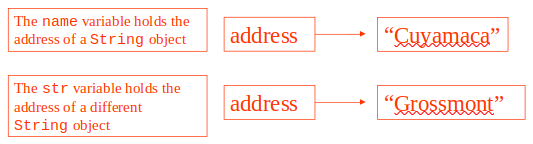
Strings are immutable objects, which means that they cannot be changed. When the line
is executed, it cannot change an immutable object, so Java creates a new object and str now points to it.
Example :
@param Tag in Documentation Comments
You can provide a description of each parameter in your documentation comments by using the @param tag.
General format
Example :
All @param tags in a method’s documentation comment must appear after the general description.
The description can span several lines.
More About Local Variables
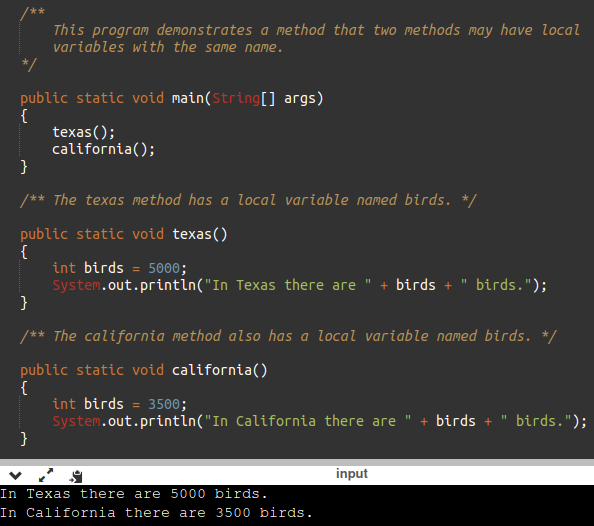
A local variable is declared inside a method and is not accessible to statements outside the method.
Different methods can have local variables with the same names because the methods cannot see each other’s local variables.
A method’s local variables exist only while the method is executing. When the method ends, the local variables and parameter variables are destroyed and any values stored are lost.
Local variables are not automatically initialized with a default value and must be given a value before they can be used.
Example :
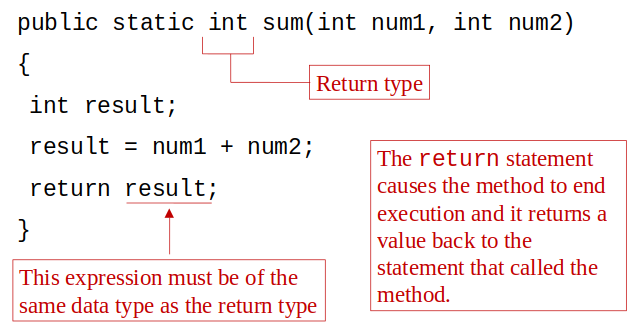
Returning a Value from a Method
Data can be passed into a method by way of the parameter variables.
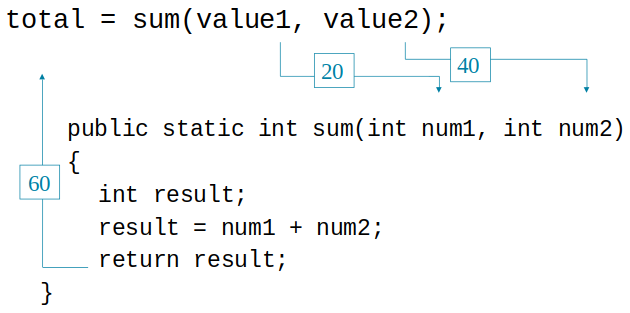
Data may also be returned from a method, back to the statement that called it.
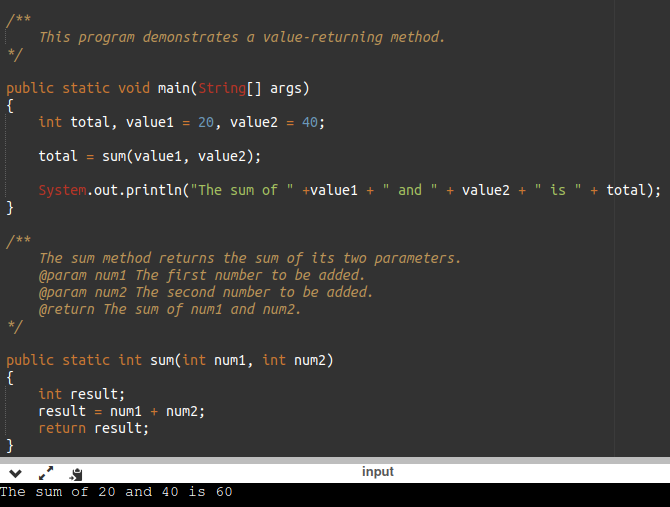
Example :
Defining a Value-Returning Method
Calling a Value-Returning Method
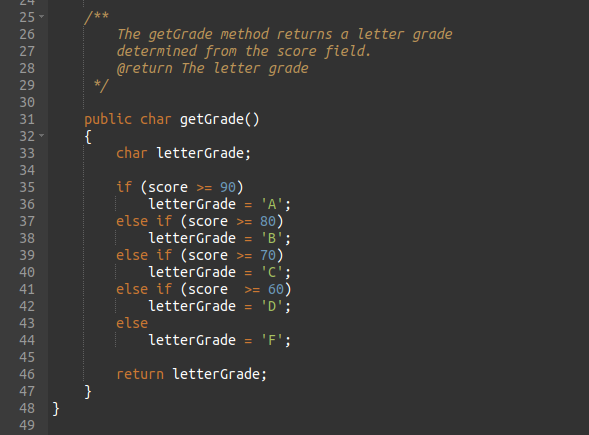
@return Tag in Documentation Comments
You can provide a description of the return value in your documentation comments by using the @return tag.
Format :
The @return tag in a method’s documentation comment must appear after the general description.
The description can span several lines.
Example :
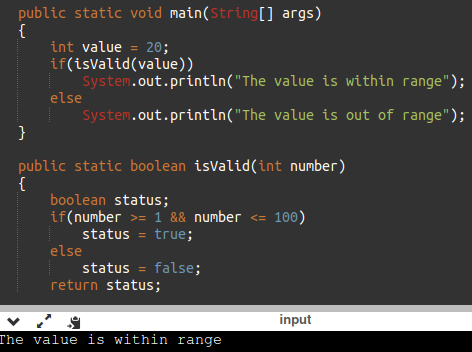
Returning a booleanValue
Sometimes we need to write methods to test arguments for validity and return true or false
Example :
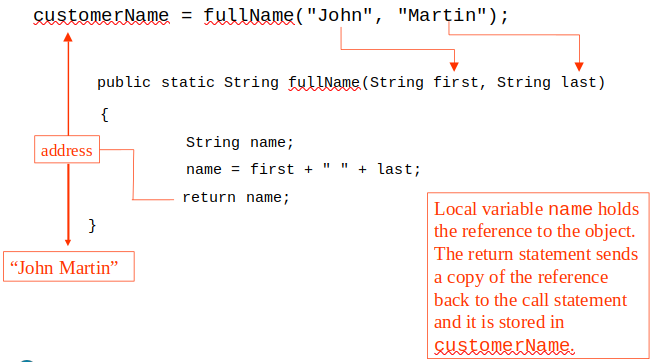
Returning a Reference to a String Object
Problem Solving with Methods
A large, complex problem can be solved a piece at a time by methods.
The process of breaking a problem down into smaller pieces is called functional decomposition.
If a method calls another method that has a throws clause in its header, then the calling method should have the same throws clause.
Example :
Calling Methods that Throw Exceptions
All methods that use a Scanner object to open a file must throw or handle IOException.
You will learn how to handle exceptions in Chapter 12.
For now, understand that Java required any method that interacts with an external entity, such as the file system to either throw an exception to be handles elsewhere in your application or to handle the exception locally.
Chapter 6
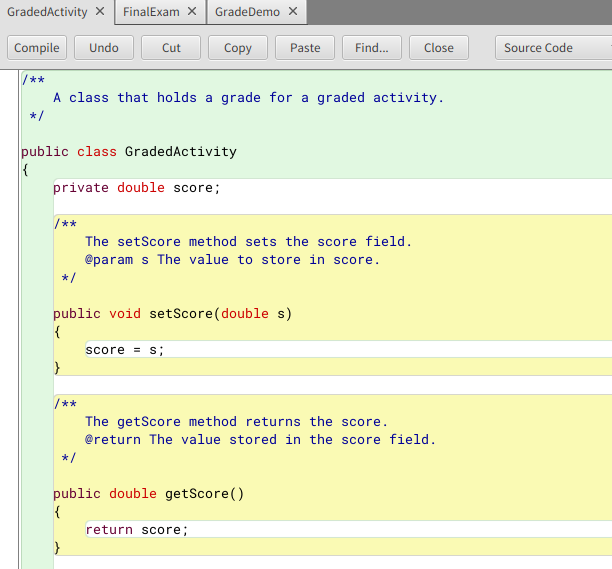
Objects and Classes
An object exists in memory, and performs a specific task.
Objects have two general capabilities :
-Objects can store data.
The pieces of data stored in an object are known as fields.
-
Objects can perform operations.
The operations that an object can perform are known as methods.
You have already used the following classes to create objects :
- Scanner objects, for reading input
- Random objects, for generating random numbers
- PrintWriter objects, for writing data to files
When a program needs the services of a particular type of object, it creates that object in memory, and then calls that object's methods as necessary.
A class is code that describes a particular type of object. It specifies the data that an object can hold (
the object's fields
), and the actions that an object can perform (
the object's methods
).
You can think of a class as a code "blueprint" that can be used to create a particular type of object.
When a program is running, it can use the class to create, in memory, as many objects of a specific type as needed.
Each object that is created from a class is called an instance of the class.
Example 1 :
Example 2 :
Example 3 :
The Java API provides many classes
so far, the classes that you have created objects from are provided by the Java API(Scanner, Random, PrintWriter).
Access Specifiers
An access specifier is a Java keyword that indicates how a field or method can be accessed.
When the public access specifier is applied to a class member, the member can be accessed by code inside the class or outside.
When the private access specifier is applied to a class member, the member cannot be accessed by code outside the class. The member can be accessed only by methods that are members of the same class.
Example :
Accessor and Mutator Methods
Because of the concept of data hiding, fields in a class are private.
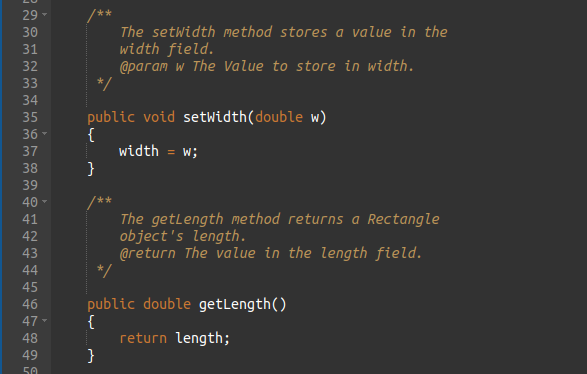
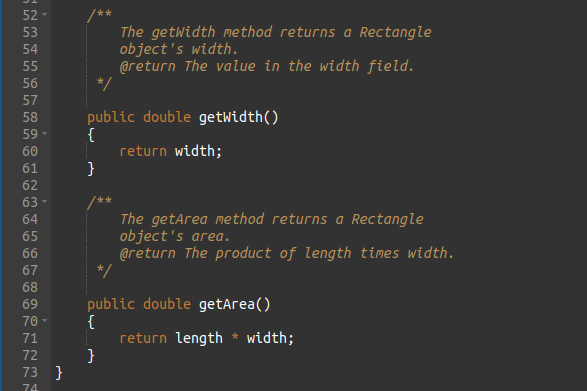
The methods that retrieve the data of fields are called accessors.
The methods that modify the data of fields are called mutators.
Each field that the programmer wishes to be viewed by other classes needs an accessor.
Each field that the programmer wishes to be modified by other classes needs a mutator.
Other names for these methods are getters(accessors) and setters(mutators).
Data Hiding
An object hides its internal, private fields from code that is outside the class that the object is an instance of.
Only the class's methods may directly access and make changes to the object’s internal data.
Code outside the class must use the class's public methods to operate on an object's private fields.
Data hiding is important because classes are typically used as components in large software systems, involving a team of programmers.
Data hiding helps enforce the integrity of an object's internal data.
This is big for data integrity and information assurance/protection!
Stale Data
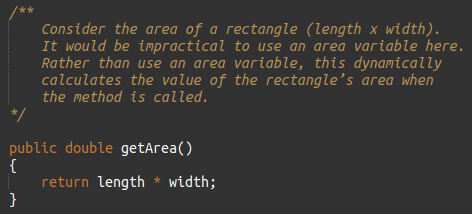
Some data is the result of a calculation.
Data that requires the calculation of various factors has the potential to become stale.
To avoid stale data, it is best to calculate the value of that data within a method rather than store it in a variable.
Example :
Class Layout Conventions
The layout of a source code file can vary by employer or instructor.
A common layout is: Fields listed first, Methods listed second
(accessors and mutators are typically grouped).
There are tools that can help in formatting layout to specific standards.
Instance Fields and Methods
Objects created from a class each have their own copy of instance fields.
Instance methods are methods that are
not declared
with a special keyword, static
.
Instance fields and instance methods require an object to be created in order to be used.
Example :
Constructors
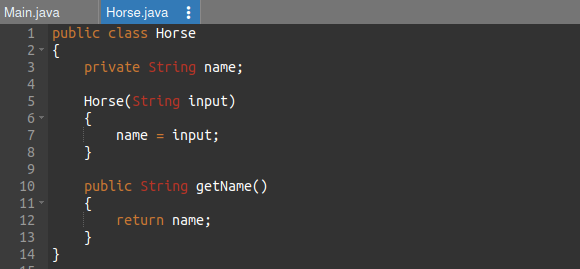
Classes can have special methods called constructors.
A constructor is a method that is automatically called when an object is created.
Constructors are used to perform operations at the time an object is created (vs creating objects and using mutators (setters)).
Constructors typically initialize instance fields and perform other object initialization tasks.
Constructors have a few special properties that set them apart from normal methods :
- Constructors have the same name as the class.
- Constructors have no return type (not even void).
- Constructors may not return any values.
- Constructors are typically public.
Example :
The Default Constructor
When an object is created, its constructor is always called.
If you do not write a constructor, Java provides one when the class is compiled.
The constructor that Java provides is known as the default constructor :
- It sets all of the object’s numeric fields to 0.
- It sets all of the object’s boolean fields to false.
- It sets all of the object’s reference variables to the special value null.
The default constructor is a constructor with no parameters, used to initialize an object in a default configuration.
The only time that Java provides a default constructor is when you do not write any constructor for a class.
A default constructor is not provided by Java if a constructor is already written.
Writing Your Own No-Arg Constructor
A constructor that does not accept arguments is known as a no-arg constructor.
The default constructor (provided by Java) is a no-arg constructor.
Example :
The String Class Constructor
One of the String class constructors accepts a string literal as an argument.
This string literal is used to initialize a String object.
This creates a new reference variable name that points to a String object that represents the name “Michael Long”.
Because they are used so often, String objects can be created with a shorthand :
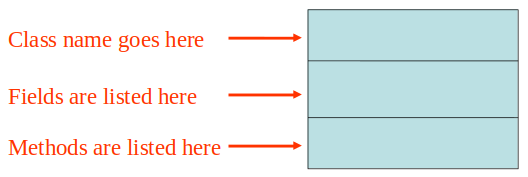
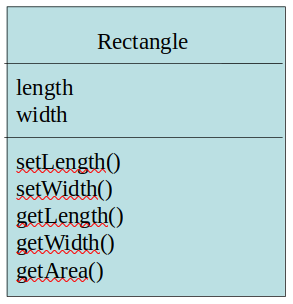
UML Diagram
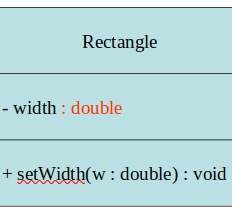
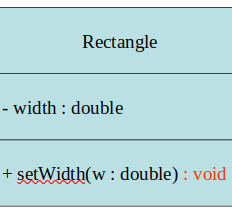
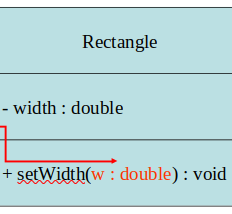
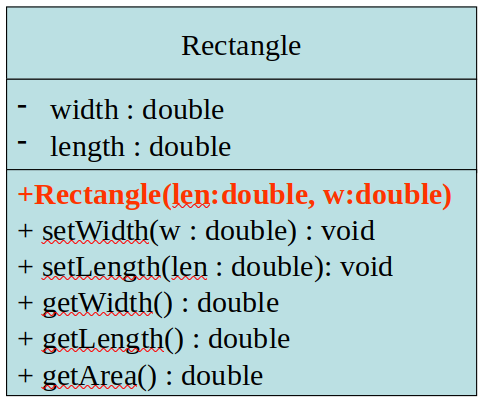
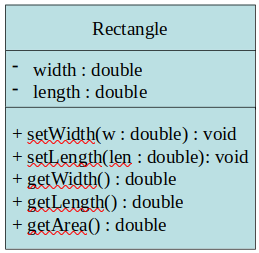
Unified Modeling Language (UML) provides a set of standard diagrams for graphically depicting object-oriented systems.
Example :
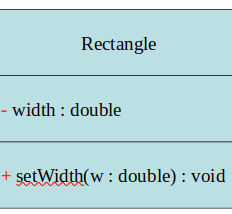
UML Data Type and Parameter Notation
UML diagrams are language independent.
UML diagrams use an independent notation to show return types, access modifiers, etc.
Access modifiers are denoted as: + public & - private.
Access modifiers are used to set the accessibility of classes, constructors, methods, and other members in Java.
Variable types are placed after the variable name, separated by a colon.
Method return types are placed after the method declaration name, separated by a colon.
Method parameters are shown inside the parentheses using the same notation as variables.
In UML, the most common way constructors are defined is :
Example :
(Notice there is no return type listed for constructors.)
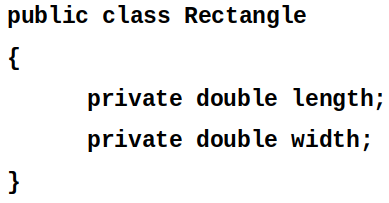
Converting the UML Diagram to Code
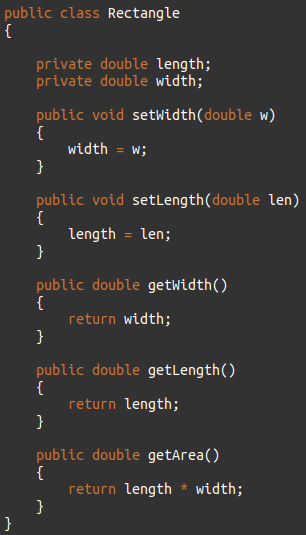
Putting all of this information together, a Java class file can be built easily using the UML diagram.
The UML diagram parts match the Java class file structure.
Format :
Example :
Uninitialized Local Reference Variables
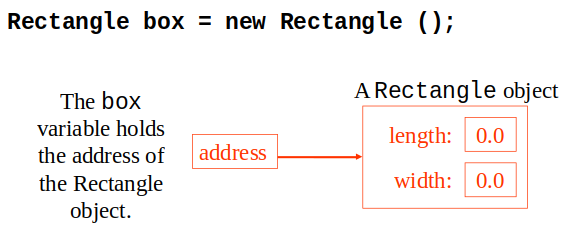
Reference variables can be declared without being initialized.
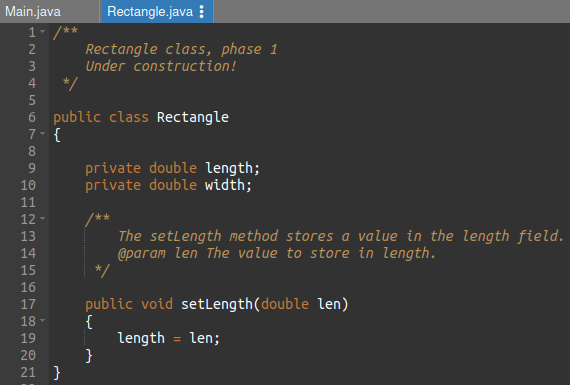
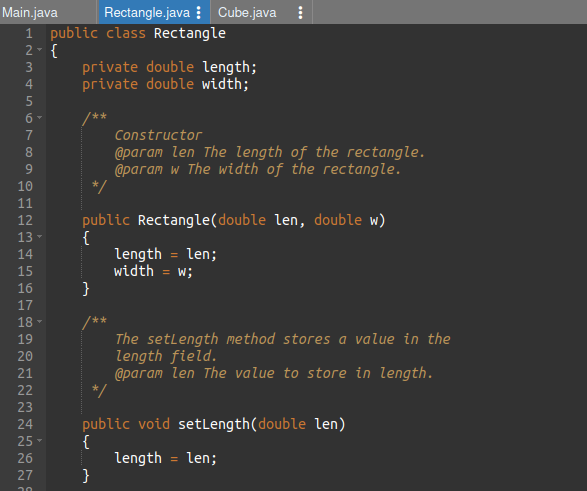
This statement does not create a Rectangle object, so it is an uninitialized local reference variable.
A local reference variable must reference an object before it can be used, otherwise a compiler error will occur.
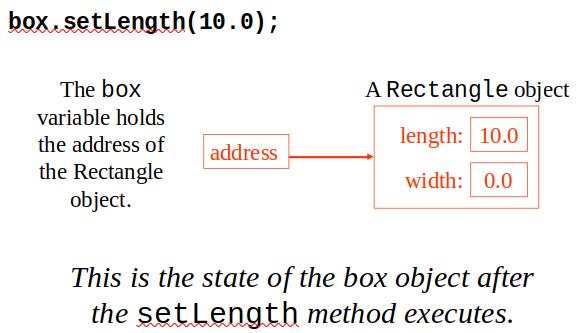
box will now reference a Rectangle object of length 7.0 and width 14.0.
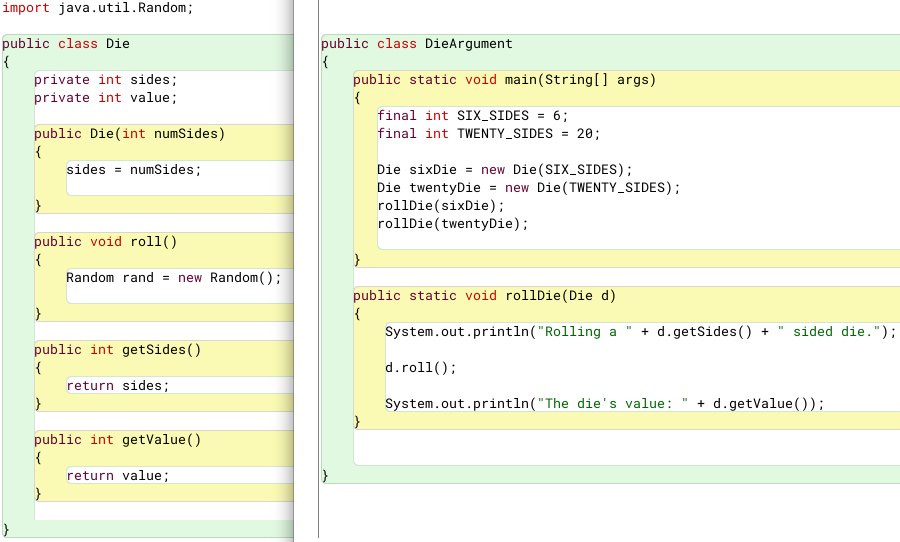
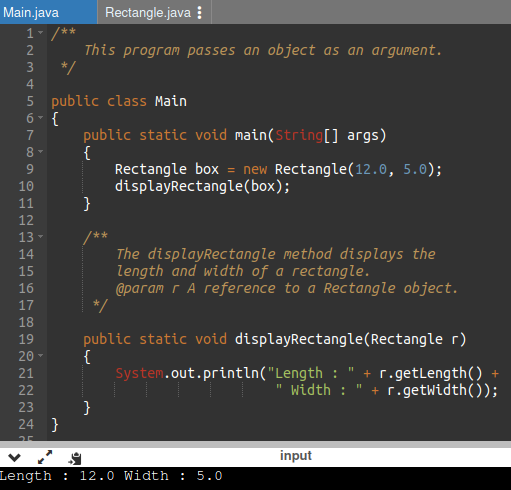
Passing Objects as Arguments
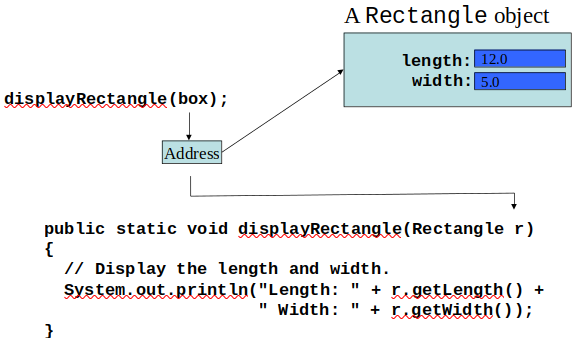
When you pass a object as an argument, the thing that is passed into the parameter variable is the object's memory address.
As a result, parameter variable references the object, and the receiving method has access to the object.
Example :
Overloading Methods and Constructors
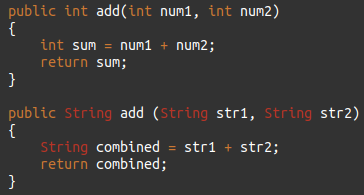
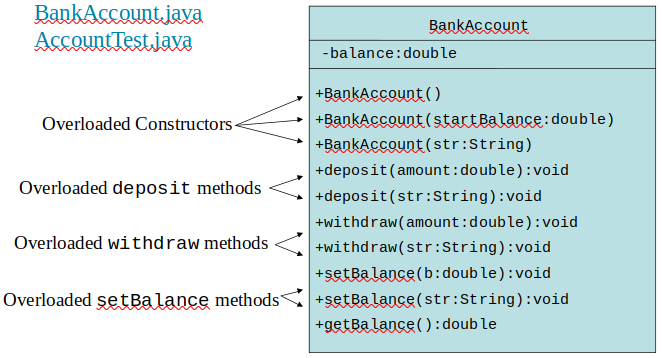
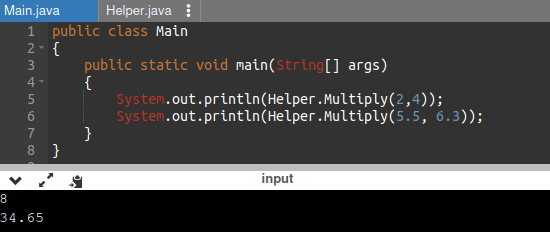
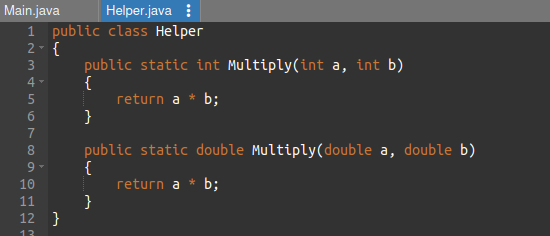
Two or more methods in a class may have the same name as long as their parameter lists are different.
When this occurs, it is called method overloading. This also applies to constructors.
Method overloading is important because sometimes you need several different ways to perform the same operation.
Example :
Method Signature and Binding
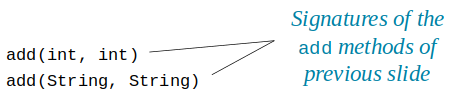
A method signature consists of the method’s name and the data types of the method’s parameters, in the order that they appear.
The return type is not part of the signature.
Example :
The process of matching a method call with the correct method is known as binding.
The compiler uses the method signature to determine which version of the overloaded method to bind the call to.
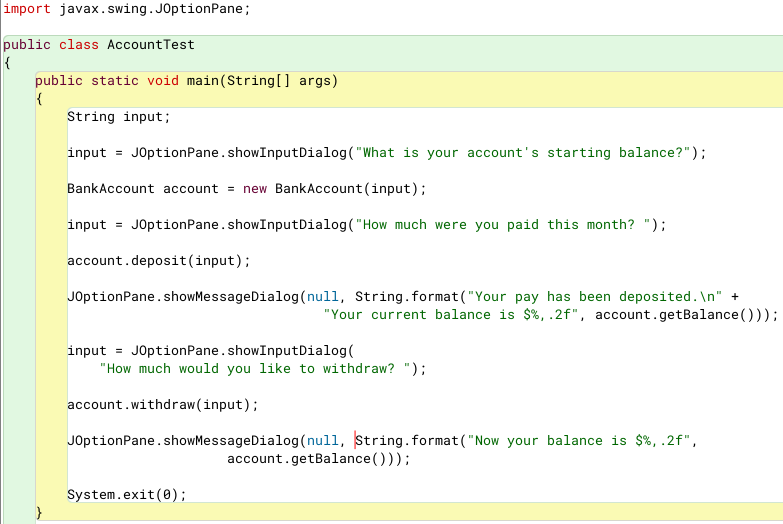
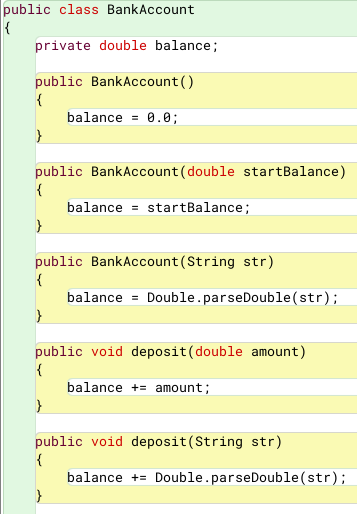
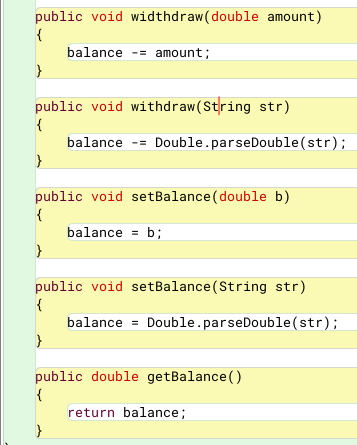
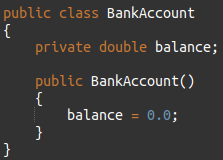
The BankAccount Example
Scope of Instance Fields
Variables declared as instance fields in a class can be accessed by any instance method in the same class as the field.
If an instance field is declared with the public access specifier, it can also be accessed by code outside the class, as long as an instance of the class exists.
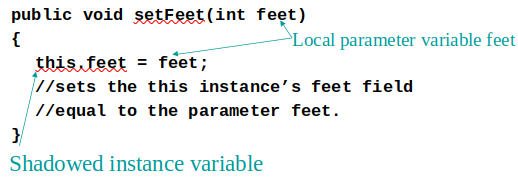
Shadowing
A parameter variable is, in effect, a local variable.
Within a method, variable names must be unique.
A method may have a local variable with the same name as an instance field.
This is called shadowing.
The local variable will hide the value of the instance field.
Shadowing is discouraged and local variable names should not be the same as instance field names.
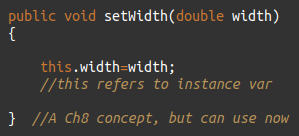
However, can use this. For example, if width is an instance var,
Packages and import Statements
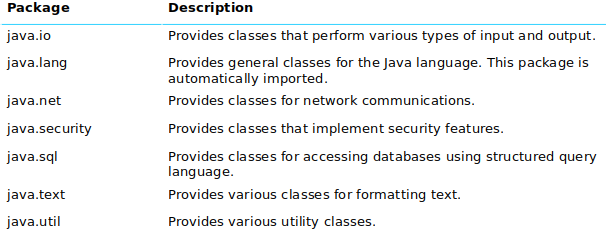
Classes in the Java API are organized into packages.
Explicit imports name a specific class
Wildcard imports name a package, followed by an *
The java.lang package is automatically made available to any Java class.
Some Java Standard Packages
Object Oriented Design
Finding the classes :
- Get written description of the problem domain
- Identify all nouns, each is a potential class
- Refine list to include only classes relevant to the problem
Identify the responsibilities
- Things a class is responsible for knowing (fields)
- Things a class is responsible for doing (methods)
Chapter 7
Introduction to Arrays
Primitive variables are designed to hold only one value at a time.
Arrays allow us to create a collection of like values that are indexed.
An array can store any type of data but only one type of data at a time.
An array is a list of data elements.
Creating Arrays
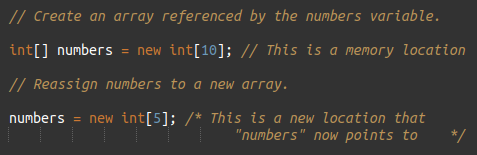
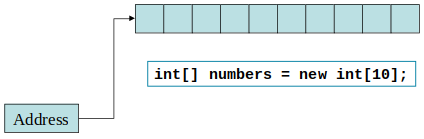
An array is an object so it needs an object reference.
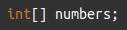
The next step creates the array and assigns its address to the numbers variable.
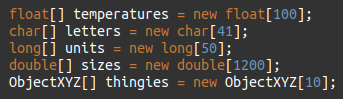
It is possible to declare an array reference and create it in the same statement.
Example :
Arrays may be of any type.
Example :
The array size must be a non-negative number.
It may be a literal value, a constant, or variable.
Example :
Once created, an array size is fixed and cannot be changed.
Accessing the Elements of an Array
An array is accessed by :
- The reference name
-A subscript that identifies which element in the array to access.
Example :
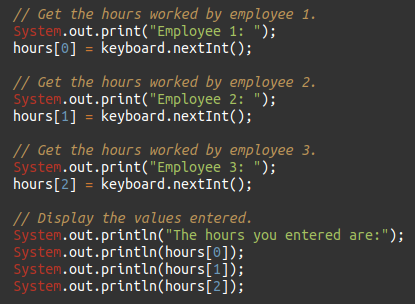
Inputting and Outputting Array Elements
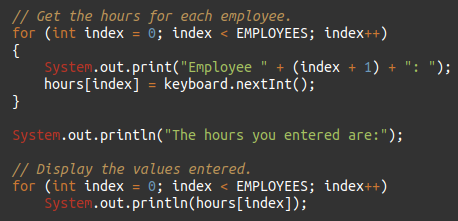
Array elements can be treated as any other variable.
They are simply accessed by the same name and a subscript.
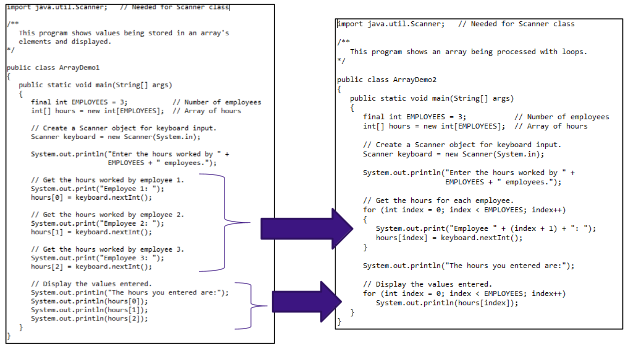
Array subscripts can be accessed using variables (such as for loop counters).
Example :
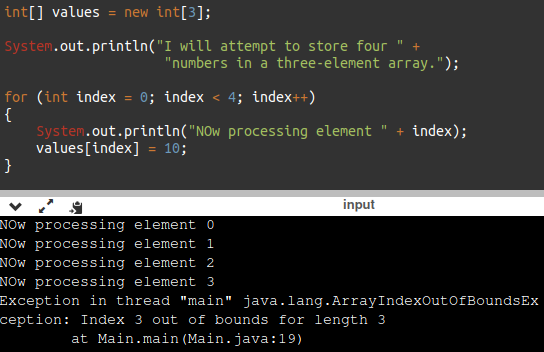
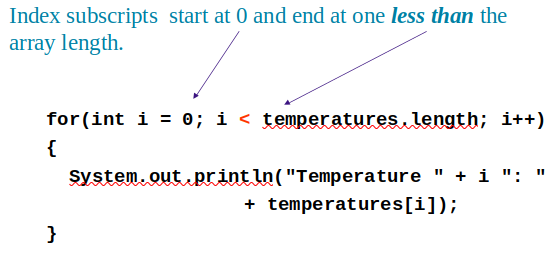
Bounds Checking
Array indexes always start at zero and continue to (array length - 1).
This array would have indexes 0 through 9.
Example :
In for loops, it is typical to use i, j, and k as counting variables.
It might help to think of i as representing the word index.
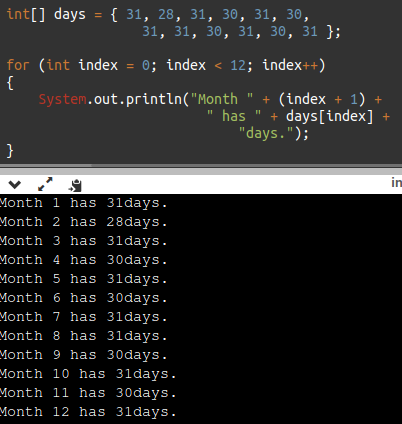
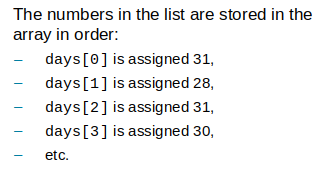
Array Initialization
When relatively few items need to be initialized, an initialization list can be used to initialize the array.
Example :
Alternate Array Declaration
Previously we showed arrays being declared:
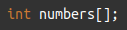
However, the brackets can also go here:
These are equivalent but the first style is typical.
Multiple arrays can be declared on the same line.
With the alternate notation each variable must have brackets.
Processing Array Contents
Processing data in an array is the same as any other variable.
Pre and post increment works the same :
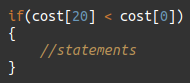
Array elements can be used in relational operations:
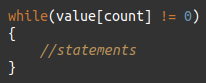
They can be used as loop conditions :
Array Length
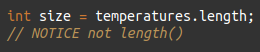
Arrays are objects and provide a public field named length that is a constant that can be tested.
The length of an array can be obtained via its length constant.
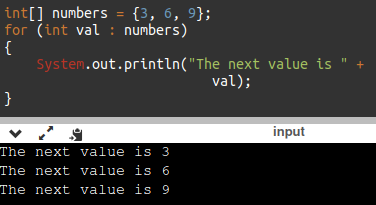
The Enhanced for Loop
For each loop is a simplified array processing (read only)
that always goes through all elements.
Format :
Example :
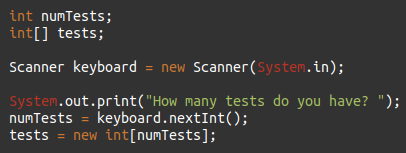
Array Size
The length constant can be used in a loop to provide automatic bounding.
You can let the user specify the size of an array :
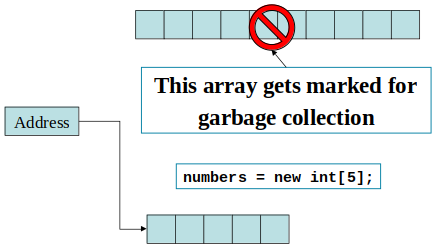
Reassigning Array References
An array reference can be assigned to another array of the same type.
If the first (10 element) array no longer has a reference to it, it will be garbage collected. The 40B of memory (int is 4B and there are 10 elements) returned to RAM.
The numbers variable holds the address of an int array.
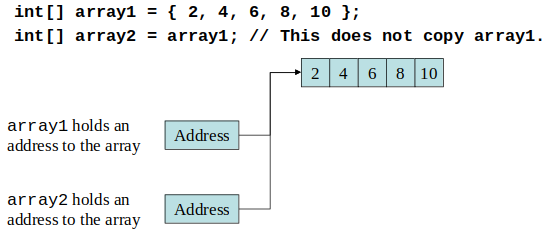
Copying Arrays
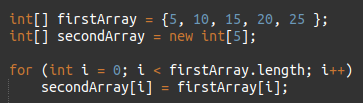
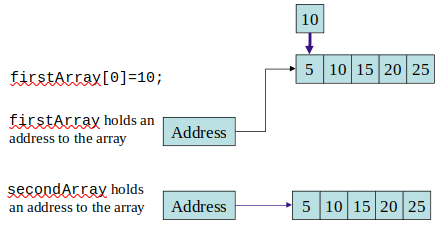
This is not the way to copy an array.
You cannot copy an array by merely assigning one reference variable to another.
You need to copy the individual elements of one array to another.
This code copies the value in each element of firstArray to the corresponding element of secondArray.
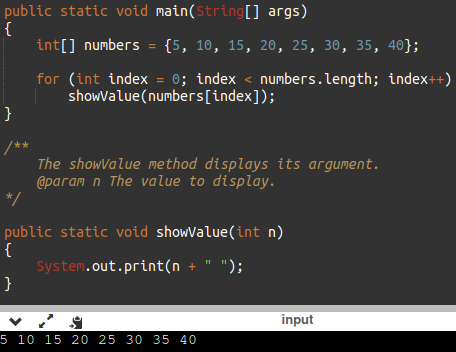
Passing Array Elements to a Method
When a single element of an array is passed to a method it is handled like any other variable.
Example :
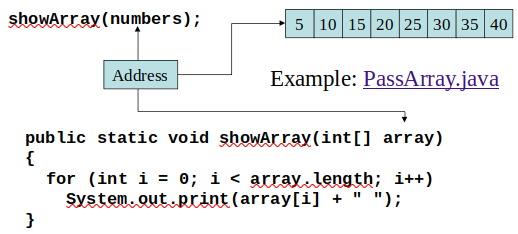
More often you will want to write methods to process array data by passing the entire array, not just one element at a time.
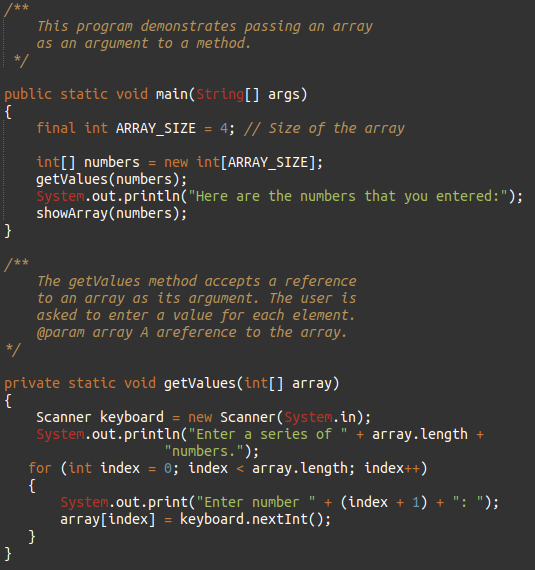
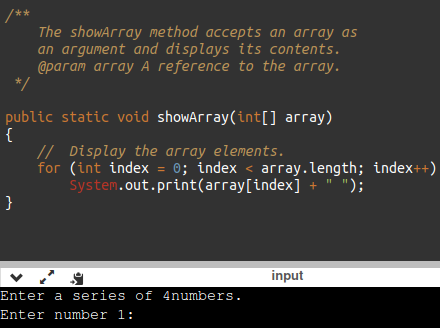
Passing Arrays as Arguments
Arrays are objects.
Their references can be passed to methods like any other object reference variable.
Example 1 :
Example 2 :
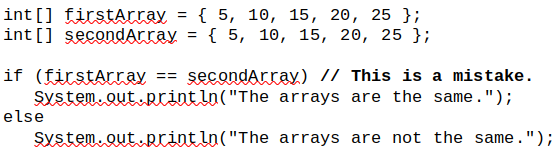
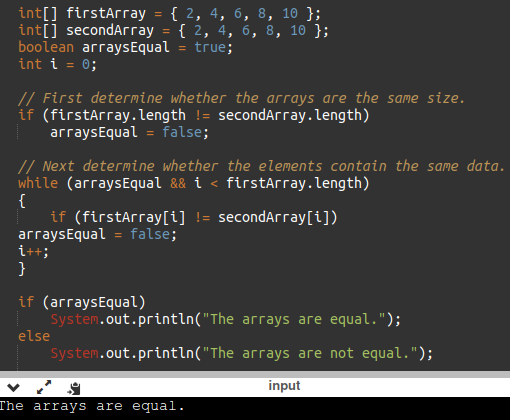
Comparing Arrays
The == operator determines only whether array references point to the same array object in memory, not whether the values are the same!
Wrong Example?
Example
Useful Array Operations
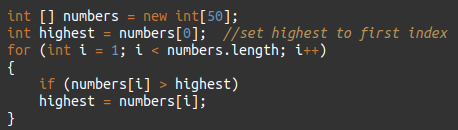
Finding the Highest Value
Example
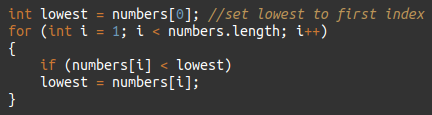
Finding the Lowest Value
Example
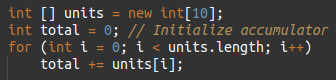
Summing Array Elements :
Example
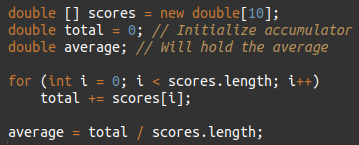
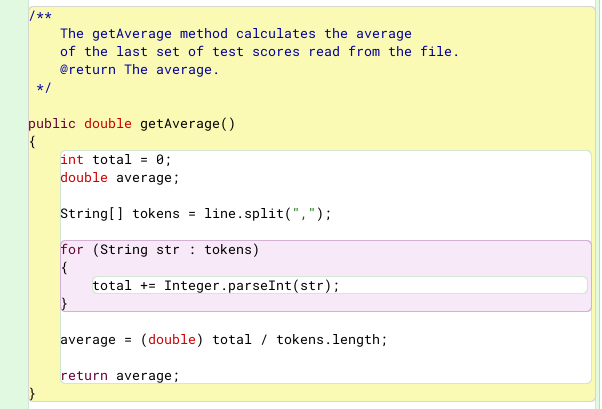
Averaging Array Elements :
Example
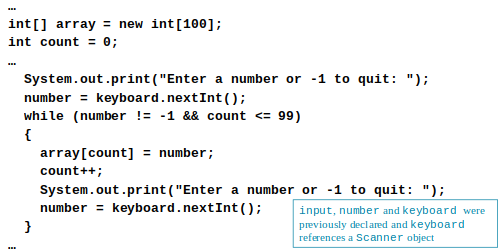
Partially Filled Arrays
Typically, if the amount of data that an array must hold is unknown :
- size the array to the largest expected number of elements.
- use a counting variable to keep track of how much valid data is in the array.
Example
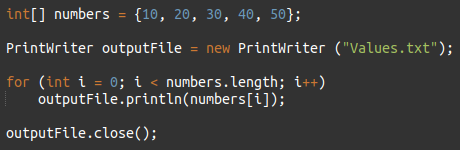
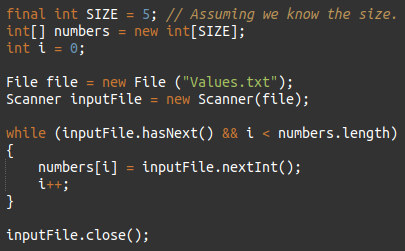
Arrays and Files
Saving the contents of an array to a file :
Example :
Reading the contents of a file into an array :
Example :
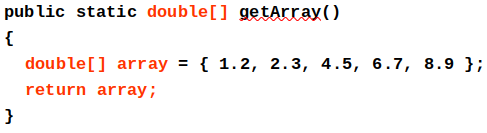
Returning an Array Reference
A method can return a reference to an array.
The return type of the method must be declared as an array of the right type.
Example :
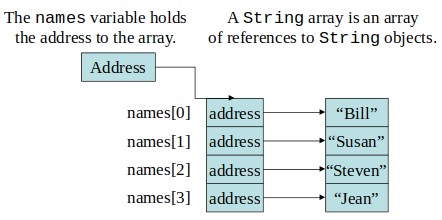
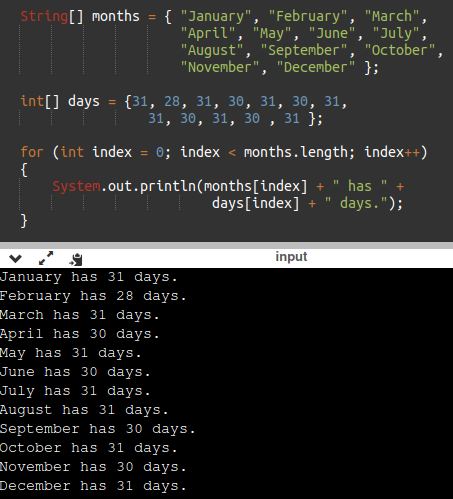
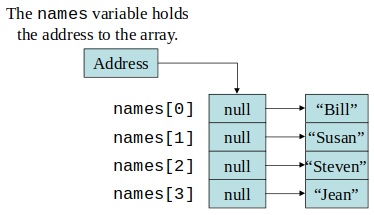
String Arrays
Arrays are not limited to primitive data.
An array of String objects can be created :
Example 1 :
Example 2 :
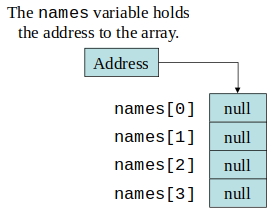
If an initialization list is not provided, the new keyword must be used to create the array :
Example :
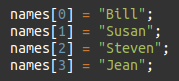
When an array is created in this manner, each element of the array must be initialized.
Example :
Calling String Methods On Array Elements
String objects have several methods, including :
- toUpperCase
- compareTo
- equals
- charAt
Each element of a String array is a String object.
Methods can be used by using the array name and index as before.
Example :
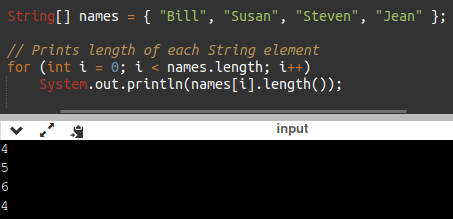
The length Field & The length Method
Arrays have a final field named length.
An array’s length is a field, you do not write a set of parentheses after its name.
String objects have a method named length().
You do write the parentheses after the name of the String class’s length method.
Example :
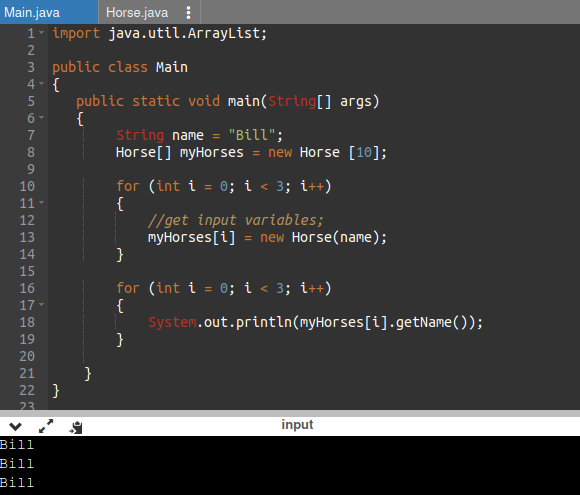
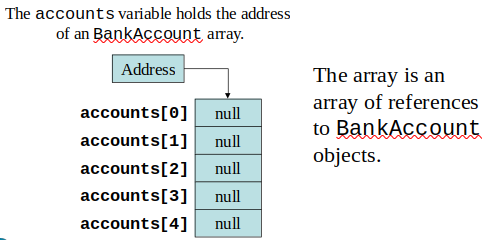
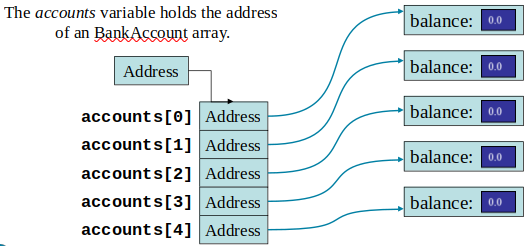
Arrays of Objects
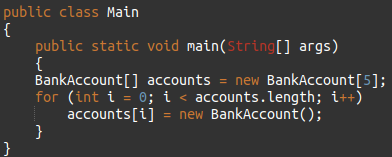
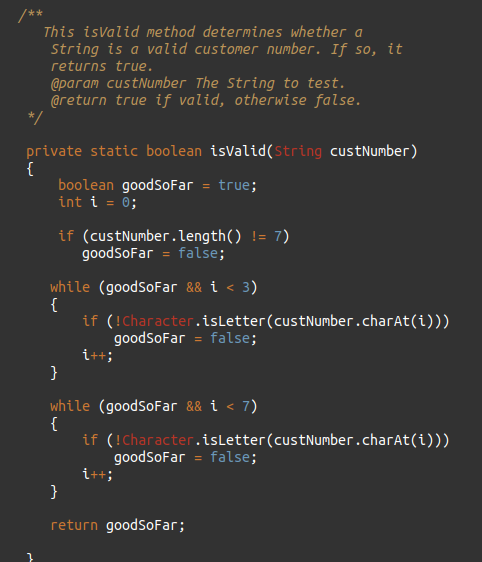
Because Strings are objects, we know that arrays can contain objects.
Example :
Each element needs to be initialized.
Example :
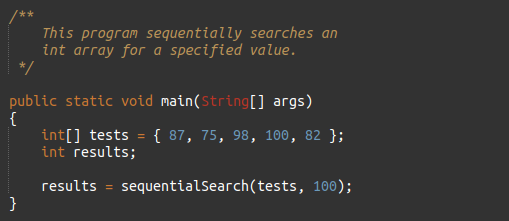
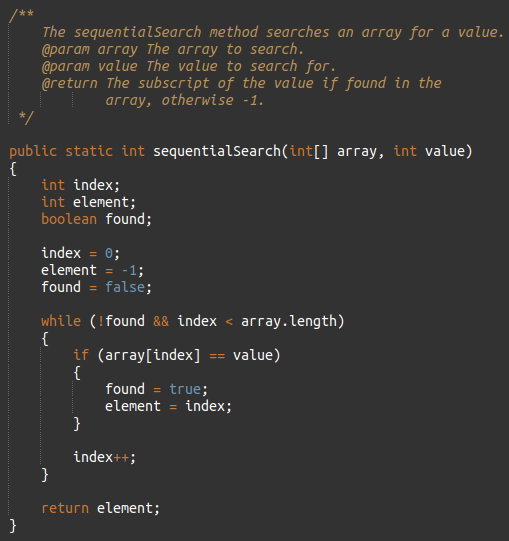
The Sequential Search Algorithm
A search algorithm is a method of locating a specific item in a larger collection of data.
The sequential search algorithm uses a loop to:
- sequentially step through an array
- compare each element with the search value
- stop when the value is found or the end of the array is encountered.
Example :
Two-Dimensional Arrays
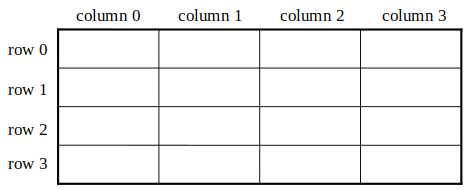
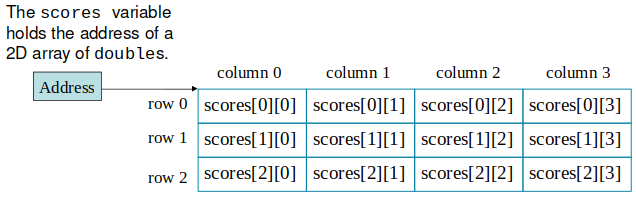
A two-dimensional array is an array of arrays.
It can be thought of as having rows and columns.
Declaring a two-dimensional array requires two sets of brackets and two size declarators
- The first one is for the number of rows.
- The second one is for the number of columns.
- Just remember Rick[row] Cassoni[column].
Example :
The two sets of brackets in the data type indicate that the scores variable will reference a two-dimensional array.
Notice that each size declarator is enclosed in its own set of brackets.
Accessing Two-Dimensional Array Elements
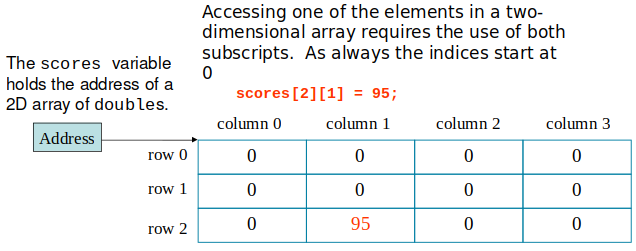
When processing the data in a two-dimensional array, each element has two subscripts :
one for its row and another for its column.
Example :
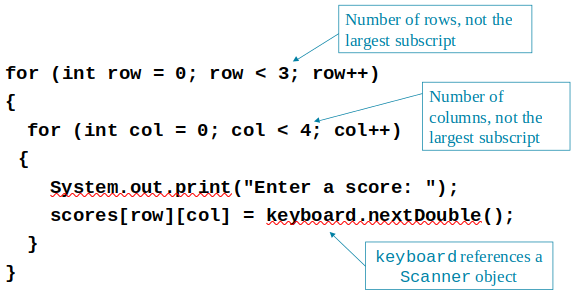
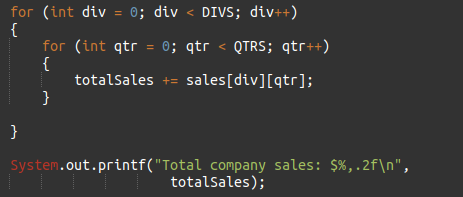
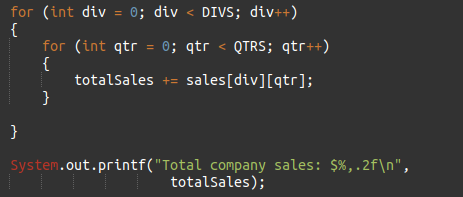
Programs that process two-dimensional arrays can do so with nested loops.
To fill the scores array :
Example :
To print out the scores array :
Example :
Initializing a Two-Dimensional Array
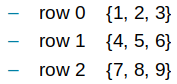
Initializing a two-dimensional array requires enclosing each row’s initialization list in its own set of braces.
Java automatically creates the array and fills its elements with the initialization values.
Declares an array with three rows and three columns.
The length Field
Two-dimensional arrays are
arrays of one-dimensional arrays
.
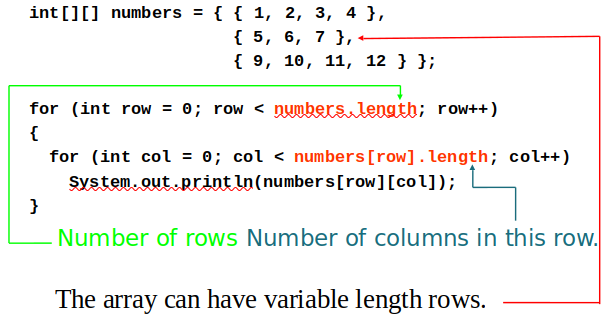
The length field of the array gives the number of rows in the array.
Each row has a length constant tells how many columns is in that row.
Each row can have a different number of columns – ragged arrays.
To access the length fields of the array:
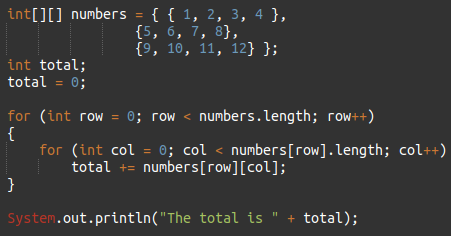
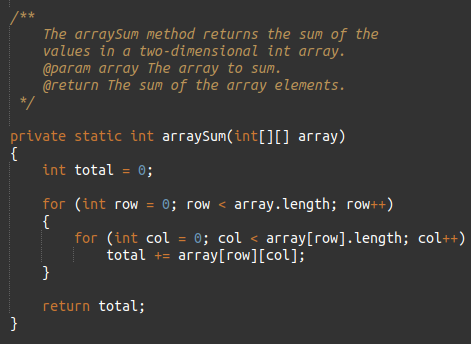
Summing The Elements of a Two-Dimensional Array
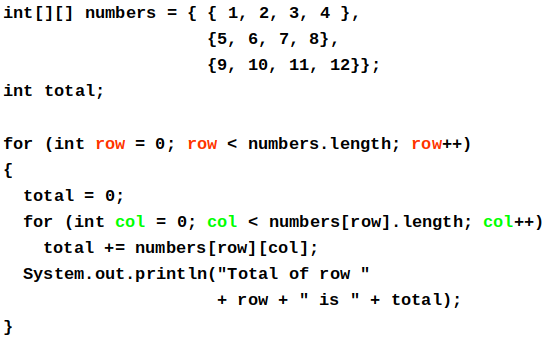
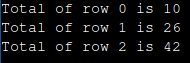
Summing The Rows of a Two-Dimensional Array
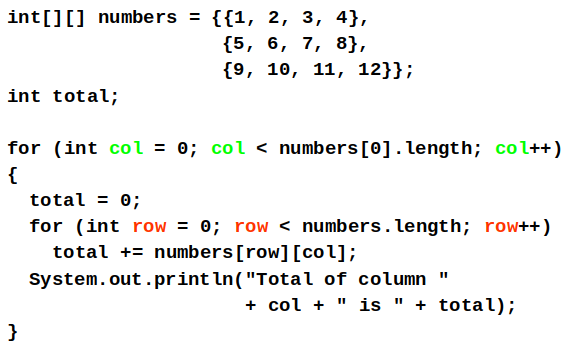
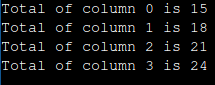
Summing The Columns of a Two-Dimensional Array
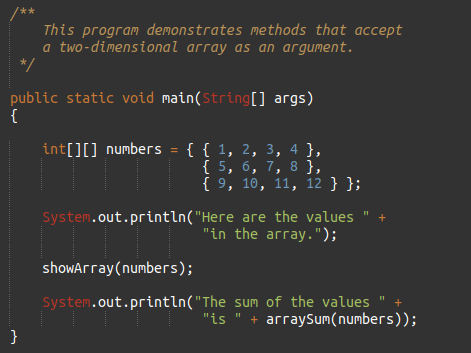
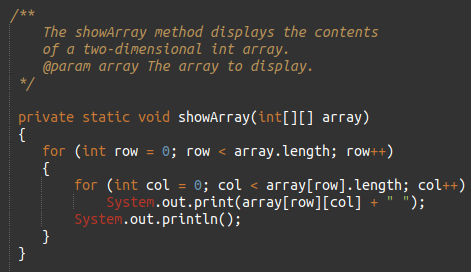
Passing and Returning Two-Dimensional Array References
There is no difference between passing a single or two-dimensional array as an argument to a method.
The method must accept a two-dimensional array as a parameter.
Example :
Ragged Arrays
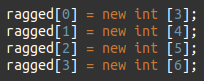
When the rows of a two-dimensional array are of different lengths, the array is known as a ragged array.
You can create a ragged array by creating a two-dimensional array with a specific number of rows, but no columns.
Then create the individual rows.
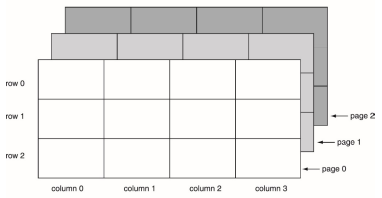
More Than Two Dimensions
Java does not limit the number of dimensions that an array may be.
More than three dimensions is hard to visualize, but can be useful in some programming problems.
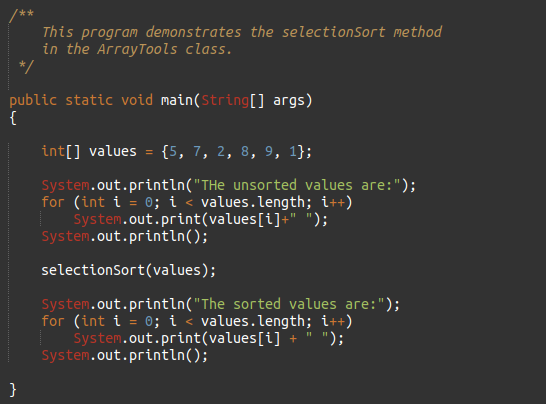
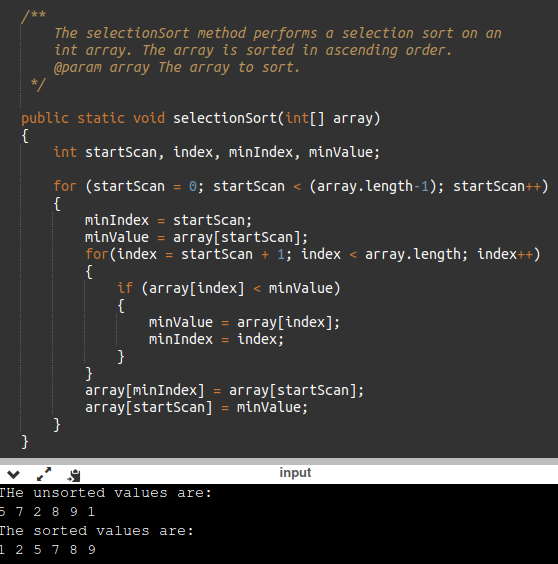
Selection Sort
In a selection sort :
- The smallest value in the array is located and moved to element 0.
- Then the next smallest value is located and moved to element 1.
- This process continues until all the elements have been placed in their proper order.
- This is also called a Bubble Sort
Example :
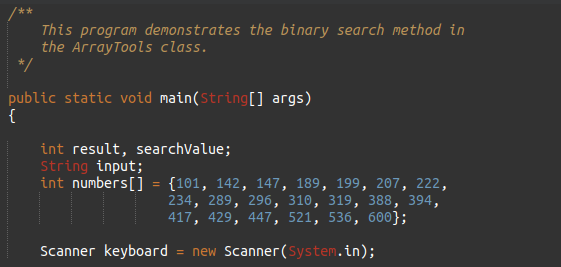
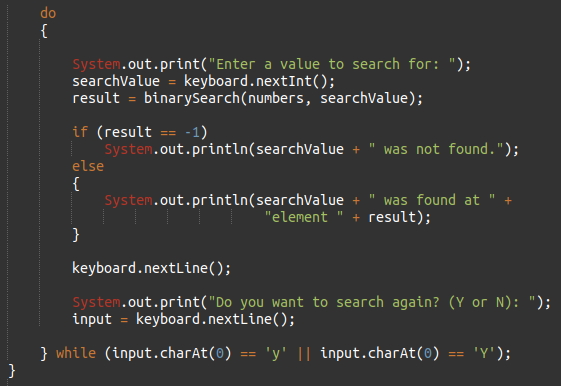
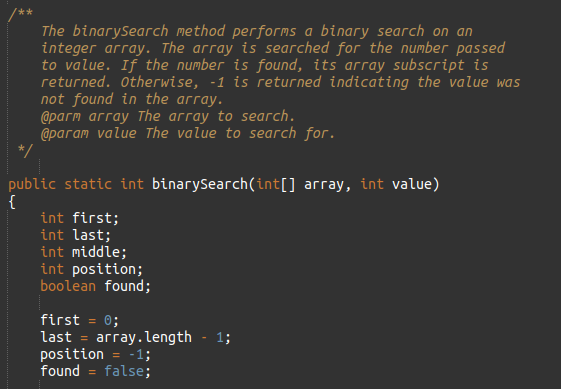
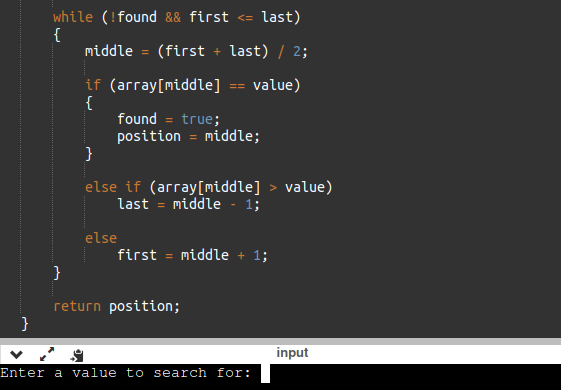
Binary Search
A binary search :
- requires an array sorted in ascending order.
- starts with the element in the middle of the array.
- If that element is the desired value, the search is over.
- Otherwise, the value in the middle element is either greater or less than the desired value
- If it is greater than the desired value, search in the first half of the array.
- Otherwise, search the last half of the array.
- Repeat as needed while adjusting start and end points of the search
Example :
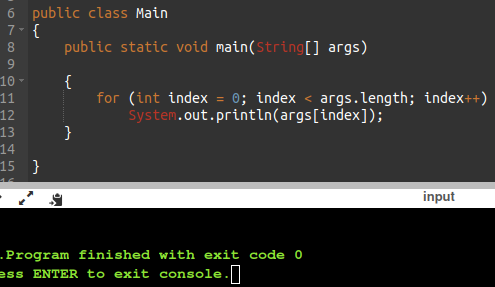
Command-Line Arguments
A Java program can receive arguments from the operating system command-line.
The main method has a header that looks like this:
The main method receives a String array as a parameter.
The array that is passed into the args parameter comes from the operating system command-line.
Example :
It is not required that the name of main’s parameter array be args.
Great for passing in settings, etc.
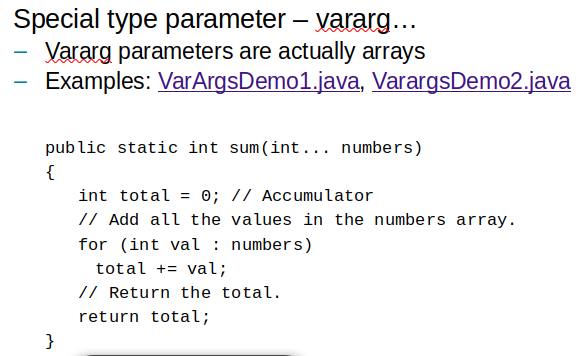
Variable-Length Argument Lists
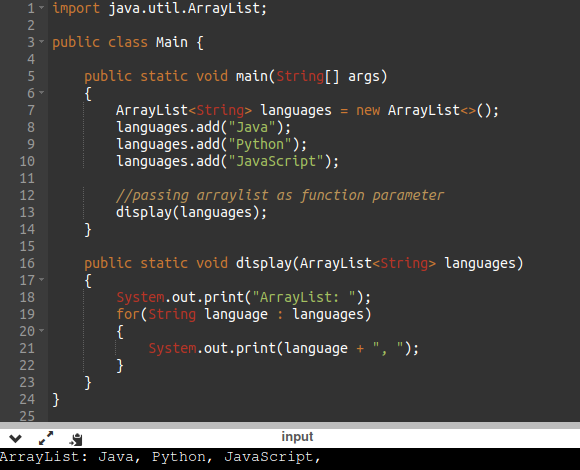
The ArrayList Class
Similar to an array, an ArrayList allows object storage
requires import :
Unlike an array, an ArrayList object :
- Automatically expands when a new item is added
- Automatically shrinks when items are removed
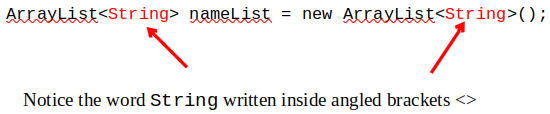
Creating an ArrayList
This specifies that the ArrayList can hold String objects.
If we try to store any other type of object in this ArrayList, an error will occur.
Can be any class (object) type
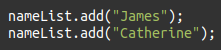
Using an ArrayList
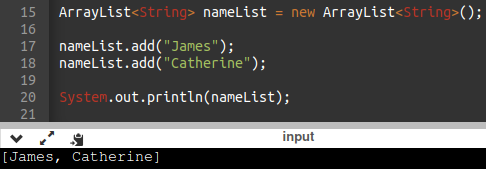
To populate the ArrayList, use the add method :
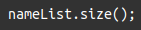
To get the current size, call the size method
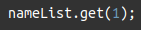
To access items in an ArrayList, use the get method
The ArrayList class's toString method returns a string representing all items in the ArrayList
The ArrayList class's remove method removes designated item from the ArrayList
The ArrayList class's add method with one argument adds new items to the end of the ArrayList
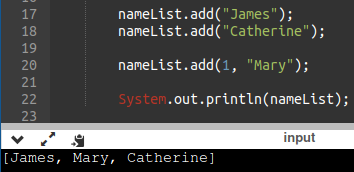
To insert items at a location of choice, use the add method with two arguments:
This statement inserts the String "Mary" at index 1 and pushes
what was in index 1 and below to index 2 and below
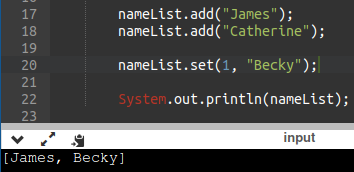
To replace an existing item, use the set method:
An ArrayList has a capacity, which is the number of items it can hold without increasing its size.
The default capacity of an ArrayList is 10 items.
To designate a different capacity, use a parameterized constructor:
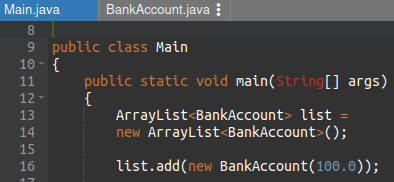
You can store any type of object in an ArrayList
Example 1:
Example 2
Chapter 8
Review of Instance Fields and Methods
Each instance of a class has its own copy of instance variables.
values stored in its length and width fields.
Instance methods require that an instance of a class be created in order to be used.
Instance methods typically interact with instance fields or calculate values based on those fields.
Static Class Members
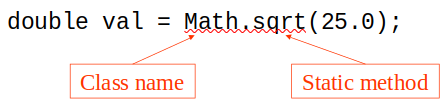
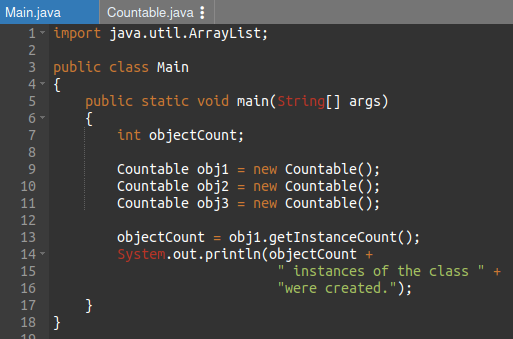
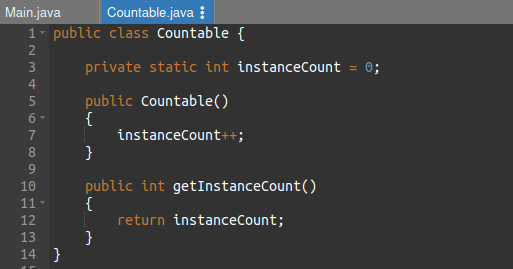
Static fields and static methods do not belong to a single instance of a class.
To invoke a static method or use a static field, the class name, rather than the instance name, is used.
Example :
Static Fields
Class fields are declared using the static keyword between the access specifier and the field type.
The field is initialized to 0 only once, regardless of the number of times the class is instantiated.
(Primitive static fields are initialized to 0 if no initialization is performed.)
Example :
Static Methods
Methods can also be declared static by placing the static keyword between the access modifier and the return type of the method.
When a class contains a static method, it is not necessary to create an instance of the class in order to use the method.
Example 1 :
Example 2 :
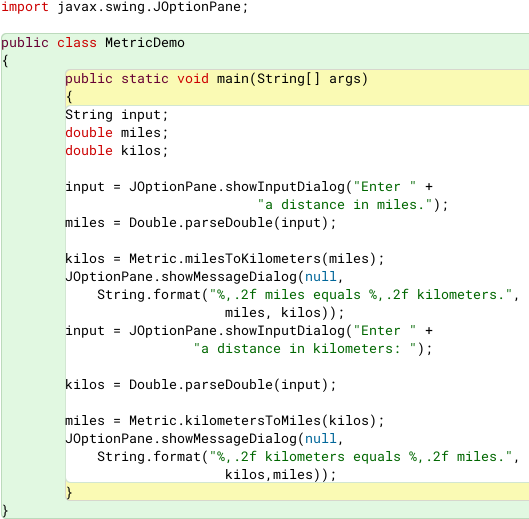
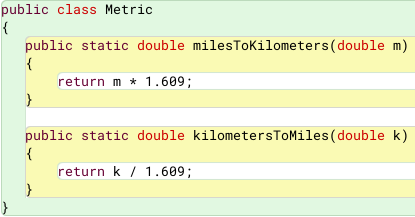
Static methods are convenient because they may be called at the class level.
They are typically used to create utility classes, such as the Math class in the Java Standard Library vs blueprints that are instantiated.
Static methods may not communicate with instance fields, only static fields.
Passing Objects as Arguments
Objects can be passed to methods as arguments.
Java passes all arguments by value.
When an object is passed as an argument, the value of the reference variable (memory address) is passed.
The value of the reference variable is an address or reference to the object in memory.
A copy of the object is not passed, just a pointer to the object.
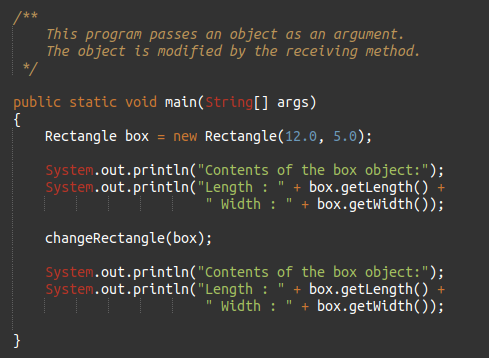
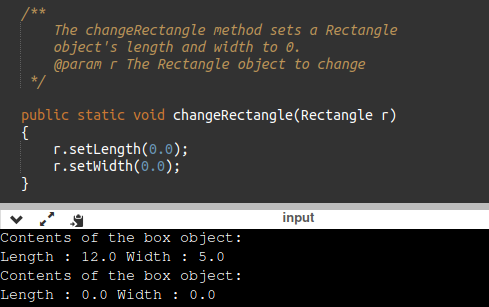
Cybersecurity Risk - When a method receives a reference variable as an argument, it is possible for the method to modify the contents of the object referenced by the variable.
Example 1
Example 2
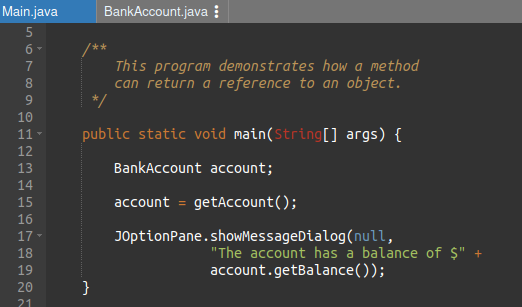
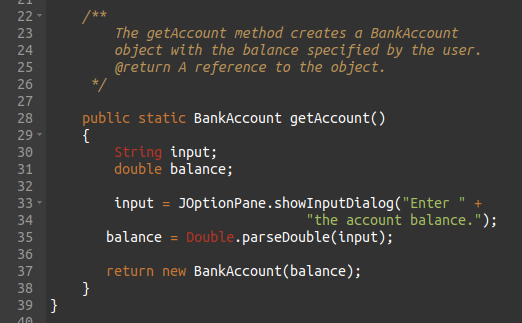
Returning Objects from Methods
Methods are not limited to returning the primitive data types.
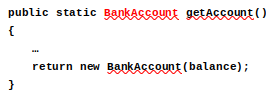
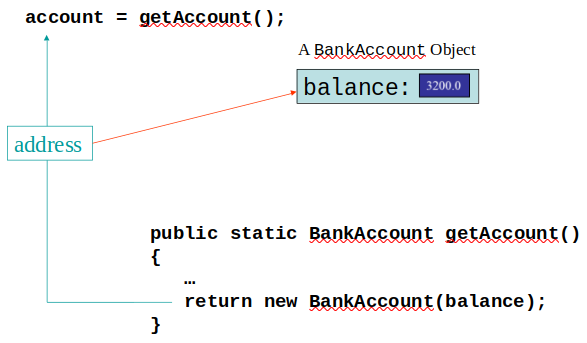
Methods can return references to objects as well.
Just as with passing arguments, a copy of the object is not returned, only its address.
Example :
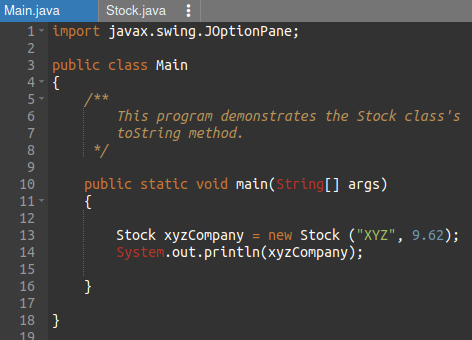
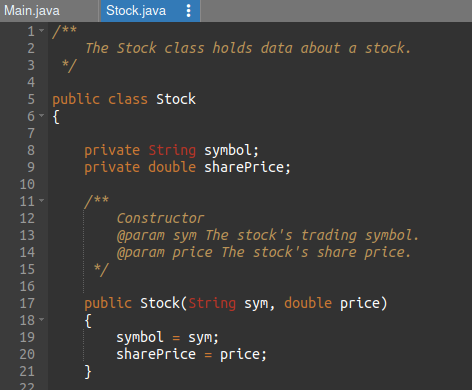
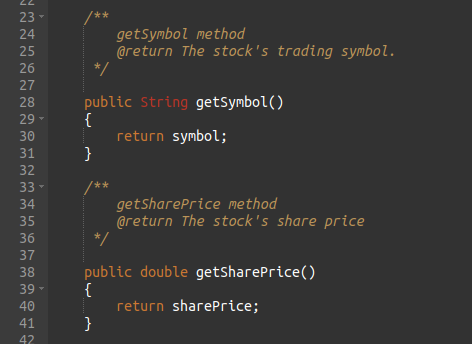
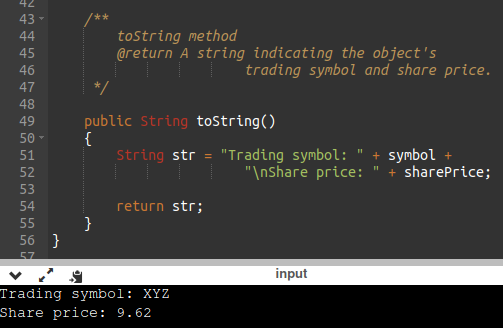
The toString Method
The toString method of a class can be called explicitly :
However, the toString method does not have to be called explicitly but is called implicitly whenever you pass an object of the class to println or print.
The toString method is also called implicitly whenever you concatenate an object of the class with a string.
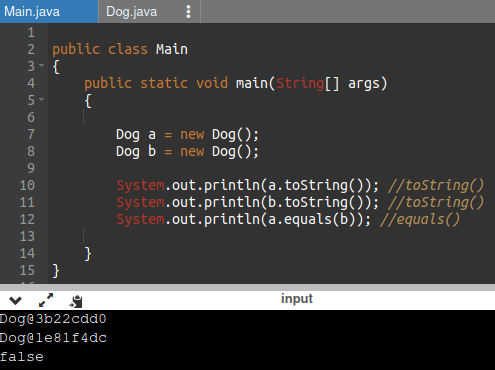
All objects have a toString method that returns the class name and a hash of the memory address of the object.
We can override the default method with our own to print out more useful information.
Example :
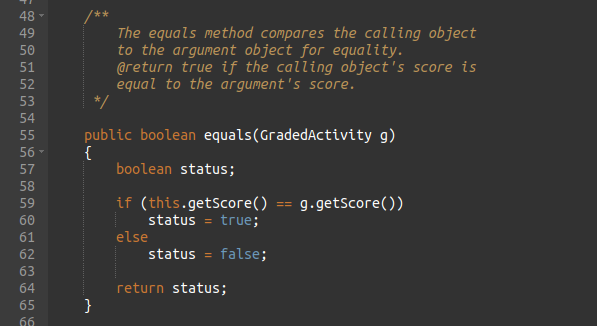
The equals Method
When the == operator is used with reference variables, the memory address of the objects are compared.
The contents of the objects are not compared.
All objects have an equals method.
The default operation of the equals method is to compare memory addresses of the objects (just like the == operator).
Instead of using the == operator to compare two Stock objects, we should use the equals method.
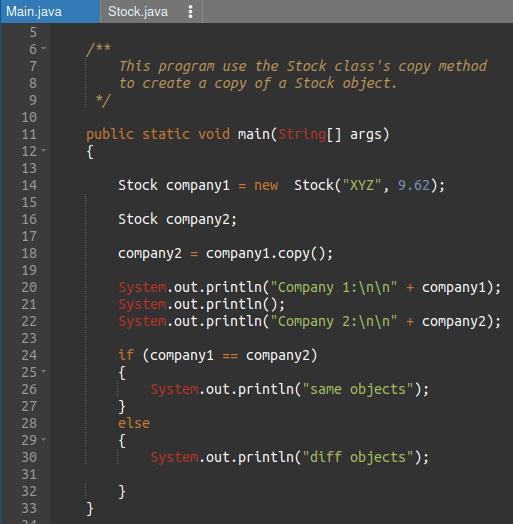
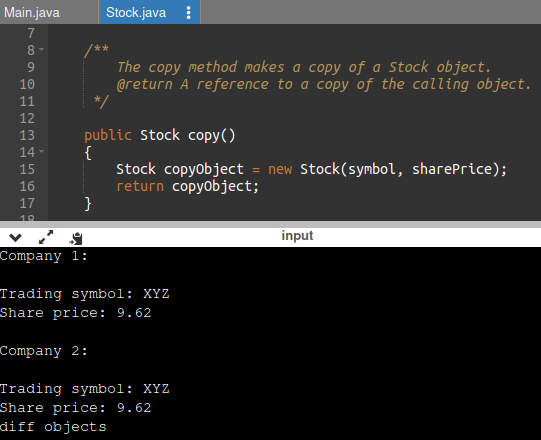
Methods That Copy Objects
There are two ways to copy an object.
Reference only copy (security hole)
This is simply copying the address of an object into another reference variable.
Deep copy (correct)
This involves creating a new instance of the class and copying the values from one object into the new object.
Example :
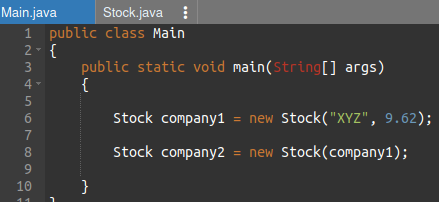
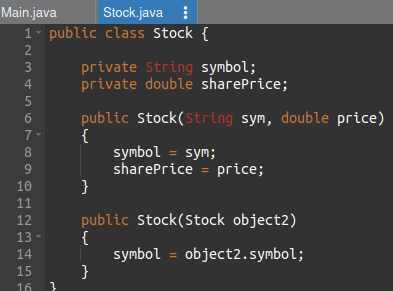
Copy Constructors
A copy constructor accepts an existing object of the same class and clones it.
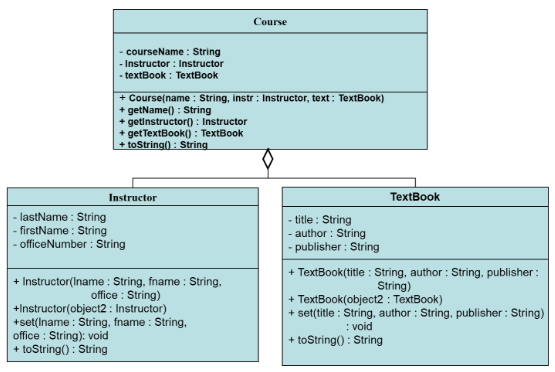
Aggregation
Creating an instance of one class as a reference in another class is called object aggregation.
Aggregation creates a “has a” relationship between objects.
Aggregation in UML Diagrams
Returning References to Private Fields
Avoid returning references to private data elements.
Returning references to private variables will allow any object that receives the reference to modify the variable-
Cybersecurity hole
.
Instead, use new
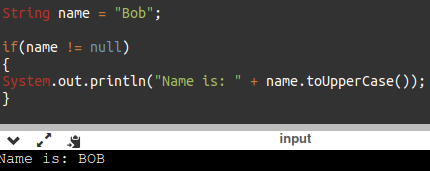
Null References
A null reference is a reference variable that points to nothing.
If a reference is null, then no operations can be performed on it.
References can be tested to see if they point to null prior to being used.
NOTE – Many IDEs will catch and prevent compiling.
The this Reference
The this reference is simply a name that an object can use to refer to itself.
The this reference can be used to overcome shadowing and allow a parameter to have the same name as an instance field.
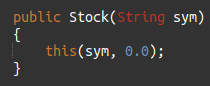
The this reference can be used to call a constructor from another constructor.
- This constructor would allow an instance of the Stock class to be created using only the symbol name as a parameter.
- It calls the constructor that takes the symbol and the price, using sym as the symbol argument and 0 as the price argument.
Elaborate constructor chaining can be created using this technique.
If this is used in a constructor, it must be the first statement in the constructor.
Enumerated Types
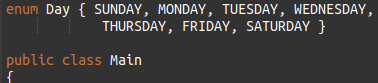
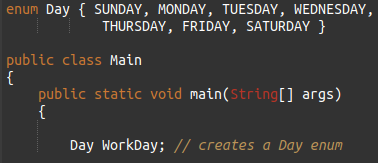
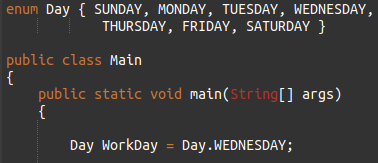
Known as an enum, requires declaration and definition like a class. Like an array of constants.
Syntax :
Definition :
Declaration :
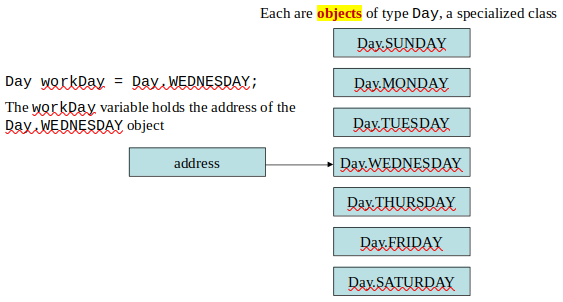
Assignment :
An enum is a specialized class
Enumerated Types - Methods
toString – returns name of calling constant
ordinal – returns the zero-based position of the constant in the enum. For example the ordinal for Day.THURSDAY is 4
equals – accepts an object as an argument and returns true if the argument is equal to the calling enum constant
compareTo - accepts an object as an argument and returns a negative integer if the calling constant’s ordinal < than the argument’s ordinal, a positive integer if the calling constant’s ordinal > than the argument’s ordinal and zero if the calling constant’s ordinal == the argument’s ordinal.
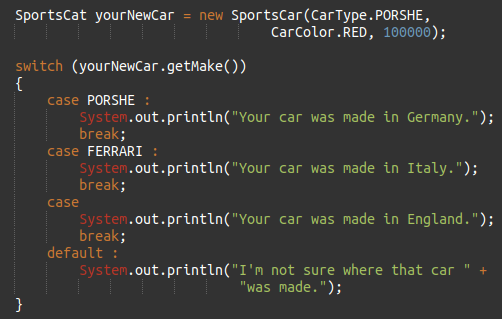
Enumerated Types - Switching
Java allows you to test an enum constant with a switch statement.
Example :
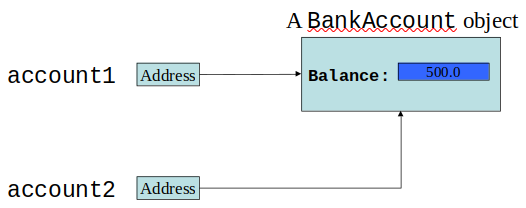
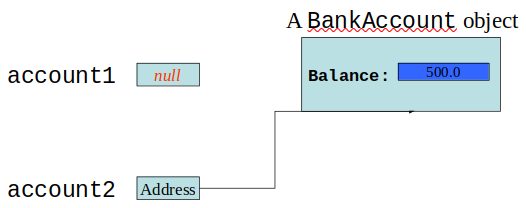
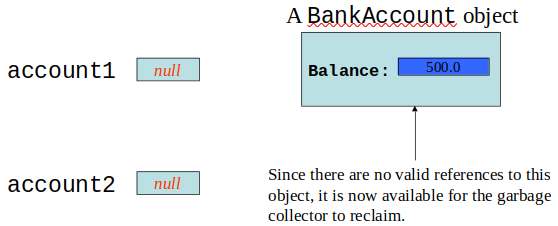
Garbage Collection
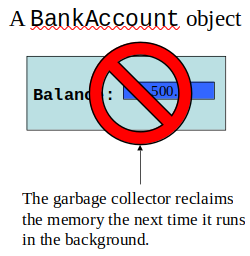
When objects are no longer needed they should be destroyed.
This frees up the memory that they consumed.
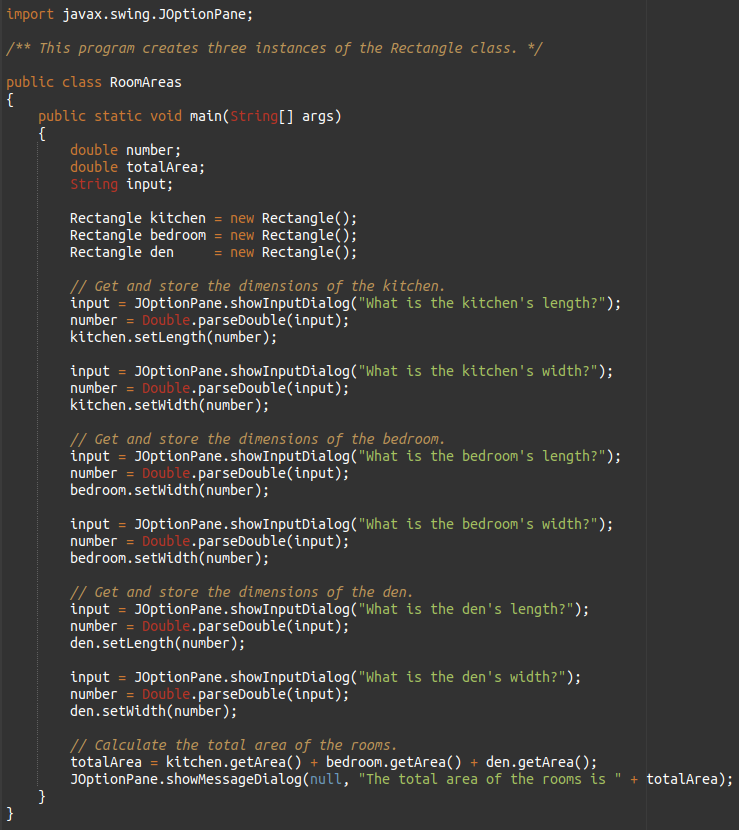
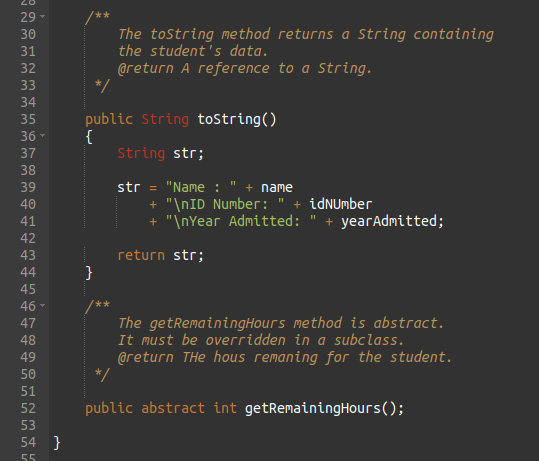
Java handles all of the memory operations for you.
Simply set the reference to null and Java will reclaim the memory.
The Java Virtual Machine has a process that runs in the background that reclaims memory from released objects.
The garbage collector will reclaim memory from any object that no longer has a valid reference pointing to it.
NOTE - This is a security flaw!
Here, both account1 and account2 point to the same
instance of the BankAccount class.
However, by running the statement:
account1 = null;
only account2 will be pointing to the object.
If we now run the statement:
account2 = null;
neither account1 or account2 will be pointing to the object.
The finalize Method
If a method with the signature :
is included in a class, it will run just prior to the garbage collector reclaiming its memory.
The garbage collector is a background thread that runs periodically.
It cannot be determined when gc and therefore the finalize method will actually run.
Can be used in networking to end network connections/streams
Class Collaboration
Collaboration – two classes interact with each other
If an object is to collaborate with another object, it must know something about the second object’s methods and how to call them
If we design a class StockPurchase that collaborates with the Stock class (previously defined), we define it to create and manipulate a Stock object.
CRC Cards
Class, Responsibilities and Collaborations (CRC) cards are useful for determining and documenting a class’s responsibilities.
- The things a class is responsible for knowing
- The actions a class is responsible for doing
Example :
Chapter 9
Introduction to Wrapper Classes
Java provides 8 primitive data types.
They are called “primitive” because they are not created from classes
.
Java provides wrapper classes for all primitive data types.
A wrapper class is a class that is “wrapped around” a primitive data type.
The wrapper classes are part of java.lang so to use them, there is no import statement required.
Wrapper Classes
Wrapper classes allow you to create objects to represent a primitive.
Wrapper classes are immutable, which means that once you create an object, you cannot change the object’s value.
To get the value stored in an object you must call a method.
Wrapper classes provide static methods that are very useful (ie Integer.parseInt()).
Character Testing and Conversion With The Character Class
The Character class allows a char data type to be wrapped in an object.
Once wrapped, the Character class provides methods that allow easy testing, processing, and conversion of character data.
The Character Class
Character Testing and Conversion With The Character Class
The Character class provides two methods that will change the case of a character.
Example 1 :
Example 2 :
Substrings
The String class provides several methods that search for a string inside of a string.
A substring is a string that is part of another string.
Some of the substring searching methods provided by the String class:
???
Searching String
The startsWith method determines whether a string begins with a specified substring.
Example :
The endsWith method determines whether a string ends with a specified substring.
Example :
The String class provides methods that will if specified regions of two strings match.
The String class provides methods that will if specified regions of two strings match. (regionMatches)
The String class also provides methods that will locate the position of a substring. (indexof & lastIndexOf)
Example 1 :
Example 2 :
String Methods For Getting Character Or Substring Location
int indexOf(char ch)
int indexOf(char ch, int start)
int indexOf(String str)
int indexOf(String str, int start)
int lastIndexOf(char ch)
int lastIndexOf(char ch, int start)
int lastIndexOf(String str)
int lastIndexOf(String str, int start)
Extracting Substrings
The String class provides methods to extract substrings in a String object.
The substring method returns a substring beginning at a start location and an optional ending location.
Example :
Extracting Characters to Arrays
The String class provides methods to extract substrings in a String object and store them in char arrays.
getChars, Stores a substring in a char array.
toCharArray, Returns the String object’s contents in an array of char values.
Example :
Returning Modified Strings
The String class provides methods to return modified String objects.
concat, Returns a String object that is the concatenation of two String objects.
replace, Returns a String object with all occurrences of one character being replaced by another character.
trim, Returns a String object with all leading and trailing whitespace characters removed.
The valueOf Methods
The String class provides several overloaded valueOf methods.
They return a String object representation of a primitive value or a character array.
Example 1 :
Example 2 :
The StringBuilder Class
The StringBuilder class is similar to the String class, but is MUTABLE vs IMMUTABLE (String).
You may change the contents of StringBuilder objects.
- You can change specific characters
- insert characters
- delete Characters
- perform other operations.
A StringBuilder object will grow or shrink in size, as needed, to accommodate the changes. You can kind of think of StringBuilder as similar to ArrayList.
StringBuilder Constructors
StringBuilder()
- This constructor gives the object enough storage space to hold 16 characters.
StringBuilder(int length)
-This constructor gives the object enough storage space to hold length characters.
StringBuilder(String str)
- This constructor initializes the object with the string in str.
- The object will have at least enough storage space to hold the string in str.
StringBuilder()
- This constructor gives the object enough storage space to hold 16 characters.
Other StringBuilder Methods
The String and StringBuilder also have common methods :
Appending to a StringBuilder Object
The StringBuilder class has several overloaded versions of a method named append (to add).
They append a string representation of their argument to the calling object’s current contents.
The general form of the append method is:
where object is an instance of the
StringBuilder class and item is:
- a primitive literal or variable.
- a char or array
- a String literal or object.
After the append method is called, a string representation of item will be appended to object’s contents.
The StringBuilder class also has several overloaded versions of a method named insert.
These methods accept two arguments:
- An int that specifies the position to begin insertion
- The value to be inserted
The value to be inserted may be
- a primitive literal or variable.
- a char array
- a String literal or object
The general form of a typical call to the insert method.
where object is an instance of the StringBuilder class,
start is the insertion location, and item is :
- a primitive literal or variable.
- a char array
- a String literal or object.
Example :
Replacing a Substring in a StringBuilder Object
The StringBuilder class has a replace method that replaces a specified substring with a string.
The general form of a call to the method:
- start is an int that specifies the starting position of a substring in the calling object.
- end is an int that specifies the ending position of the substring. (The starting position is included in the substring, but the ending position is not.)
- str parameter is a String object.
After the method executes, the substring will be replaced with str.
Example:
Other StringBuilder Methods
The StringBuilder class also provides methods to set and delete characters in an object.
The toString method :
- You can call a StringBuilder's toString method to convert that StringBuilder object to a regular String
- NOTE – str is an immutable String vs a mutable StringBuilder
Tokenizing Strings
Tokenizes a String object and returns an array of String objects.
Use the String class’s split method.
Each array element is one token.
Example :
Numeric Data Type Wrappers
Java provides wrapper classes for all of the primitive data types.
The numeric primitive wrapper classes are:
Creating a Wrapper Object
To create objects from these wrapper classes, you can pass a value to the constructor:
You can also assign a primitive value to a wrapper class object:
The Parse Methods
Recall from Chapter 2, we converted String input (from JOptionPane) into numbers. Any String containing a number, such as “127.89”, can be converted to a numeric data type.
Each of the numeric wrapper classes has a static method that converts a string to a number.
- The Integer class has a method that converts a String to an int
- The Double class has a method that converts a String to a double
- etc
These methods are known as parse methods because their names begin with the word “parse.”
The parse methods all throw a NumberFormatException if the String object does not represent a numeric value.
The toString Methods
Each of the numeric wrapper classes has a static toString method that converts a number to a string.
The method accepts the number as its argument and returns a string representation of that number.
The toBinaryString, toHexString, and toOctalString Methods
The Integer and Long classes have three additional methods:
toBinaryString, toHexString, and toOctalString
MIN_VALUE and MAX_VALUE
The numeric wrapper classes each have a set of static final variables :
MIN_VALUE & MAX_VALUE.
These variables hold the minimum and maximum values for a particular data type.
Autoboxing and Unboxing
You can declare a wrapper class variable and assign a value:
You may think this is an error, but because number is a wrapper class variable, autoboxing occurs.
Once boxed, you can use Wrapper class methods.
Unboxing does the opposite with wrapper class variables – converts objects to primitive types:
You rarely need to declare numeric wrapper class objects, but they can be useful when you need to work with primitives in a context where primitives are not permitted.
Recall the ArrayList class, which works only with objects.
Autoboxing and unboxing allow you to conveniently use ArrayLists with primitives.
TestScoreReader and TestAverages
Chapter 10
What is Inheritance? Generalization vs. Specialization
Real-life objects are typically specialized versions of other more general objects.
The term “insect” describes a very general type of creature with numerous characteristics.
Grasshoppers and bumblebees are insects
They share the general characteristics of an insect.
However, they have special characteristics of their own.
(grasshoppers have a jumping ability, and
bumblebees have a stinger.)
Grasshoppers and bumblebees are specialized versions of an insect.
Inheritance
The “is a” Relationship
The relationship between a superclass and an inherited class is called an “is a” relationship.
- A grasshopper “is a” insect.
- A poodle “is a” dog.
- A car “is a” vehicle.
A specialized object has:
all the characteristics of the general object, PLUS
additional characteristics that make it special.
In object-oriented programming, inheritance creates an “is a” relationship among classes.
We can extend the capabilities of a class.
Inheritance involves a superclass and a subclass :
- Superclass is the general class.
- Subclass is the specialized class.
The relationship of classes can be thought of as parent classes and child classes.
Java Inheritance (Subclass and Superclass)
In Java, it is possible to inherit attributes and methods from one class to another. We group the "inheritance concept" into two categories:
- subclass (child) - the class that inherits from another class.
- superclass (parent) - the class being inherited from.
To inherit from a class, use the extends keyword.
Example :
Inheritance
The subclass inherits public fields and methods
from the superclass without any of them being
rewritten.
New fields and methods may be added to the subclass.
The Java keyword, extends, is used on the class header to define the subclass.
Exmaple :
The GradedActivity Example
Inheritance, Fields and Methods
Members of the superclass that are marked private :
- Are not inherited by the subclass
- Exist in memory when the object of the subclass is created
- May only be accessed from the subclass by public methods of the superclass.
Members of the superclass that are marked public (typically methods – getters/setters):
- Are inherited by the subclass
- May be directly accessed from the subclass.
When an instance of the subclass is created, the non-private methods of the superclass are available through the subclass object.
Non-private methods and fields of the superclass are available in the subclass.
Inheritance and Constructors
Constructors are not inherited.
When a subclass is instantiated, the superclass default constructor is executed first.
Example :
The Superclass’s Constructor
The super keyword refers to an object’s superclass.
The superclass constructor can be explicitly called from the subclass by using the super keyword.
Example 1 :
Example 2 :
The super keyword in Java is a reference variable which is used to refer immediate parent class object.
super can be used to refer immediate parent class instance variable.
super can be used to invoke immediate parent class method.
super() can be used to invoke immediate parent class constructor.
We can use super keyword to access the data member or field
of parent class. It is used if parent class and child class
have same fields.
The super keyword can also be used to invoke parent class
method. It should be used if subclass contains the same method
as parent class.
In other words, it is used if method is overridden.
The super keyword can also be used to invoke the parent class constructor.
The this keyword refers to the current object in a method or constructor.
The most common use of the this keyword is to eliminate the confusion between class attributes and parameters with the same name (because a class attribute is shadowed by a method or constructor parameter).
Example 2 :
Calling The Superclass Constructor
If a parameterized constructor is defined in the superclass
the superclass must provide a no-arg constructor, or ...
- subclasses must provide a constructor
- subclasses must call a superclass constructor.
Calls to a superclass constructor must be the first java statement in the subclass constructors.
Example :
Overriding Superclass Methods
A subclass may have a method with the same signature as a superclass method.
The subclass method overrides the superclass method.
This is known as method overriding.
Example :
Example 2 :
Recall that a method’s signature consists of :
- the method’s name
- the data types method’s parameters in the order that they appear.
A subclass method that overrides a superclass method must have the same signature as the superclass method.
An object of the subclass invokes the subclass’s version of the method, not the superclass’s.
The @Override annotation should be used just before the subclass method declaration.
If the annotated method does not actually override anything, the compiler issues a warning.
It can also help to make the source code more readable.
Example 1 :
Example 2 :
- This causes the compiler to display an error message if the method fails to correctly override a method in the superclass.
An subclass method can call the overridden superclass method via the super keyword.
There is a distinction between method overloading and overriding a method.
Overloading is a feature that allows a class to have more than one method with the same name, but with different parameters.
Method overriding occurs when a subclass (child class) has the same method as the parent class.
Both overloading and overriding can take place in an inheritance relationship.
Example :
Preventing a Method from Being Overridden
The final modifier will prevent the overriding of a superclass method in a subclass.
If a subclass attempts to override a final method, the compiler generates an error.
This ensures that a particular superclass method is used by subclasses rather than a modified version of it.
Chains of Inheritance
A superclass can also be derived from another class.
Classes often are depicted graphically in a class hierarchy.
A class hierarchy shows the inheritance relationships between classes.
The Object Class
All Java classes are directly or indirectly derived from a class named Object.
Object is in the java.lang package.
Any class that does not specify the extends keyword is automatically derived from the Object class.
Because every class is directly or indirectly derived from the Object class:
every class inherits the Object class’s members (example: toString and equals).
In the Object class, the toString method returns a string containing the object’s class name and a hash of its memory address.
The equals method
accepts
the
address of an object as its argument
and
returns true if it is the same as
the calling object’s address
.
Polymorphism
The word polymorphism means having many forms.
In simple words, we can define polymorphism as
the ability of a message to be displayed in more
than one form.
In Java polymorphism is mainly divided into two types:
Compile-time Polymorphism & Runtime Polymorphism.
(Overloading is a feature that allows a class to
have more than one method with the same name, but
with different parameters. Method overriding occurs
when a subclass (child class) has the same method
as the parent class.)
Compile-time polymorphism, also known as
static polymorphism. This type of polymorphism
is achieved by function overloading
or operator overloading.
Example :
In runtime polymorphism, also known as
Dynamic Method Dispatch. It is a process
in which a function call to the overridden method
is resolved at Runtime. This type of polymorphism
is achieved by Method Overriding.
Method overriding, on the other hand, occurs when
a derived class has a definition for one of the
member functions of the base class. That base
function is said to be overridden.
Polymorphism
The term polymorphism means the ability to take many
forms.
In Java, a reference variable is polymorphic because
it can reference objects of types different from its
own, as long as those types are subclasses of its type.
If the object of the subclass has overridden a
method in the superclass:
If the variable makes a call to that method the
subclass’s version of the method will be run.
Java performs dynamic binding or
late binding when a
variable contains a polymorphic reference.
The Java Virtual Machine determines at runtime which
method to call, depending on the type of object that
the variable references.
It is the object’s type, rather than the reference
type, that determines which method is called.
Is-a and instanceof???
Is-a Relationship Does Not Work in Reverse. You
cannot assign a superclass object to a subclass
reference variable.
Abstract Classes
An abstract class cannot be
instantiated, but other classes are derived from it
.
An Abstract class serves as a superclass for other classes.
The abstract class represents the generic or abstract form
of all the classes that are derived from it.
A class becomes abstract when you place the abstract
key word in the class definition.
Abstract Method
An abstract method has no body and must be overridden in a subclass.
An abstract method is a method that appears in a
superclass, but expects to be overridden in a subclass.
An abstract method has only a header and no body.
Format :
Example :
Notice that the key word abstract appears in the
header, and that the header ends with a semicolon.
Any class that contains an
abstract method is automatically abstract
.
If a subclass fails to override an abstract method, a
compiler error will result.
Abstract methods are used to ensure that a subclass
implements the method.
Interfaces
An interface is similar to an abstract class that
has all abstract methods :
- It cannot be instantiated
- All the methods listed in an interface must be written
elsewhere.
It is often said that an interface is like
a “contract,” and when a class implements an interface
it must adhere to the contract.
An interface looks similar to a class, except:
- the keyword interface is used instead of the keyword
class
- the methods that are specified in an interface
have no bodies, only headers that are terminated by
semicolons.
Format :
All methods specified by an interface are public by default.
A class can implement one or more interfaces (ie implements Interface1, Interface2).
If a class implements an interface, it uses the implements keyword in the class header.
Interfaces in UML
Fields in Interfaces
An interface can contain field declarations:
all fields in an interface are treated as final and static.
Because they automatically become final, you must provide an initialization value.
In this interface, FIELD1 and FIELD2 are final static
int variables.
Any class that implements this interface has access
to these variables.
Extended subclasses also have access.
Implementing Multiple Interfaces
A class can be derived from only one superclass.
Java allows a class to implement multiple interfaces.
When a class implements multiple interfaces, it must
provide the methods specified by all of them.
To specify multiple interfaces in a class definition, simply list the names of the interfaces, separated by commas, after the implements key word.
Polymorphism with Interfaces
Java allows you to create reference variables of an
interface type.
An interface reference variable can reference any
object that implements that interface, regardless of
its class type.
Example :
When a class implements an interface, an inheritance
relationship known as interface inheritance is
established.
A reference to an interface can point to any class
that implements that interface.
You cannot create an instance of an interface.
When an interface variable references an object:
- only the methods declared in the interface are available,
- explicit type casting is required to access the other
methods of an object referenced by an interface reference.
Chapter 11
Handling Exceptions
An exception is an object that is generated as the
result of an error or an unexpected event.
Exception are said to have been “thrown.”
It is the programmer’s responsibility to write code
that detects and handles exceptions.
Unhandled exceptions will crash a program.
Java allows you to create exception handlers.
An exception handler is a section of code that gracefully responds to exceptions.
The process of intercepting and responding to exceptions is called exception handling.
The default exception handler deals with unhandled exceptions.
The default exception handler prints an error message and crashes the program.
Exception Classes
An exception is an object.
Exception objects are created from classes in the
Java API hierarchy of exception classes.
All the exception classes in the hierarchy are derived
from the Throwable class.
Error and Exception are derived from the Throwable class.
Classes that are derived from Error:
are for exceptions that are thrown when critical errors
occur. (i.e. :
an internal error in the Java Virtual Machine, or
running out of memory.
)
Applications should not try to handle these errors because
they are the result of a serious condition.
Programmers should handle the exceptions that are
instances of classes that are derived from the Exception
class.
Handling Exceptions
To handle an exception, you use a try statement.
First the keyword try indicates a block of code will
be attempted (the curly braces are required).
This block of code is known as a try block.
A try block is:
- one or more statements that are executed
- can potentially throw an exception.
The application will not halt if the try block
throws an exception.
After the try block, a catch clause appears.
A catch clause begins with the key word catch :
- ExceptionType is the name of an exception class
- ParameterName is a variable name which will reference the exception object if the code in the try block throws an exception
The code that immediately follows the catch clause is
known as a catch block (the curly braces
are required).
The code in the catch block is executed if the try block
throws an exception.
?????
This code is designed to handle
a FileNotFoundException
if it is thrown.
The Java Virtual Machine searches for a catch clause
that can deal with the exception.
Example :
The parameter must be of a type that is compatible with
the thrown exception’s type.
In the case of the OpenFile example
(FileNotFoundException e).
NOTE - It is customary to use e as the param name.
After an exception, the program will continue execution
at the point just past the catch block.
Each exception object has a method named getMessage
that can be used to retrieve the default error message
for the exception.
Example 1 :
Example 2 :
Polymorphic References To Exceptions
When handling exceptions, you can use a polymorphic
reference as a parameter in the catch clause.
Most exceptions are derived from the Exception class.
A catch clause that uses a parameter variable of the
Exception type is capable of catching any exception
that is derived from the Exception class.
The Integer class’s parseInt method throws a
NumberFormatException object.
The NumberFormatException class is derived from the
Exception class.
Handling Multiple Exceptions
The code in the try block may be capable of throwing
more than one type of exception.
A catch clause needs to be written for each type of
exception that could potentially be thrown.
The JVM will run the first compatible catch clause found.
The catch clauses must be listed from most specific to
most general.